

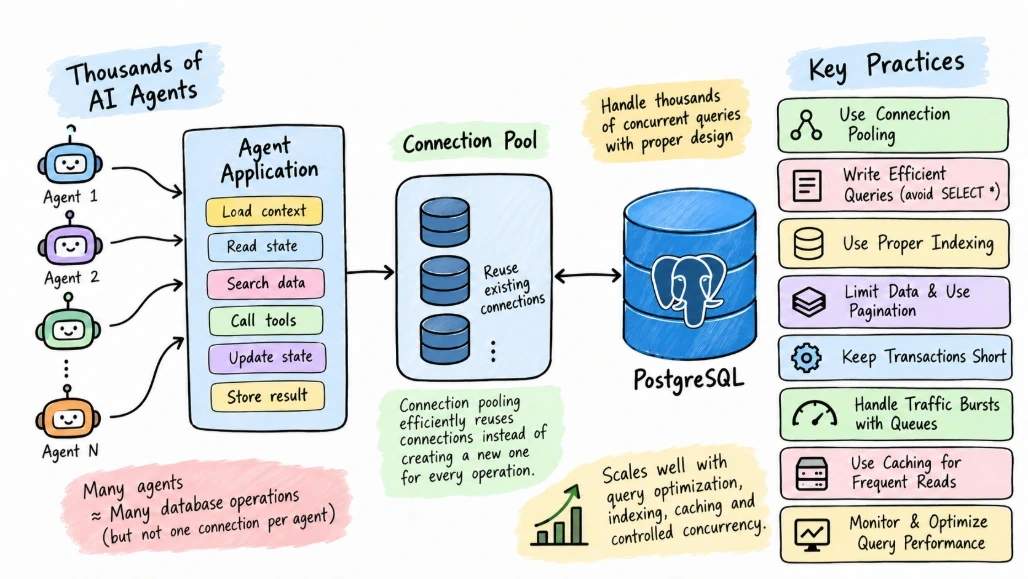
AI agents can generate a very different database workload from a traditional web application.
A normal application might have a predictable number of users and requests. An agent platform can create bursts of database activity when thousands of agents independently query data, retrieve context, call tools, and update workflow state.
For example, one agent may execute a few queries per minute, while another may perform several database operations during a single task.
If thousands of agents are active at the same time, the database can become a bottleneck.
PostgreSQL can handle substantial concurrent workloads, but the answer is not simply to increase the number of connections or add more database resources. Query design, connection pooling, indexing, transaction behavior, caching, and workload isolation all matter.
This article explains what happens when many AI agents access PostgreSQL concurrently and how to design the database layer so that agent workloads remain manageable.
Why AI Agents Can Generate Heavy Database Traffic
An AI agent rarely performs just one database operation.
A typical task might look like this:
Agent
  |
  +--> Load user context
  |
  +--> Read task state
  |
  +--> Search data
  |
  +--> Retrieve agent memory
  |
  +--> Update workflow
  |
  +--> Store result
If one agent performs six database operations, then:
10 agents     -> 60 database operations
1,000 agents  -> 6,000 operations
10,000 agents -> 60,000 operations
These numbers are only illustrative. Actual workload depends on how the application is designed.
The important point is that agent count and database operations are not the same thing.
An agent platform needs to estimate the actual database workload.
Connections Are Not the Same as Queries
One of the first mistakes developers make is assuming that every agent should have its own database connection.
Consider:
5,000 Agents
     |
     v
5,000 PostgreSQL Connections
This can create unnecessary pressure on the database.
A better architecture usually places connection pooling between the application and PostgreSQL:
5,000 Agents
      |
      v
Agent Application
      |
      v
Connection Pool
      |
      v
PostgreSQL
The application can reuse established connections instead of opening a new database connection for every operation.
With C#, PostgreSQL applications commonly use Npgsql, which provides connection pooling.
Connection Pooling in C#
A typical connection can be created like this:
await using var connection =
    new NpgsqlConnection(connectionString);

await connection.OpenAsync(cancellationToken);

await using var command =
    new NpgsqlCommand(
        "SELECT id, name FROM customers WHERE id = @id",
        connection);

command.Parameters.AddWithValue("id", customerId);

await using var reader =
    await command.ExecuteReaderAsync(cancellationToken);
When connection pooling is enabled, closing or disposing the connection normally returns it to the pool instead of physically creating a brand-new database connection every time.
The important part is to keep database operations short.
Do not hold a connection open while the AI model is generating a response.
Never Hold a Database Connection During Model Processing
Consider this pattern:
Open Database Connection
        |
        v
Call AI Model
        |
        v
Wait for Model
        |
        v
Update Database
        |
        v
Close Connection
This is inefficient.
The model may take significantly longer than the database query itself, and the database connection remains occupied unnecessarily.
Prefer:
Open Connection
     |
     v
Read Data
     |
     v
Close Connection
     |
     v
Call AI Model
     |
     v
Open Connection
     |
     v
Write Result
     |
     v
Close Connection
This keeps database connections available for other operations.
Query Efficiency Matters More With Agent Workloads
Suppose thousands of agents execute:
SELECT *
FROM agent_memory
WHERE user_id = @userId;
If the table becomes large and user_id is not indexed appropriately, every request can become expensive.
An index can improve lookup performance:
CREATE INDEX idx_agent_memory_user_id
ON agent_memory(user_id);
But indexes should be designed based on actual query patterns.
Adding indexes to every column is not a solution because indexes also consume storage and add overhead to write operations.
Avoid SELECT *
Agents often need only a small amount of information.
Instead of:
SELECT *
FROM agent_memory
WHERE user_id = @userId;
prefer:
SELECT memory_id, content, created_at
FROM agent_memory
WHERE user_id = @userId;
This reduces the amount of data transferred and makes the query's requirements explicit.
This becomes increasingly useful when many agents execute the same query concurrently.
Limit the Amount of Context Retrieved
An AI agent does not necessarily need every historical record.
For example:
SELECT memory_id, content
FROM agent_memory
WHERE user_id = @userId
ORDER BY created_at DESC
LIMIT 20;
Retrieving a controlled amount of relevant data reduces:
Database work
Network transfer
Application memory usage
Model context size
For semantic retrieval systems, relevance filtering becomes even more important.
Use Pagination for Large Results
Avoid loading thousands of records into an agent at once.
A basic pagination approach could use:
SELECT id, created_at, status
FROM agent_tasks
WHERE user_id = @userId
ORDER BY created_at DESC
LIMIT @limit
OFFSET @offset;
For very large datasets, keyset pagination can be more appropriate:
SELECT id, created_at, status
FROM agent_tasks
WHERE user_id = @userId
  AND id < @lastId
ORDER BY id DESC
LIMIT @limit;
The right approach depends on the query pattern and indexing strategy.
Transactions Should Be Short
Transactions are important for maintaining consistency, but long transactions can create contention.
For example:
await using var transaction =
    await connection.BeginTransactionAsync(
        cancellationToken);

await UpdateTaskAsync(
    connection,
    transaction,
    cancellationToken);

await SaveResultAsync(
    connection,
    transaction,
    cancellationToken);

await transaction.CommitAsync(
    cancellationToken);
The transaction should contain only the operations that need to be atomic.
Avoid doing this:
BEGIN TRANSACTION
     |
     v
Call AI Model
     |
     v
Wait for response
     |
     v
Process result
     |
     v
UPDATE database
     |
     v
COMMIT
The AI model call should normally happen outside the database transaction.
A better pattern is:
Read Required Data
       |
       v
Close Connection
       |
       v
Call AI Model
       |
       v
Open Connection
       |
       v
Short Transaction
       |
       v
Save Result
Handling Bursts From Thousands of Agents
The problem is not always constant load.
AI workloads can create bursts.
For example:
09:00
|
+-- 500 agents start
|
+-- 1,000 agents start
|
+-- 2,000 agents start
|
v
Database traffic spikes
A queue can help smooth these bursts.
Agents
   |
   v
Message Queue
   |
   v
Workers
   |
   v
Connection Pool
   |
   v
PostgreSQL
Instead of allowing every agent to immediately execute expensive database work, workers can process tasks at a controlled rate.
This is especially useful for background operations.
Read and Write Workloads
Agent applications often have both read-heavy and write-heavy operations.
Examples of reads:
Retrieve memory
Read customer data
Search tasks
Load configuration
Examples of writes:
Store agent response
Update workflow state
Record tool execution
Save memory
Treating these workloads separately can help with capacity planning.
Caching may also reduce repeated reads.
For example:
Agent
  |
  v
Cache
  |
  +---- Hit ----> Return Data
  |
  +---- Miss ---> PostgreSQL
Not every database query should be cached. Frequently changing data and correctness-sensitive operations require careful consideration.
Database Connection Limits
PostgreSQL has limits around concurrent connections, and the effective limit depends on the database configuration and available resources.
This is why simply increasing the connection pool size is not a reliable scaling strategy.
Suppose the application has:
10 application instancesand each instance is configured with a large connection pool.
The combined potential connections can become much larger than expected.
For example:
10 instances × 100 connections
= 1,000 possible connections
The actual number of active connections may be lower, but the configuration should still be considered at the system level.
Connection Pooling Architecture
A typical C# agent application can look like:
                Agent Requests
                      |
                      v
               ASP.NET Core
                      |
              +-------+-------+
              |               |
              v               v
         Agent Workers      API Requests
              |               |
              +-------+-------+
                      |
                      v
                Npgsql Pool
                      |
                      v
                 PostgreSQL
The pool should be sized according to the application's actual concurrency and database capacity rather than simply matching the number of agents.
Comparing Common Scaling Approaches
Approach | Main Benefit | Main Concern |
|---|---|---|
Connection pooling | Reuses connections efficiently | Pool sizing matters |
Query optimization | Reduces database work | Requires query analysis |
Indexing | Faster selective queries | Adds write/storage overhead |
Caching | Reduces repeated reads | Data freshness |
Queues | Smooths workload bursts | Adds infrastructure |
Read replicas | Separates some read workloads | Replication and consistency considerations |
Database scaling | Adds available resources | Cost and capacity planning |
Workload isolation | Prevents noisy neighbors | More infrastructure |
No single technique solves every concurrency problem.
Common Mistakes
Creating One Connection Per Agent
Agents are logical workers, not necessarily database connections.
Use connection pooling.
Making the Connection Pool Extremely Large
A larger pool does not automatically mean better performance.
It can create too much concurrent database work.
Running AI Calls Inside Transactions
AI operations can take much longer than database operations and should generally not hold database transactions open.
Fetching Entire Tables
Agent workflows should retrieve only the data required for the current task.
Missing Indexes
Repeated selective queries should be reviewed for appropriate indexing.
Ignoring Burst Traffic
A database can behave differently under sudden concurrency than under steady traffic.
Running Expensive Queries Without Limits
Agent-generated analytical queries can consume significant resources if not constrained.
Best Practices for Production
Measure Actual Query Patterns
Monitor which queries consume the most:
Execution time
CPU
I/O
Connections
Rows returned
Do not optimize based only on the number of agents.
Keep Queries Small and Focused
Retrieve only the columns and rows required by the workflow.
Use Parameterized Queries
For C# applications:
await using var command =
    new NpgsqlCommand(
        """
        SELECT id, name
        FROM customers
        WHERE id = @id
        """,
        connection);

command.Parameters.AddWithValue("id", customerId);
This also avoids constructing SQL by concatenating agent-generated values.
Control Concurrency
Use worker limits, queues, or application-level concurrency controls when workloads can spike.
Separate Expensive Operations
Do not make every agent perform expensive database queries synchronously if the work can be queued or processed asynchronously.
Monitor Connection Pool Usage
Track whether the application is:
Exhausting the pool
Opening too many connections
Waiting for available connections
Holding connections too long
Review Slow Queries
Use PostgreSQL's query analysis and monitoring capabilities to identify inefficient operations.
Advantages and Disadvantages
Advantages
PostgreSQL can support substantial concurrent application workloads
Connection pooling improves connection reuse
Query optimization reduces database pressure
Caching can reduce repeated reads
Queues can smooth workload spikes
PostgreSQL's relational model works well for structured agent state
Disadvantages
Thousands of agents can generate unpredictable bursts
Poor queries can become expensive at scale
Connection pools can be misconfigured
Large transactions can create contention
Agent-generated queries require careful controls
Scaling database resources alone does not fix inefficient application design
Troubleshooting High Database Load
If PostgreSQL starts experiencing high load when many agents are active, investigate systematically.
Check active database connections.
Check application connection-pool usage.
Identify slow or frequently executed queries.
Review query execution plans.
Check whether indexes support the most common filters.
Look for long-running transactions.
Check whether agents are retrieving excessive amounts of data.
Review transaction duration.
Check for workload bursts.
Determine whether caching or queue-based processing can reduce database pressure.
Do not immediately assume that PostgreSQL needs more CPU or memory.
The bottleneck may be inefficient queries, excessive concurrency, or an application holding resources unnecessarily.
Summary
PostgreSQL can be part of an AI agent platform serving large numbers of concurrent agents, but scaling the number of agents does not mean creating one database connection per agent.
The database workload depends on how many queries agents generate, how expensive those queries are, how much data they retrieve, how long transactions remain open, and how much concurrency the application allows.
For C# applications, connection pooling, short database operations, efficient indexing, parameterized queries, controlled concurrency, caching, and queue-based processing can help manage large agent workloads.
The most important lesson is to optimize the database workload, not simply the number of agents. Thousands of lightweight database operations can be very different from thousands of expensive queries, so capacity planning should be based on measured workload characteristics.
Join the conversation! Your thoughts help the community grow.