

Introduction
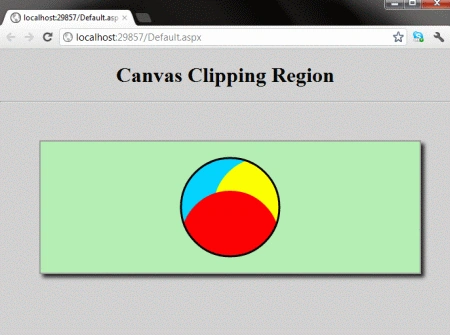
In this article, we are going to understand working with Canvas Clipping Regions Using HTML 5. In this section, we can draw a path and then use the clip() method of the canvas context. The circle type of figure having different colors within itself, while displaying in a browser.
Here we will use some JavaScript and some styles along with HTML code. Just go through the steps to see how to create this application.
Let's see how the Clipping Region application can be created. To do so use the following steps.
Step 1 : Open a HTML editor or Visual Studio.


- Go to Solution Explorer
- Right-click on the Application name
- Select Add-->add new item
- Now in the window that opens, select an HTML page or a new Webform
- Rename it to canvasregion.aspx

- <style>
- body
- {
- margin: 0px;
- padding: 0px;
- font-family: Comic Sans MS;
- outline-color: Yellow;
- }
- #myCanvas
- {
- border: 2px solid #9C9898;
- margin-top: 50px;
- margin-left: 60px;
- background-color: #00B2EE;
- box-shadow: 5px 5px 8px #222;
- }
- .title
- {
- text-align: center;
- font-family: Segoe UI Light, Arial, Helvetica;
- font-size: 2.2em;
- margin: 1em;
- }
- .info
- {
- text-align: center;
- font-family: Segoe UI Light, Arial, Helvetica;
- font-size: 1.2em;
- margin: 0.25em;
- }
- </style>
Step 3 : In this part we need to work on some JavaScript. For fully understanding how the JavaScript works, download the attached .rar file and run the Clipping Region application.
The whole JavaScript looks as in the following.
- <script>
- window.onload = function () {
- var canvas = document.getElementById("myCanvas");
- var context = canvas.getContext("2d");
- var centerX = canvas.width / 2;
- var centerY = canvas.height / 2;
- var radius = 75;
- var offset = 50;
- context.save();
- context.beginPath();
- context.arc(centerX, centerY, radius, 0, 2 * Math.PI, false);
- context.clip();
- context.beginPath();
- context.arc(centerX - offset, centerY - offset, radius, 0, 2 * Math.PI, false);
- context.fillStyle = "#00D2FF"; // light blue
- context.fill();
- context.beginPath();
- context.arc(centerX + offset, centerY, radius, 0, 2 * Math.PI, false);
- context.fillStyle = "yellow";
- context.fill();
- context.beginPath();
- context.arc(centerX, centerY + offset, radius, 0, 2 * Math.PI, false);
- context.fillStyle = "red";
- context.fill();
- context.restore();
- context.beginPath();
- context.arc(centerX, centerY, radius, 0, 2 * Math.PI, false);
- context.lineWidth = 3;
- context.strokeColor = "black";
- context.stroke();
- };
- </script>
Gowtham RajamanickamPosted Apr 11, 2015, 1:32 PM
good article
Gowtham RajamanickamPosted Apr 11, 2015, 1:32 PM
well explaiend