

Introduction
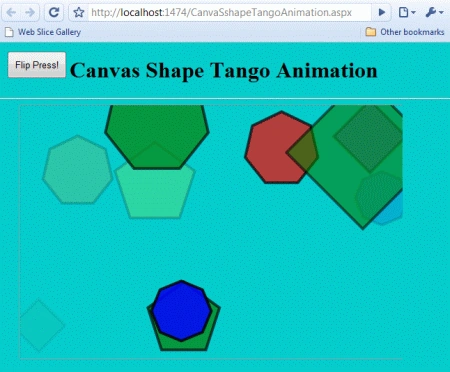
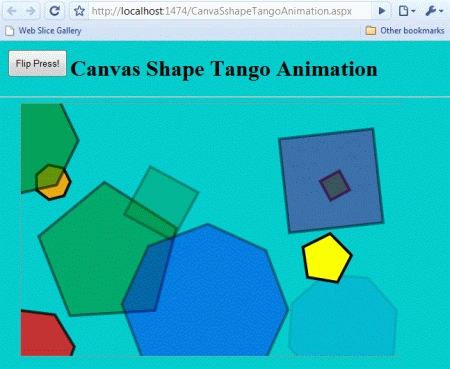
In this article, we are going to understand canvas shape tango animation using HTML 5. In this section, drag and drop the shapes and press the "Flip press!" button to make the shapes move and refresh the page to generate new random shapes while running the application in the browser.
Here we will use some JavaScript and some styles along with HTML code. Just go through the steps to see how to create this application.
Let's see how the CanvasShapeTango application can be created. To do so use the following steps.
Step 1 : Open a HTML editor or Visual Studio.
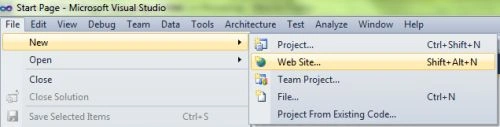
Open File menu ->select new ->Choose Website
- Go to Solution Explorer
- Right-click on the Application name
- Select Add-->add new item
- Now in the window that opens, select an HTML page or new Web form
- Rename it to CanvaSshapeTangoAnimation.aspx
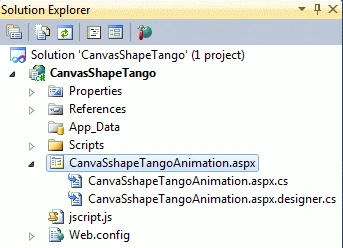
Step 2: In this section, we will create the style for the media and create the .css on the media screen. Put the given script in the Head section of the HTML or between the <head>--</head> tags. Here the CSS is used for design purposes.
CSS Script
- <style>
- body
- {
- background-color: #66CCFF;
- margin: 0px;
- padding: 0px;
- }
- canvas
- {
- border: 1px solid #9C9898;
- left: 30px;
- }
- #tango
- {
- position: absolute;
- top: 10px;
- left: 10px;
- padding: 10px;
- }
- #container
- {
- background-image: url('blue-background.jpg');
- display: inline-block;
- overflow: hidden;
- height: 365px;
- width: 580px;
- }
- </style>
Step 3: In this part, we need to work on some JavaScript. To fully understand how JavaScript works, download the attached .rar file and run the CanvasShapeTango application.
The whole JavaScript looks as in the following:
- <script>
- function tango(layer)
- {
- for (var n = 0; n < layer.getChildren().length; n++)
- {
- var shape = layer.getChildren()[n];
- var stage = shape.getStage();
- shape.transitionTo({
- rotation: Math.random() * Math.PI * 2,
- radius: Math.random() * 100 + 20,
- x: Math.random() * stage.width,
- y: Math.random() * stage.height,
- alpha: Math.random(),
- duration: 1,
- easing: 'ease-in-out'
- });
- }
- }
- window.onload = function ()
- {
- var stage = new Kinetic.Stage({
- container: 'container',
- width: 578,
- height: 363
- });
- var layer = new Kinetic.Layer();
- var colors = ['red', 'orange', 'yellow', 'green', 'blue', 'purple'];
- for (var n = 0; n < 10; n++) {
- var mine = new Kinetic.RegularPolygon({
- x: Math.random() * stage.width,
- y: Math.random() * stage.height,
- sides: Math.ceil(Math.random() * 5 + 3),
- radius: Math.random() * 100 + 20,
- fill: colors[Math.round(Math.random() * 5)],
- stroke: 'black',
- alpha: Math.random(),
- strokeWidth: 4,
- draggable: true
- });
- layer.add(mine);
- }
- stage.add(layer);
- document.getElementById('tango').addEventListener('click', function () {
- tango(layer);
- }, false);
- };
- </script>
Join the conversation! Your thoughts help the community grow.