

Nearly every website has the same style. When the user fills in an online form for an online registration for many things, such as an examination, booking a ticket online or any kind of money transaction, an image is shown in the registration form. When you have successfully filled in the specified words (provided in the image) in the TextBox, your form is submitted. 
These kinds of images are called CAPTCHA images. In this article, I will show you how to implement a CAPTCHA feature in your ASP.Net web form application.
For using this feature, we have the "mscaptcha.dll" file. You can download this file from this article.
Question: What is the "MSCaptcha.dll" file?
Answer: The "MSCaptcha.dll" file provides a user control for randomly generating CAPTCHA images.
So let's start implementation of CAPTCHAs in our website.
- Open Visual Studio
- "File" -> "New" -> "Project..." then seelct "ASP.Net Webform Application"
- Add a new web form
- Download "Mscaptcha.dll"
- Now right-click on the project and select "Add Reference" then select "mscaptcha.dll" from where you stored it then click on "Ok".

You can see in the following image that "MScaptcha.dll" is loaded into your project.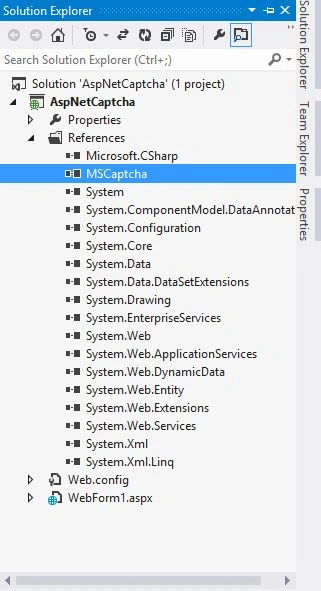
- If you are developing your application in Visual Studio 2012 or later then you need to implement one more step. Visual Studio 2010/2008/2005 users don't need to implement the seventh step.
- Select your project and click on "Properties".
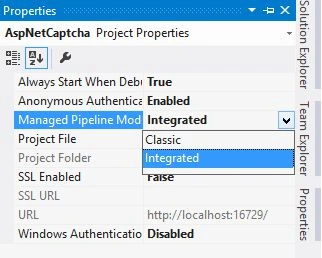
- Change Managed Pipeline mode Integrated to Classic.
- Now you are ready to implement the CAPTCHA feature in your application. Now open web.config and add the following httpHandlers code, under the <system.web> section:
- <httpHandlers>
- <addverb="GET"path="CaptchaImage.axd"
- type="MSCaptcha.CaptchaImageHandler, MSCaptcha" />
- </httpHandlers>
- Open webform1.aspx and add the following line:
- <%@RegisterAssembly="MSCaptcha"Namespace="MSCaptcha"TagPrefix="cc1"%>
Webform1.aspx
- <%@ Page Language="C#" AutoEventWireup="true" CodeFile="Default2.aspx.cs" Inherits="Default2" %>
- <%@ Register Assembly="MSCaptcha" Namespace="MSCaptcha" TagPrefix="cc1" %>
- <!DOCTYPE html>
- <html xmlns="http://www.w3.org/1999/xhtml">
- <head runat="server">
- <title></title>
- </head>
- <body>
- <form id="form1" runat="server">
- <div>
- <cc1:CaptchaControl ID="cptCaptcha" runat="server"
- CaptchaBackgroundNoise="Low" CaptchaLength="5"
- CaptchaHeight="60" CaptchaWidth="200"
- CaptchaLineNoise="None" CaptchaMinTimeout="5"
- CaptchaMaxTimeout="240" FontColor = "#529E00" />
- </div>
- <asp:TextBox ID="txtCaptcha" runat="server"></asp:TextBox>
- <br />
- <asp:Button ID="btnVerify" runat="server" Text="Verify Image" OnClick="btnVerify_Click" />
- <asp:RequiredFieldValidator ID="RequiredFieldValidator1" runat="server" ErrorMessage="*Required" ControlToValidate = "txtCaptcha"></asp:RequiredFieldValidator>
- <br />
- <br />
- <asp:Label ID="lblErrorMessage" runat="server" Font-Names = "Arial" Text=""></asp:Label>
- </div>
- </form>
- </body>
- </html>
Now when the user clicks on the button it will determine whether the text entered is valid or not.
Weform1.aspx.cs
- protected void btnVerify_Click(object sender, EventArgs e)
- {
- cptCaptcha.ValidateCaptcha(txtCaptcha.Text.Trim());
- if (cptCaptcha.UserValidated)
- {
- lblErrorMessage.ForeColor = System.Drawing.Color.Green;
- lblErrorMessage.Text = "Valid text";
- }
- else
- {
- lblErrorMessage.ForeColor = System.Drawing.Color.Red;
- lblErrorMessage.Text = "InValid Text";
- }
- }
That's it. Press F5 and test your app.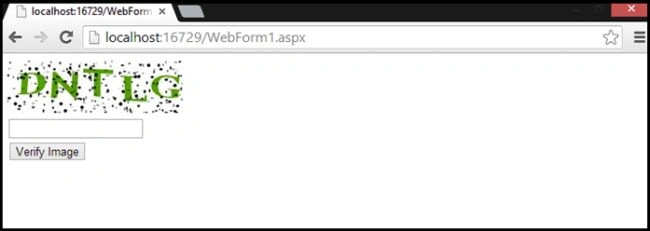
You can see in the preceding image, there's an image when you enter the same text that you get a valid message otherwise you will get an invalid error.
For any suggestions/queries, please send your comments. Happy Programming.
ravindra aharPosted Oct 20, 2023, 9:06 AM
It should be <add verb="GET"
Nimesh JainPosted Mar 8, 2023, 11:20 AM
I get error when i use the captcha dll in my existing application. It is not able to load the captcha.axd?guid= value. It gives error 404.
mayank JalaniaPosted Oct 25, 2022, 9:16 AM
Captcha image not loading
Eric EngPosted Apr 14, 2021, 8:32 AM
Hi, is the dll workable on angular and .net 5 web api as well? Thanks in advance.
Sujit SahooPosted Jul 30, 2018, 6:38 AM
Thanks for sharing valuable article.
chan myaaePosted May 16, 2017, 12:08 AM
Hi Sourabh Mishra, it is very useful captcha module. But I have some problem when I use it. Because, When I directly call my web page (eg http://localhost:20/feedback.aspx), Captch Control show image url like that "http://localhost:51234/CaptchaImage.axd?guid=bb17e2e9-071c-440d-a467-282f54e476cf", it is ok , captcha image show successful. But when my real url is http://localhost:51234/form/give-feedback/97, captcha image url is http://localhost:51234/form/give-feedback/CaptchaImage.axd?guid=8797af31-52d2-4e48-aaa8-81273208414 . Captcha image did not show. My opinion is you need to add at image src "/" like that => <img src="/CaptchaImage.axd?guid=8797af31-52d2-4e48-aaa8-812732084142" border="0" width="200" height="60"> . You need to add "/" in front of CaptchaImage.axd.
prasath cPosted Dec 3, 2015, 11:30 PM
Working good... But there is no refresh option for capta, once again thanks for the same
Vashi KuttyPosted Jul 18, 2015, 2:49 PM
good
Saunak SahaPosted Apr 13, 2015, 5:34 AM
good
ravikant sonarePosted Oct 10, 2014, 3:48 PM
fine work in local but when i upload on server it getting error 500 access ....
ravikant sonarePosted Oct 10, 2014, 3:46 PM
It not working in dedicated server please check
kalyani iasPosted Dec 15, 2013, 10:57 AM
thank you so much friend it will help us alot.really thank you