Introduction
Many developers understand the concept of CAS (Code access security) but very few know how to implement the same. This article will discuss and demonstrate practically all those aspects of CAS which you have ready only in theory till today.
This article first starts with the basic concepts of CAS like evidence, permission, code groups, and caspol.exe. It then moves ahead to demonstrate how CAS can be implemented in the real world. This article further talks about ground-up changes made in .NET 4.0 for CAS. In those regards, it discusses the security transparent model and sandboxing.
Bet me this article is your last chance to see CAS in actual action....enjoy.
This is a small Ebook for all my .NET friends that covers topics like WCF, WPF, WWF, AJAX, Core .NET, SQL, etc you can download the same from
SampleDotNetInterviewQuestionBook
What is CAS?
Code Access Security is a security model that grants or denies permission to your assembly depending on evidence like from where the code has emerged, who the publisher is? , strong names, etc.
When you want to execute any code in your environment you would first like to know from where the code came from. Depending on where it came from, you would then would like to give him access rights. For instance, a code compiled from your own computer would have greater rights than code downloaded from the internet.
In order to know the same, we need to probe the assembly/exe/dll and get evidence like who is the publisher of the code, from which site has this code from, from which zone has it come from ( internet, intranet, etc), etc.
What is a permission and permission set?
Once you have gathered the evidence about the code you would like to assign permission to the code. There are various permissions that you can assign to the code like Can the code create a file, can we write to the registry, can the code execute reflection, can the code open file dialog box, etc.
These permissions are collect permission sets and those permission sets are allocated to the code.
Code groups are nothing but categories of code. These categories are defined by permissions and evidence values. When .NET code runs it's assigned to a code group by the evidence which is collected during runtime.
For instance, there are various default code groups like My computer zone, internet zone, intranet zone, etc.
My computer zone code group is allocated to code whose evidence says that they are assemblies which are installed on the computer and they have permission set 'internet' which has various permissions like file dialog, execute, user interface, printing, etc.
When the assembly runs following steps takes place:-
- Evidences are gathered about the assembly. In other words from where did this assembly come?
- Depending on evidence the assembly is assigned to a code group. In other words what rights does the assembly depending on the evidence gathered?
- Depending on the code group the assembly is allocated security rights.
- Using the security rights the assembly is run within those rights.
Can we see a quick demo of CAS?
If you want to allocate rights to an assembly we need to install the .NET configuration tool and click on the trust assembly menu as shown in the below figure.
Once you trust the assembly you can adjust the trust to full trust or none.
Please do see the below complete video which explains how we can assign permission, permission set, code group, and evidence to an exe or an assembly.
It's the core exe that is responsible to assign permission to the assembly. The .NET configuration tool is just a cover that sits on the top of caspol.exe to ease our work. CASPOL.exe commands are cryptic so the .NET configuration tool is more user-friendly. In case you are interested in using caspol.exe you can go to the visual studio command prompt and type caspol.exe with the necessary parameters.
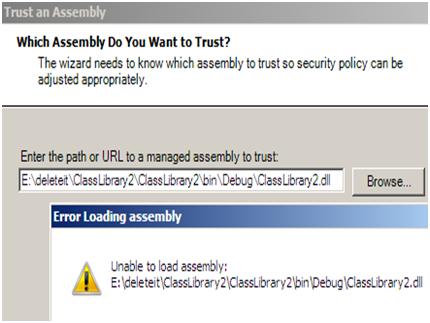
When I open a .NET 4.0 DLL/Assembly using CASPOL it throws an error?
If you try to open a .NET 4.0 DLL in configuration wizard you will get an error as shown below.
CAS is completely deprecated in .NET 4.0, there are two big changes:-
- Granting of permission is no more dependent on the .NET CAS, it's now the job of the host. So the host who runs the .NET DLL will define what kind of rights will the assembly have. NET Framework 4.0 comes with CAS a disabled which means all applications started via Windows Explorer or the command prompt run with full trust. Hosted .NET applications, those running inside Internet Explorer or ASP.NET, will run at the trust level granted by their host, being partially trusted.
- Security transparent model is introduced which divides a .NET code into 3 categories Security critical, Security transparent, and security safe critical.
The security transparent model puts code into separate boxes as per the risk associated. If you know that code can do something wrong you can box that code as 'Security transparent' and if you have a code that you trust you can box them into 'Security critical'.
By putting the above compartments you have ensured that the unsecured code (Security transparent) cannot call the secured code (Security critical). When you mark a code as security transparent, these types of code cannot call security-critical code.
If for some reason the transparent code wants to call security-critical code it can go via the bridge security safe critical code.
Below is a simple video where we have created a simple code marked as security-critical and then we tried calling the same from security transparent code and we get an error.
What is the concept of sandboxing?
The next question answers the same.
Is security transparent is good when we control the code what about external DLL?
The security transparent code is good when we control the code but what if get assembly which is a third party. In those situations, you can use the concept of sandboxing. One of the important points to note is that CAS is deprecated and not removed completely.
So if you have a third-party DLL you can create your own appdomain and assign permission sets so that your 3rd party DLL runs under a controlled environment. Below is a sample code snippet that shows how we can do things. The below code snippet creates an application domain, allocates permissions for execution, and user interface display only.
We then try to do something funny like popping up a file browse dialog box and we end up with an error as shown in the below figure.
Step1:- Create appdomain with two permission execution and UI display using permission set class.
- PermissionSet permset = new PermissionSet(PermissionState.None);
- permset.AddPermission(new SecurityPermission(SecurityPermissionFlag.Execution));
- permset.AddPermission(new UIPermission(UIPermissionWindow.AllWindows));
Step 2:- Apply the above defined permission set to the newly created application domain as shown in the below code snippet.
- AppDomainSetup objSetup = new AppDomainSetup();
- objSetup.ApplicationBase = AppDomain.CurrentDomain.SetupInformation.ApplicationBase;
- AppDomain domain = AppDomain.CreateDomain("New domain name", AppDomain.CurrentDomain.Evidence, objSetup, permset);
Step 3:- Create the instance and try calling the 'ShowDialog' function.
- Interface1 i1 = (ClassLibrary1.Class1)domain.CreateInstanceAndUnwrap("ClassLibrary1", "ClassLibrary1.Class1");
- i1.ShowDialog();
If you try to execute the open dialog it will pop up an error as shown in the below code.
But why this change, what was the problem with CAS?
- First thing CAS was not easy, all those cryptic steps of creating code groups, and permission sets, etc eat your energy completely.
- If you have to move the assembly to a different computer you need to do the whole rework again.
- The worst part CAS does not work on unmanaged code. I am dead sure it's always possible you will download exe which is not written in .NET.
So how can we give code access after .NET 4.0 and later?
The best way to restrict code access is by putting restrictions at the operating system level. Windows SRP (Software restriction policy) helps to achieve the same.
- Log on with an Administrator account.
- Type gpedit.msc into the Run or Search box on your Start menu, click OK, and Group Policy will open.
- Go down to Computer Configuration > Windows Settings > Security Settings.
- Right-click on "Software Restriction Policies" and create new policies.
What if I still want to use CAS in .NET 4.0?
"<NetFx40_LegacySecurityPolicy>" configuration element lets you specify that a process or library uses CAS policy. When you activate this element, the policy and evidence overloads will work as they did in older versions of the .NET framework.
- <configuration>
- <runtime>
- <NetFx40_LegacySecurityPolicy enabled="true"/>
- </runtime>
- </configuration>
http://blogs.rev-net.com/ddewinter/2010/03/02/tip-20-opting-out-of-security-changes-in-net-4-in-asp-net-and-custom-appdomains/
-
MSDN link to CAS http://msdn.microsoft.com/en-us/library/930b76w0%28VS.90%29.aspx
- What's new in .NET 4.0 security http://www.simple-talk.com/dotnet/.net-framework/whats-new-in-code-access-security-in-.net-framework-4.0---part-i/
- CAS in .NET nice simple article http://www.devx.com/vb2themax/article/19886/1954
- Nice Q and A article explaining CAS http://justindeveloper.wordpress.com/2010/02/09/application-security-for-developers/
- 5 reasons why you would use sandboxing http://blogs.msdn.com/b/shawnfa/archive/2006/04/19/579066.aspx
- Legacy CAS policy in .NET 4.0 backward compatibility http://blogs.rev-net.com/ddewinter/2010/03/02/tip-20-opting-out-of-security-changes-in-net-4-in-asp-net-and-custom-appdomains/







Amit PatelPosted Oct 4, 2012, 11:22 AM
Excellent