

We take two combo box, bind and cascade it.
Initial chamber
Step 1: Open Visual Studio 2010, Go to File, New, Projects, then under Visual C# select Windows.
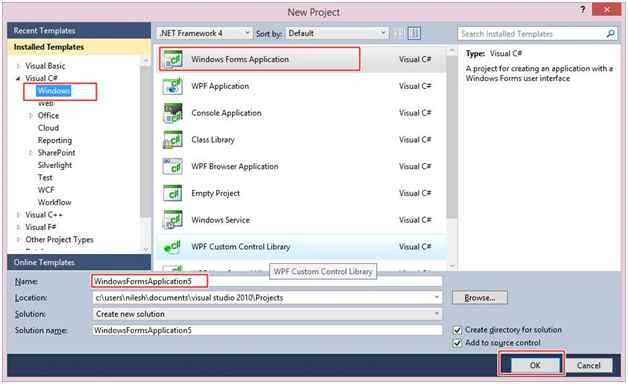
You can change the name of the project and browse your project to different location too. And then press OK.
Step 2: In Solution Explorer you get your Project, Add Service Based Database. By going to your project right click and Add New Item - Service Based Database.
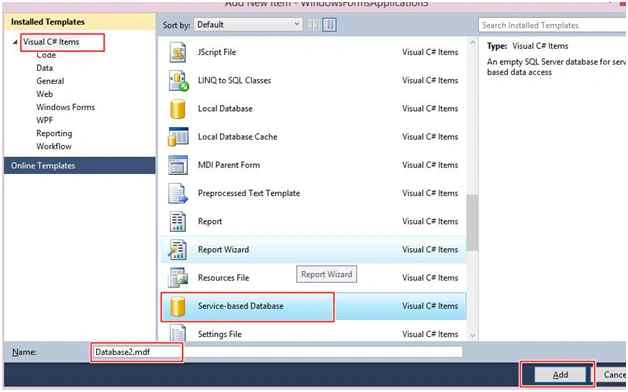
Database chamber
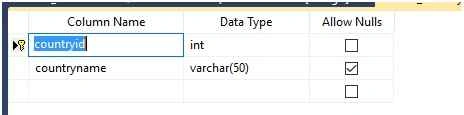
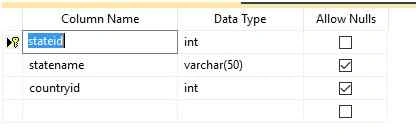
Step 3: Get to your Database [Database.mdf], we will create two table - tbl_country and tbl_state. Go to the database.mdf, Table and Add New table. Design your table like the following:
Tbl_country:
Tbl_state:
Design chamber
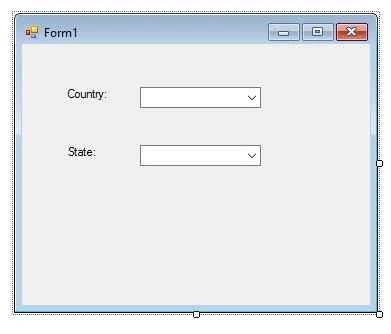
Step 4: Now open your Form1.cs [Design] file, where we create our design for Cascading ComboBox.
We will drag two ComboBox from the tool box to Form1.cs [Design], you will see your Form look like this.
Form1.cs [Design]:
Code chamber
Right click on the blank part of Form1.cs, View Code. You will see you are entered in the code part of the form. Write the following code and then Press F5 to run the project.
- using System;
- using System.Collections.Generic;
- using System.ComponentModel;
- using System.Data;
- using System.Drawing;
- using System.Linq;
- using System.Text;
- using System.Windows.Forms;
- using System.Data.SqlClient;
- namespace cascadingdropdownlist
- {
- public partial class Form1 : Form
- {
- SqlConnection con = new SqlConnection(@"Data Source=.\SQLEXPRESS;AttachDbFilename=|DataDirectory|\Database1.mdf;Integrated Security=True;User Instance=True");
- DataRow dr;
- public Form1()
- {
- InitializeComponent();
- refreshdata();
- }
- public void refreshdata()
- {
- con.Open();
- SqlCommand cmd = new SqlCommand("select * from tbl_country", con);
- SqlDataAdapter sda = new SqlDataAdapter(cmd);
- DataTable dt = new DataTable();
- sda.Fill(dt);
- con.Close();
- dr = dt.NewRow();
- dr.ItemArray = new object[] { 0, "--Select Country--" };
- dt.Rows.InsertAt(dr, 0);
- comboBox1.ValueMember = "countryid";
- comboBox1.DisplayMember = "countryname";
- comboBox1.DataSource = dt;
- }
- private void comboBox1_SelectedIndexChanged(object sender, EventArgs e)
- {
- if (comboBox1.SelectedValue.ToString()!= null)
- {
- int countryid = Convert.ToInt32(comboBox1.SelectedValue.ToString());
- refreshstate(countryid);
- }
- }
- public void refreshstate(int countryid)
- {
- con.Open();
- SqlCommand cmd = new SqlCommand("select * from tbl_state where countryid= @countryid", con);
- cmd.Parameters.AddWithValue("countryid", countryid);
- SqlDataAdapter sda = new SqlDataAdapter(cmd);
- DataTable dt = new DataTable();
- sda.Fill(dt);
- con.Close();
- dr = dt.NewRow();
- dr.ItemArray = new object[] { 0, "--Select State--" };
- dt.Rows.InsertAt(dr, 0);
- comboBox2.ValueMember = "stateid";
- comboBox2.DisplayMember = "statename";
- comboBox2.DataSource = dt;
- }
- }
- }
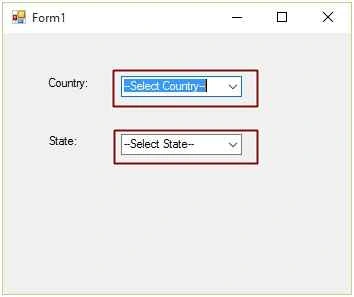
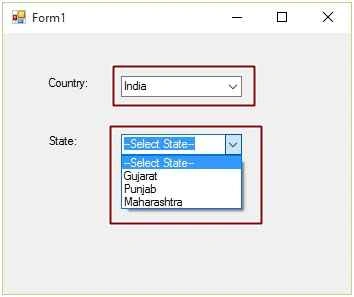
We are selecting Country as India from the first Combo box; the state combo box will show only the state relevant to India.

Hope you liked this. Thank you for reading. Have a good day.
Nur-A-Alam SiddiquePosted Sep 8, 2017, 10:45 AM
I am using the below code but there are no data. Please if you can check and instruct me what is the problem. public partial class Form1 : Form { MySqlConnection con = new MySqlConnection("datasource=127.0.0.1;uid=root;database=voter;port=3306;pass="); DataRow dr; public Form1() { InitializeComponent(); refreshdata(); } public void refreshdata() { con.Open(); MySqlCommand cmd = new MySqlCommand ("select * from division", con); MySqlDataAdapter sda = new MySqlDataAdapter(cmd); DataTable dt = new DataTable(); sda.Fill(dt); con.Close(); dr = dt.NewRow(); dr.ItemArray = new object[] { 0, "--Select Division--" }; dt.Rows.InsertAt(dr, 0); comboBoxDivision.ValueMember = "id"; comboBoxDivision.DisplayMember = "name_en"; comboBoxDivision.DataSource = dt; } private void comboBox1_SelectedIndexChanged(object sender, EventArgs e) { if (comboBoxDivision.SelectedValue.ToString() != null) { int division = Convert.ToInt32(comboBoxDivision.SelectedValue.ToString()); refreshdistrict(division); } } public void refreshdistrict(int division) { con.Open(); MySqlCommand cmd = new MySqlCommand("select * from district where division= @division", con); cmd.Parameters.AddWithValue("division", division); MySqlDataAdapter sda = new MySqlDataAdapter(cmd); DataTable dt = new DataTable(); sda.Fill(dt); con.Close(); dr = dt.NewRow(); dr.ItemArray = new object[] { 0, "--Select District--" }; dt.Rows.InsertAt(dr, 0); comboBoxDistrict.ValueMember = "id"; comboBoxDistrict.DisplayMember = "name_en"; comboBoxDistrict.DataSource = dt; }
Shahbuddin RazaPosted Aug 28, 2017, 4:04 PM
Sir mujhe same patern textbox k through karna hai agar posible ho toh pls mujhe bataiye....
Rahul AnandPosted Jun 21, 2017, 8:04 AM
Sir, i have some doubt in combobox. if there are 2 combobox, i selected an item from first combobox and also in second one. both item will view in datagridview in same row. next time when i select the first combobox item, the item i have already selected before in second combobox should not come. will u please send me the [email protected] this is my email-id..i hope u will definitely help me. Thank You in advance..
Ray GiuliPosted Mar 16, 2017, 2:59 PM
An exception of type 'MySql.Data.MySqlClient.MySqlException' occurred in MySql.Data.dll but was not handled in user code Additional information: You have an error in your SQL syntax; check the manual that corresponds to your MySQL server version for the right syntax to use near 'WHERE 'Equip_Type_ID_Num'= 0' at line 1
Ray GiuliPosted Mar 16, 2017, 2:59 PM
Thank you for the article! I am trying to incorporate this into my first mySQL C# applications build. I continually get the following error pertaining to the MySqlDataAdapter and .Fill(dt)...
reuben sanballatPosted Sep 8, 2016, 8:05 AM
Try and catch will only prevent crashing but necessarily resolve the problem. Any other solution? Any way, I am actually using Visual Studio 2015 community edition.
reuben sanballatPosted Sep 6, 2016, 8:57 AM
Tried running your code but it returns a FormatException error flagging this line "int countryid = Convert.ToInt32(comboBox1.SelectedValue.ToString());" as the culprit. Any Solution to the error?
Arul RPosted Oct 28, 2015, 5:31 AM
Good one !!!
Santhakumar MunuswamyPosted Oct 18, 2015, 4:53 AM
Good one
Priyaranjan K SPosted Oct 9, 2015, 6:25 AM
Good One Nilesh Jadav
Mukesh KumarPosted Oct 9, 2015, 3:32 AM
I have created same for my application thanks...
Sujeet SumanPosted Oct 9, 2015, 1:25 AM
Nice Article.................
Sibeesh VenuPosted Oct 9, 2015, 1:11 AM
Nice Share
Harshad PansuriyaPosted Oct 9, 2015, 12:50 AM
Nice one
Rajeesh MenothPosted Oct 9, 2015, 12:43 AM
Good One
Ujjval ShuklaPosted Oct 9, 2015, 12:35 AM
Nice One..
Mukesh KumarPosted Oct 8, 2015, 11:55 PM
Good article
Shridhar SharmaPosted Oct 8, 2015, 7:15 PM
good one :)