

This article shows how to work with a cascading dropdown list for country/state/city in ASP.Net using Entity Framework.
Create three tables as needed, as in:
- CREATE TABLE country
- (
- countryID INT NOT NULL,
- countryName varchar(50) NOT NULL,
- PRIMARY KEY (countryID ),
- );
- CREATE TABLE state
- (
- stateID INT NOT NULL,
- countryID INT NOTNULL,
- stateName varchar(50) NOT NULL,
- PRIMARY KEY (stateID ),
- FOREIGN KEY (countryID ) REFERENCES country (countryID));
- CREATE TABLE city
- (
- cityID INT NOT NULL,
- stateID INT NOTNULL,
- cityName varchar(50) NOT NULL,
- PRIMARY KEY (cityID),
- FOREIGN KEY (stateID) REFERENCES state (stateID));
First create an empty web application, as in:
Add a model as we did earlier and do the necessary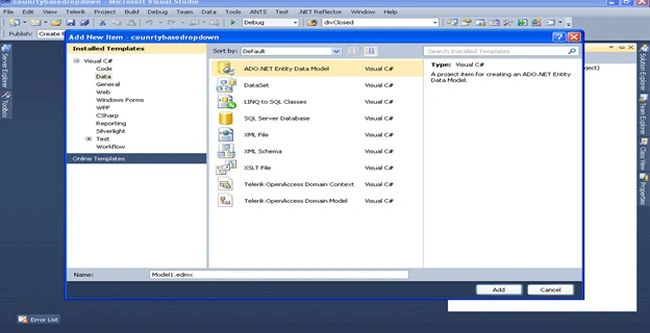

Add a web page to the solution and copy and paste this into the .aspx page:
- <%@ Page Language="C#" AutoEventWireup="true" CodeBehind="cascading.aspx.cs" Inherits="counrtybasedropdown.cascading" %>
- <!DOCTYPE html PUBLIC "-//W3C//DTD XHTML 1.0 Transitional//EN" "http://www.w3.org/TR/xhtml1/DTD/xhtml1-transitional.dtd">
- <html xmlns="http://www.w3.org/1999/xhtml">
- <head id="Head1" runat="server">
- <title></title>
- </head>
- <body>
- <form id="form1" runat="server">
- <div>
- <center>
- <h3>
- Cascading DropDownList for Country/State/City in ASP.Net</h3>
- <table>
- <tr>
- <td>
- Select a Country :
- </td>
- <td>
- <asp:DropDownList ID="ddlCountry" runat="server" AutoPostBack="true" OnSelectedIndexChanged="ddlCountry_SelectedIndexChanged">
- </asp:DropDownList>
- </td>
- </tr>
- <tr>
- <td>
- Select a State :
- </td>
- <td>
- <asp:DropDownList ID="ddlState" runat="server" Enabled="false" AutoPostBack="true" OnSelectedIndexChanged="ddlState_SelectedIndexChanged">
- </asp:DropDownList>
- </td>
- </tr>
- <tr>
- <td>
- Select a City :
- </td>
- <td>
- <asp:DropDownList ID="ddlCity" runat="server" Enabled="false">
- </asp:DropDownList>
- </td>
- </tr>
- </table>
- </center>
- </div>
- </form>
- </body>
- </html>
Your .aspx.cs should be as follows:
- using System;
- using System.Collections.Generic;
- using System.Linq;
- using System.Web;
- using System.Web.UI;
- using System.Web.UI.WebControls;
- namespace counrtybasedropdown
- {
- public partial class cascading : System.Web.UI.Page
- {
- Database1Entities dbEntity = new Database1Entities();
- protected void Page_Load(object sender, EventArgs e)
- {
- if (!IsPostBack)
- {
- var country = from c in dbEntity.countries select new { c.countryID, c.countryName };
- ddlCountry.DataSource = country.ToList();
- ddlCountry.DataValueField = "countryID";
- ddlCountry.DataTextField = "countryName";
- ddlCountry.DataBind();
- ddlCountry.Items.Insert(0, "--Select--");
- }
- }
- protected void ddlCountry_SelectedIndexChanged(object sender, EventArgs e)
- {
- int countyID = Convert.ToInt16(ddlCountry.SelectedValue.ToString());
- var state = from s in dbEntity.states where s.countryID.Equals(countyID) select new { s.stateID, s.stateName };
- ddlState.DataSource = state.ToList();
- ddlState.Enabled = true;
- ddlState.DataValueField = "stateID";
- ddlState.DataTextField = "stateName";
- ddlState.DataBind();
- ddlState.Items.Insert(0, "--Select--");
- }
- protected void ddlState_SelectedIndexChanged(object sender, EventArgs e)
- {
- int stateID = Convert.ToInt16(ddlState.SelectedValue.ToString());
- var city = from c in dbEntity.cities where c.stateID.Equals(stateID) select new { c.cityID, c.cityName };
- ddlCity.DataSource = city.ToList();
- ddlCity.Enabled = true;
- ddlCity.DataValueField = "cityID";
- ddlCity.DataTextField = "cityName";
- ddlCity.DataBind();
- ddlCity.Items.Insert(0, "--Select--");
- }
- }
- }
Happy coding.
Elena MitevskaPosted May 31, 2017, 9:45 AM
Great article. I would like to know how can i choose more then one options from dropdown?
Upendra Pratap ShahiPosted May 1, 2016, 7:06 AM
nice..
vishnu vardhanPosted Apr 7, 2014, 10:50 AM
no i am using if condition on page load event i.e if(!Page.IsPostBack){}
Dorababu MekaPosted Apr 7, 2014, 9:23 AM
Hi as per your post I may see that you are nor binding the dropdown in page_load event with if(!ispostback){//BindCombo}
vishnu vardhanPosted Apr 7, 2014, 8:56 AM
i already posted on questions but i didn't get any thing there pls .. give me some solution
vishnu vardhanPosted Apr 7, 2014, 8:55 AM
Hello Dorababu, I am working on some project there i have 2 drop down lists and one Textbox in Update panel1. here i am binding the Names of PG from database to dropdownlist1(DDPGNames) and binding the PG rooms to dropdownlist2(DDRoomNumber) based first dropdownlist (it's like Country and state thing) now if i select any Room number in 2nd Dropdownlist the room rent has to dispaly automatically in textbox. for this i am writing this code on DDRoomNumber SelectIndexChanged Event. but my problem is DDRoomNumber is not taking selected room Number (It is taking Only First Value) if i select any other room in dropdown list it's going first one only. see here my code: protected void DDRoomNumber_SelectedIndexChanged(object sender, EventArgs e) { txtRent.Enabled = true; MySqlConnection Con = new MySqlConnection(MyConString); MySqlCommand Cmd = Con.CreateCommand(); string S = "SELECT*FROM pg_room_list WHERE Room_Num ='" DDRoomNumber.SelectedItem.Text "' AND Room_PG_ID ='" DDPGNames.SelectedValue "';"; Cmd = new MySqlCommand(S, Con); MySqlDataReader Dr; Con.Open(); Dr = Cmd.ExecuteReader(); while (Dr.Read()) { string SRoom_Rent = Dr.GetString("Room_Rent"); txtRent.Text = SRoom_Rent; } Con.Close(); } Pls give me some solution. Thanks