

Introduction
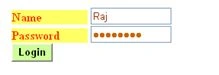
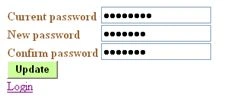
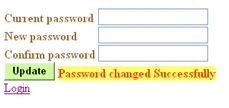
The registered user needs to login with his/her login credentials (user name and password). After successful login a Change password link will be visible. Here by clicking the link a new page will appear where the user must enter the Current Password, New Password and Confirm Password and then click on the Update button to change his/her password respectively.
Table structure
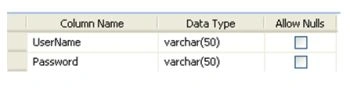
Now let's move to the coding part.
Default.aspx
- <%@ Page Language="C#" AutoEventWireup="true" CodeBehind="Default.aspx.cs" Inherits="Password_Change_in_asp.net._Default" %>
- <!DOCTYPE html PUBLIC "-//W3C//DTD XHTML 1.0 Transitional//EN" "http://www.w3.org/TR/xhtml1/DTD/xhtml1-transitional.dtd">
- <html xmlns="http://www.w3.org/1999/xhtml" >
- <head runat="server">
- <title>Untitled Page</title>
- </head>
- <body>
- <form id="form1" runat="server">
- <div>
- <asp:Label ID="Label1" runat="server" Text="Name" Font-Bold="True"
- Width="100px" BackColor="#FFFF66" ForeColor="#FF3300"></asp:Label>
- <asp:TextBox ID="TextBox_user_name" runat="server" ForeColor="#993300" Width="100px"></asp:TextBox><br />
- <asp:Label ID="Label2" runat="server" Text="Password" Font-Bold="True"
- Width="100px" BackColor="#FFFF66" ForeColor="#FF3300"></asp:Label>
- <asp:TextBox ID="TextBox_password" runat="server" ForeColor="#CC6600"
- TextMode="Password" Width="100px"></asp:TextBox><br />
- <asp:Button ID="btn_login" runat="server" Text="Login" Font-Bold="True"
- BackColor="#CCFF99" onclick="btn_login_Click" /><br />
- <asp:Label ID="lb1" runat="server" Font-Bold="True" ForeColor="#FF3300"></asp:Label>
- </div>
- </form>
- </body>
- </html>
Default.aspx.cs
- using System;
- using System.Collections;
- using System.Configuration;
- using System.Data;
- using System.Linq;
- using System.Web;
- using System.Web.Security;
- using System.Web.UI;
- using System.Web.UI.HtmlControls;
- using System.Web.UI.WebControls;
- using System.Web.UI.WebControls.WebParts;
- using System.Xml.Linq;
- using System.Data.SqlClient;
- namespace Password_Change_in_asp.net
- {
- public partial class _Default : System.Web.UI.Page
- {
- string strConnString = ConfigurationManager.ConnectionStrings["ConnectionString"].ConnectionString;
- string str = null;
- SqlCommand com;
- protected void btn_login_Click(object sender, EventArgs e)
- {
- object obj = null;
- SqlConnection con = new SqlConnection(strConnString);
- con.Open();
- Session["UserName"] = TextBox_user_name.Text;
- str = "select count(*) from login where UserName=@UserName and Password =@Password";
- com = new SqlCommand(str, con);
- com.CommandType = CommandType.Text;
- com.Parameters.AddWithValue("@UserName", Session["UserName"]);
- com.Parameters.AddWithValue("@Password", TextBox_password.Text);
- obj = com.ExecuteScalar();
- if ((int)(obj) != 0)
- {
- Response.Redirect("Welcome.aspx");
- }
- else
- {
- lb1.Text = "Invalid Username and Password";
- }
- con.Close();
- }
- }
- }
- <%@ Page Language="C#" AutoEventWireup="true" CodeBehind="Welcome.aspx.cs" Inherits="Password_Change_in_asp.net.Welcome" %>
- <!DOCTYPE html PUBLIC "-//W3C//DTD XHTML 1.0 Transitional//EN" "http://www.w3.org/TR/xhtml1/DTD/xhtml1-transitional.dtd">
- <html xmlns="http://www.w3.org/1999/xhtml" >
- <head runat="server">
- <title>Untitled Page</title>
- </head>
- <body>
- <form id="form1" runat="server">
- <div>
- <asp:Label ID="lb1" runat="server" Font-Bold="True" ForeColor="#FF3300"></asp:Label><br />
- </div>
- <asp:LinkButton ID="lnk_changepassword" runat="server"
- onclick="lnk_changepassword_Click">Change Password</asp:LinkButton>
- </form>
- </body>
- </html>

Adane TesfayePosted Mar 24, 2021, 7:20 PM
Hello!! after the password successfully changed unable to redirect to my home page. is there any help?
ప్రభాకర్ జాపతిPosted Feb 2, 2016, 1:08 PM
exlent work
Suvendu Shekhar GiriPosted Nov 25, 2015, 10:52 AM
Why so many namespaces included in the class. Are they relally used here?
Suvendu Shekhar GiriPosted Nov 25, 2015, 10:51 AM
Your code is vulnerable to SQL Injection.
Ankush MahajanPosted Aug 12, 2015, 11:04 PM
great job...
anilkumar yadavPosted May 11, 2015, 1:28 PM
i am receiving this error while doing the code , so pls help me .
anilkumar yadavPosted May 11, 2015, 1:27 PM
An SqlParameter with ParameterName '@Passoword' is not contained by this SqlParameterCollection
Sagar SkPosted Apr 17, 2014, 1:06 PM
thanks for giving these coding and superb explanation....
harik rishananPosted Mar 26, 2014, 7:35 AM
AM USING THIS CODE BUT LOT OF ERRORS....
ravi KumarPosted Jan 28, 2014, 9:59 AM
Thanks
Pramod KumarPosted Sep 28, 2013, 6:47 PM
thanking you for this wonderful coding... and helping...
deepak niranjanPosted Aug 27, 2013, 7:24 AM
this code help me very much thanks a lot