

In this article I would like to share the procedure to change the SharePoint site Welcome Page.
The Welcome Page in a SharePoint site
- The Welcome Page defines the page that is loaded when a user navigates to the site.
- By default a SharePoint team site has a Home.aspx page as a Welcome Page.
Procedure to change the Welcome Page
To change the Welcome Page of a site, do the following.
Step 1
Go to your site and click on the setting menu to navigate to site settings menu.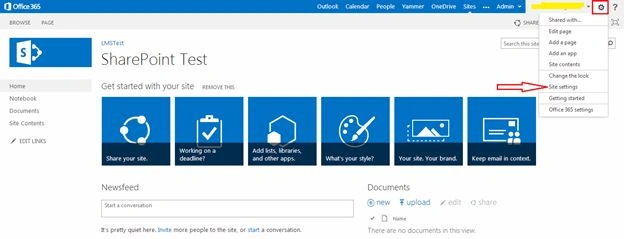
Step 2
On the site settings page click on the “Welcome Page” under the Look and Feel section.
By default the “Welcome Page” option is not available under the look and feel section. We should activate the “SharePoint server publishing feature” in the site.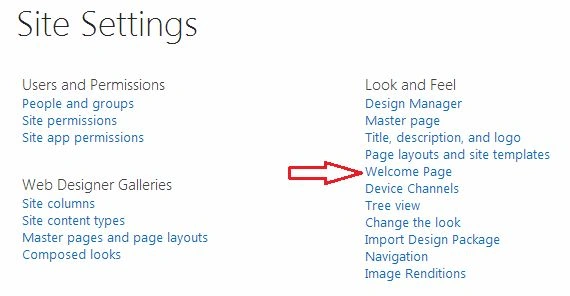
Step 3
Then provide your URL on the text box if you know, else click Browse to find the Welcome Page that you want to use for the site and then double-click the item to select it. 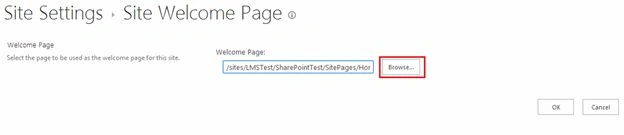
Then click on the “Insert” button as shown in the following: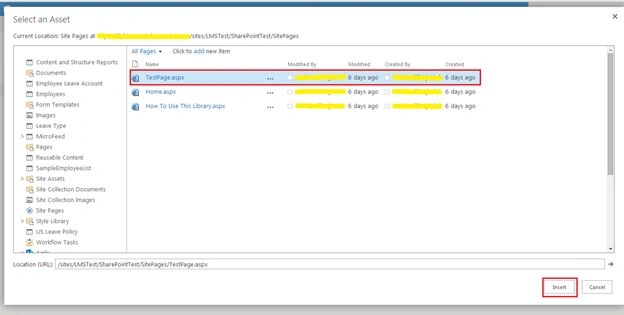
Step 4
Finally click the “OK” button to set the Welcome Page.
Summary
In this article we explored how to change the Welcome Page in a SharePoint site.
Join the conversation! Your thoughts help the community grow.