In this post we will see how we can change Themes Dynamically In Grid. I
recently came across a situation to change the grid’s theme dynamically, whenever user select any theme. So I have done this requirement by using some
in-built functionalities of jQWidget JQX grid. Here I am going to share that. I hope you will like it.
To load a grid from a JSON, you can follow the steps as discussed in this
article.
Background
If you are new to JQWidget JQX Grid, please find out the link here.
Download the Source Code
Please download the source code from here.
Using the code
I hope you have implemented your grid as shown in that article. Now I guess
your page will look like this.
Now let us make sure that grid is working fine. Please run your project.

Figure1: Change Themes Dynamically In Grid
Cool, so grid is loaded. Now need to add a select control in which we are going
to load theme names so that user can select the theme and apply. Is that fine?
- <select id="selectOptions" onchange="applyNewCSS()">
- <option value="0">Select Template</option>
- <option value="metro">metro</option>
- <option value="office">office</option>
- <option value="orange">orange</option>
- <option value="energyblue">energyblue</option>
- <option value="darkblue">darkblue</option>
- <option value="shinyblack">shinyblack</option>
- <option value="lightness" selected="selected">lightness</option>
- <option value="android">android</option>
- </select>
The next thing is we need to add the CSS links to the page, here I am going to
add some of the CSS references as follows.
- <link href="JQXItems/jqwidgets/styles/jqx.darkblue.css" rel="stylesheet" title="darkblue" />
- <link href="JQXItems/jqwidgets/styles/jqx.energyblue.css" rel="stylesheet" title="energyblue" />
- <link href="JQXItems/jqwidgets/styles/jqx.metro.css" rel="stylesheet" title="metro" />
- <link href="JQXItems/jqwidgets/styles/jqx.metrodark.css" rel="stylesheet" title="metrodark" />
- <link href="JQXItems/jqwidgets/styles/jqx.office.css" rel="stylesheet" title="office" />
- <link href="JQXItems/jqwidgets/styles/jqx.ui-darkness.css" rel="stylesheet" title="ui-darkness" />
- <link href="JQXItems/jqwidgets/styles/jqx.ui-le-frog.css" rel="stylesheet" title="ui-le-frog" />
- <link href="JQXItems/jqwidgets/styles/jqx.ui-lightness.css" rel="stylesheet" title="ui-lightness." />
- <link href="JQXItems/jqwidgets/styles/jqx.ui-sunny.css" rel="stylesheet" title="ui-sunny" />
Have you noticed that we are calling the function applyNewCSS in the on change
event of the select control. So next thing we will add that function.
- function applyNewCSS() {
- var css = $.trim($("#selectOptions").val());
- if (css == 'metro') {
- $("#jqxgrid").jqxGrid({
- theme: 'metro';
- });
- } else if (css == 'metrodark') {
- $("#jqxgrid").jqxGrid({
- theme: 'metrodark';
- });
- } else if (css == 'office') {
- $("#jqxgrid").jqxGrid({
- theme: 'office';
- });
- } else if (css == 'orange') {
- $("#jqxgrid").jqxGrid({
- theme: 'orange';
- });
- } else if (css == 'energyblue') {
- $("#jqxgrid").jqxGrid({
- theme: 'energyblue';
- });
- } else if (css == 'darkblue') {
- $("#jqxgrid").jqxGrid({
- theme: 'darkblue';
- });
- } else if (css == 'black') {
- $("#jqxgrid").jqxGrid({
- theme: 'black';
- });
- } else if (css == 'shinyblack') {
- $("#jqxgrid").jqxGrid({
- theme: 'shinyblack';
- });
- } else if (css == 'lightness') {
- $("#jqxgrid").jqxGrid({
- theme: 'lightness';
- });
- } else if (css == 'ui-le-frog') {
- $("#jqxgrid").jqxGrid({
- theme: 'ui-le-frog';
- });
- } else if (css == 'ui-darkness') {
- $("#jqxgrid").jqxGrid({
- theme: 'ui-darkness';
- });
- } else if (css == 'ui-sunny') {
- $("#jqxgrid").jqxGrid({
- theme: 'ui-sunny';
- });
- } else if (css == 'android') {
- $("#jqxgrid").jqxGrid({
- theme: 'android';
- });
- }
- }
So we can add the theme to the grid as
$(“#jqxgrid”).jqxGrid({ theme: ‘theme
name’ });
Here we are applying the theme to the grid according to the user selection.
Oops, we forgot one thing. If you apply CSS style sheet directly, the styles
won’t get applied in the page content. For that we need to disable the
remaining style sheets and enable the selected one alone.
The following code will do that magic:
- var i, link_tag;
- for (i = 0, link_tag = document.getElementsByTagName("link"); i < link_tag.length; i++)
- {
- if ((link_tag[i].rel.indexOf("stylesheet") != -1) && link_tag[i].title)
- {
- link_tag[i].disabled = true;
- if (link_tag[i].title == css)
- {
- link_tag[i].disabled = false;
- }
- }
- set_cookie('style', css, 30);
- }
We are finding all the link reference and find out whose rel property has the
word ‘stylesheet’. Now it is time to see how it woks.
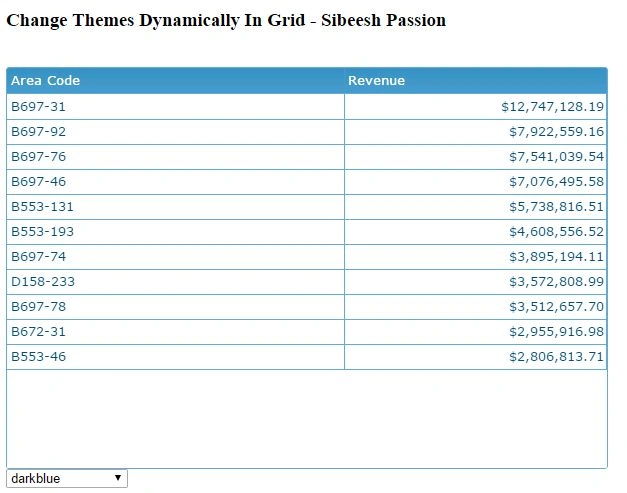 Figure 2:
 Change Themes Dynamically In Grid
 Figure 3:
 Change Themes Dynamically In Grid
You can see that the grid themes are changing according to the user selection of
theme.That’s all we have done it.
Complete Code
- <!DOCTYPE html>
- <html lang="en">
- <head>
- <title>Change Themes Dynamically In Grid - Sibeesh Passion</title>
- <script src="jquery-1.9.1.js"></script>
- <script type="text/javascript" src="JQXItems/jqwidgets/jqxcore.js"></script>
- <script type="text/javascript" src="JQXItems/jqwidgets/jqxdata.js"></script>
- <script type="text/javascript" src="JQXItems/jqwidgets/jqxbuttons.js"></script>
- <script type="text/javascript" src="JQXItems/jqwidgets/jqxscrollbar.js"></script>
- <script type="text/javascript" src="JQXItems/jqwidgets/jqxlistbox.js"></script>
- <script type="text/javascript" src="JQXItems/jqwidgets/jqxdropdownlist.js"></script>
- <script type="text/javascript" src="JQXItems/jqwidgets/jqxmenu.js"></script>
- <script type="text/javascript" src="JQXItems/jqwidgets/jqxgrid.js"></script>
- <script type="text/javascript" src="JQXItems/jqwidgets/jqxgrid.selection.js"></script>
- <script type="text/javascript" src="JQXItems/jqwidgets/jqxdatatable.js"></script>
- <link href="JQXItems/jqwidgets/styles/jqx.base.css" rel="stylesheet" />
- <link href="JQXItems/jqwidgets/styles/jqx.darkblue.css" rel="stylesheet" title="darkblue" />
- <link href="JQXItems/jqwidgets/styles/jqx.energyblue.css" rel="stylesheet" title="energyblue" />
- <link href="JQXItems/jqwidgets/styles/jqx.metro.css" rel="stylesheet" title="metro" />
- <link href="JQXItems/jqwidgets/styles/jqx.metrodark.css" rel="stylesheet" title="metrodark" />
- <link href="JQXItems/jqwidgets/styles/jqx.office.css" rel="stylesheet" title="office" />
- <link href="JQXItems/jqwidgets/styles/jqx.ui-darkness.css" rel="stylesheet" title="ui-darkness" />
- <link href="JQXItems/jqwidgets/styles/jqx.ui-le-frog.css" rel="stylesheet" title="ui-le-frog" />
- <link href="JQXItems/jqwidgets/styles/jqx.ui-lightness.css" rel="stylesheet" title="ui-lightness." />
- <link href="JQXItems/jqwidgets/styles/jqx.ui-sunny.css" rel="stylesheet" title="ui-sunny" />
- <script type="text/javascript">
- function applyNewCSS()
- {
- var css = $.trim($("#selectOptions").val());
- var i, link_tag;
- for (i = 0, link_tag = document.getElementsByTagName("link"); i < link_tag.length; i++)
- {
- if ((link_tag[i].rel.indexOf("stylesheet") != -1) && link_tag[i].title)
- {
- link_tag[i].disabled = true;
- if (link_tag[i].title == css)
- {
- link_tag[i].disabled = false;
- }
- }
- }
- if (css == 'metro')
- {
- $("#jqxgrid").jqxGrid(
- {
- theme: 'metro'
- });
- }
- else if (css == 'metrodark')
- {
- $("#jqxgrid").jqxGrid(
- {
- theme: 'metrodark'
- });
- }
- else if (css == 'office')
- {
- $("#jqxgrid").jqxGrid(
- {
- theme: 'office'
- });
- }
- else if (css == 'orange')
- {
- $("#jqxgrid").jqxGrid(
- {
- theme: 'orange'
- });
- }
- else if (css == 'energyblue')
- {
- $("#jqxgrid").jqxGrid(
- {
- theme: 'energyblue'
- });
- }
- else if (css == 'darkblue')
- {
- $("#jqxgrid").jqxGrid(
- {
- theme: 'darkblue'
- });
- }
- else if (css == 'black')
- {
- $("#jqxgrid").jqxGrid(
- {
- theme: 'black'
- });
- }
- else if (css == 'shinyblack')
- {
- $("#jqxgrid").jqxGrid(
- {
- theme: 'shinyblack'
- });
- }
- else if (css == 'lightness')
- {
- $("#jqxgrid").jqxGrid(
- {
- theme: 'lightness'
- });
- }
- else if (css == 'ui-le-frog')
- {
- $("#jqxgrid").jqxGrid(
- {
- theme: 'ui-le-frog'
- });
- }
- else if (css == 'ui-darkness')
- {
- $("#jqxgrid").jqxGrid(
- {
- theme: 'ui-darkness'
- });
- }
- else if (css == 'ui-sunny')
- {
- $("#jqxgrid").jqxGrid(
- {
- theme: 'ui-sunny'
- });
- }
- else if (css == 'android')
- {
- $("#jqxgrid").jqxGrid(
- {
- theme: 'android'
- });
- }
- }
- $(document).ready(function()
- {
-
- var data = {
- datatype: "json",
- datafields: [
- {
- "name": "AreaCode",
- "type": "string"
- },
- {
- "name": "Revenue",
- "type": "number"
- }],
- url: "jsonData.txt"
- };
- $("#jqxgrid").jqxGrid(
- {
- source: data,
- columns: [
- {
- "text": "Area Code",
- "dataField": "AreaCode",
- "cellsalign": "left",
- "cellsformat": "d"
- },
- {
- "text": "Revenue",
- "dataField": "Revenue",
- "cellsalign": "right",
- "cellsformat": "c2"
- }],
- });
- });
-
- </script>
- </head>
- <body>
- <h3>Change Themes Dynamically In Grid - Sibeesh Passion</h3>
- <br />
- <div id='jqxWidget' style="float: left; width: 99.9%;">
- <div id="jqxgrid"></div>
- </div>
- <br />
- <br />
- <select id="selectOptions" onchange="applyNewCSS()">
- <option value="0">Select Template</option>
- <option value="metro">metro</option>
- <option value="office">office</option>
- <option value="orange">orange</option>
- <option value="energyblue">energyblue</option>
- <option value="darkblue">darkblue</option>
- <option value="shinyblack">shinyblack</option>
- <option value="lightness" selected="selected">lightness</option>
- <option value="android">android</option>
- </select>
- </body>
- </html>
Did I miss anything that you may think which is needed? Have you ever wanted to
do this requirement? Did you try jQWidget yet? Could you find this post as
useful? I hope you liked this article. Please share me your valuable suggestions
and feedback.
Please see this article in my blog
here.
Your turn. What do you think?
If you have any questions, then please mention it in the comments section.


Sibeesh VenuPosted Oct 31, 2015, 6:07 AM
Isham Khan Thanks a lot
Sibeesh VenuPosted Oct 31, 2015, 6:07 AM
Nilesh Jadav Thanks a lot
Sibeesh VenuPosted Oct 31, 2015, 6:06 AM
Harshad Pansuriya Thanks a lot
Sibeesh VenuPosted Oct 31, 2015, 6:06 AM
N Vinodh Thanks a lot
Sibeesh VenuPosted Oct 31, 2015, 6:06 AM
Upendra Pratap Shahi Thanks a lot
Sibeesh VenuPosted Oct 31, 2015, 6:06 AM
Priyaranjan K S Thanks a lot
Sibeesh VenuPosted Oct 31, 2015, 6:06 AM
Gowtham K Thanks a lot
Isham KhanPosted Oct 31, 2015, 4:32 AM
so good
Nilesh JadavPosted Oct 31, 2015, 3:51 AM
Good one
Harshad PansuriyaPosted Oct 31, 2015, 12:03 AM
Nice one
Vinodh NarayananPosted Oct 30, 2015, 11:28 PM
Good one
Upendra Pratap ShahiPosted Oct 30, 2015, 1:57 PM
Very nice sir...thanks for sharing..
Priyaranjan K SPosted Oct 30, 2015, 1:36 PM
Thanks for the share
Gowtham KPosted Oct 30, 2015, 12:49 PM
Good Share:)