

In this article I would like to share the procedure to check out the site pages in SharePoint
Need for check-out and check-in
- In a SharePoint Document Library, you have one way to control the document collaboration, by using the “Require Check Out”. Especially when multiple users have access to this library.
- If you have checked out the file, other users cannot over write the file. Other users can edit the documents only when you checked-in the files.
- You are also preventing other people from seeing the latest changes or making changes themselves, so it is important that you check files back in promptly.
Step 1
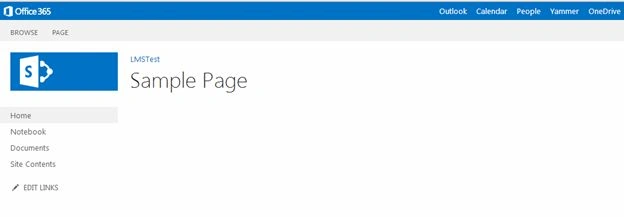
Go to the page in your site, the page you want to check out, as in the following:
Step 2
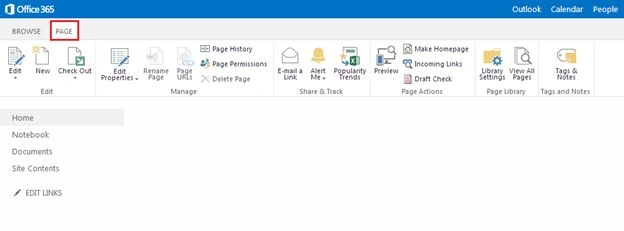
Select the “PAGE” tab on your SharePoint Page as shown below:
Step 3
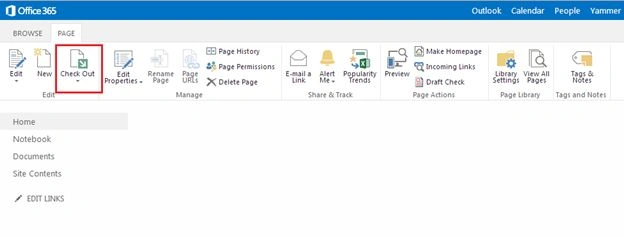
On the top ribbon click on the “Check Out” option from Edit group as shown below:
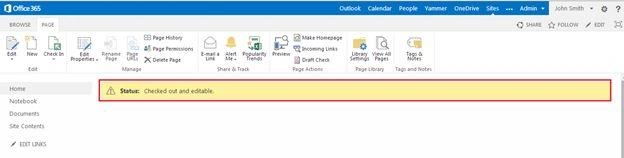
Finally your page will be checked-out successfully.
Summary
In this article we explored how to check out the page in SharePoint.
Join the conversation! Your thoughts help the community grow.