
Introduction
This sample is a utility to determine the capabilities of a Mobile Device. The MobileCapabilities class available in the Mobile Internet Toolkit provides a list of useful information on the client device. You can use this class to determine whether the target client device supports certain functionality.
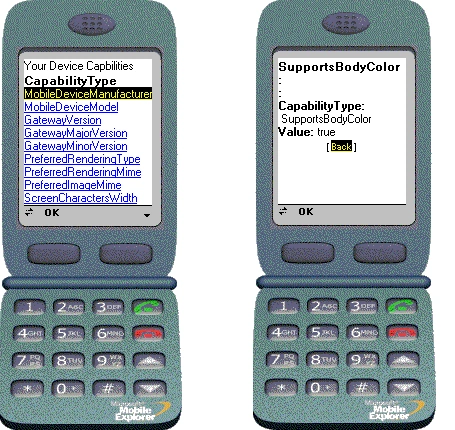
Our sample consists of a Mobile Web Form, which displays the capabilities of the client device. The MobileCapabilities class is created on Page Load and the Capability information is available programmatically. We make use of Reflection at run time to peek into the Device Capabilities class and extract it's properties and the corresponding values into an ArrayList object. The capabilities and their values for the mobile device are then displayed in user-friendly format in an ObjectList control using Data Binding.
Create a new project of Type "Visual Basic Project" using Template "Mobile Web Application". In the default Mobile Web Form that is created along with the project, insert a Label and an ObjectList control as shown in Figure 1.
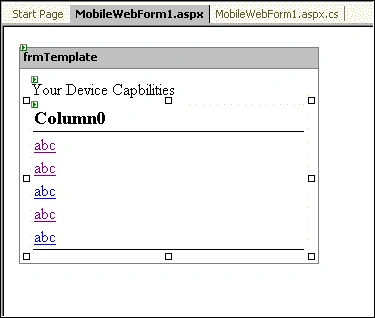
Figure 1: Designing the Mobile Web Form
Now we will define our class, which will be used to hold the capability information. Add the following code to the code view just above the class definition for the Mobile Web Form.
Class
Capability
Private _strName, _strValue
As [String]
Public Sub
New(ByVal
strCapabilityType As [String],
ByVal strValue
As [String])
_strName = strCapabilityType
_strValue = strValue
End Sub
'New
Public
ReadOnly
Property CapabilityType() As
[String]
Get
Return _strName
End Get
End Property
Public ReadOnly
Property Value()
As [String]
Get
Return _strValue
End Get
End Property
End Class
'Capability
Join the conversation! Your thoughts help the community grow.