

When I was working for a project, we had requirements like a list should be displayed in a listview and the user should be able to select items through a checkbox. Since Silverlight doesn't have a Listbox control with a checkbox, we tried many ways to achieve this. Finally we found a way to do it. In the following article, I will explain how we did that.
In a UI, the user will have an option to select a list of courses in a listbox and the selected courses will be listed in the gridview like in the following figure.
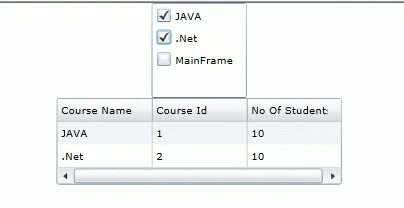
Course Class
I have a class Course with the following properties.
- CourseName
- CourseId
- NoOfStudents
Class.cs
using System;
using System.Net;
using System.Windows;
using System.Windows.Controls;
using System.Windows.Documents;
using System.Windows.Ink;
using System.Windows.Input;
using System.Windows.Media;
using System.Windows.Media.Animation;
using System.Windows.Shapes;
namespace ListBoxWithCheckBoxSLXAML
{
public class Course
{
public string CourseName { get; set; }
public int CourseId { get; set; }
public int NoOfStudents { get; set; }
}
}
ViewModel
As usual I have one BaseViewModel and a viewmodel for a view which inherits from baseviewmodel.
BaseViewModel.cs
using System;
using System.Net;
using System.Windows;
using System.Windows.Controls;
using System.Windows.Documents;
using System.Windows.Ink;
using System.Windows.Input;
using System.Windows.Media;
using System.Windows.Media.Animation;
using System.Windows.Shapes;
using System.ComponentModel;
namespace ListBoxWithCheckBoxSLXAML
{
public class BaseViewModel : INotifyPropertyChanged
{
public event PropertyChangedEventHandler PropertyChanged;
protected void NotifyPropertyChanged(string propertyName)
{
if (PropertyChanged != null)
{
PropertyChanged(this, new PropertyChangedEventArgs(propertyName));
}
}
}
}
ViewModel.cs
I have 2 properties in the viewmodel. One is for a list of courses and the other is for a list of selected courses.
using System;
using System.Net;
using System.Windows;
using System.Windows.Controls;
using System.Windows.Documents;
using System.Windows.Ink;
using System.Windows.Input;
using System.Windows.Media;
using System.Windows.Media.Animation;
using System.Windows.Shapes;
using System.Collections.ObjectModel;
namespace ListBoxWithCheckBoxSLXAML
{
public class ViewModel : BaseViewModel
{
private ObservableCollection<Course> _courses;
private ObservableCollection<Course> _selectedcourses;
public ObservableCollection<Course> Courses
{
get
{
return _courses;
}
set
{
_courses = value;
NotifyPropertyChanged("Courses");
}
}
public ObservableCollection<Course> SelectedCourses
{
get
{
return _selectedcourses;
}
set
{
_selectedcourses = value;
NotifyPropertyChanged("SelectedCourses");
}
}
public ViewModel()
{
Courses = new ObservableCollection<Course>()
{
new Course(){CourseId=1,CourseName="JAVA",NoOfStudents=10},
new Course(){CourseId=2,CourseName=".Net",NoOfStudents=10},
new Course(){CourseId=3,CourseName="MainFrame",NoOfStudents=10}
};
SelectedCourses = new ObservableCollection<Course>();
SelectedCourses.CollectionChanged += new System.Collections.Specialized.NotifyCollectionChangedEventHandler(SelectedCourses_CollectionChanged);
}
void SelectedCourses_CollectionChanged(object sender, System.Collections.Specialized.NotifyCollectionChangedEventArgs e)
{
NotifyPropertyChanged("SelectedCourses");
}
}
}
View
MainPage.xaml
In my XAML file under usercontrol.resources, I added the following code.
<Style x:Key="CheckBoxList" TargetType="ListBox" >
<Setter Property="ItemContainerStyle">
<Setter.Value>
<Style TargetType="ListBoxItem">
<Setter Property="Template">
<Setter.Value>
<ControlTemplate>
<Border Background="Transparent" Margin="{TemplateBinding Padding}">
<CheckBox Content="{Binding CourseName}" VerticalContentAlignment="Center"
IsChecked="{Binding Path=IsSelected,RelativeSource={RelativeSource TemplatedParent},Mode=TwoWay}"/>
</Border>
</ControlTemplate>
</Setter.Value>
</Setter>
</Style>
</Setter.Value>
</Setter>
</Style>
Daisy KrausePosted Feb 2, 2012, 12:29 AM
Great what an article. I will surely try to implement this.
Alok PandeyPosted Feb 1, 2012, 11:51 PM
Very useful article. Thanks for sharing.
Arjun PanwarPosted Feb 1, 2012, 5:55 PM
Really your article is considerately.Thanks