

So the question always arises, how to create a Checkboxlist in MVC. We can build this in ASP.Net webforms very easily using built-in server controls. But how to do this in MVC.
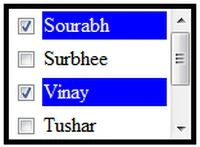
Figure: Checkbox List
So in this article, I explain how to create a checkboxlist in MVC.
Please follow these steps:
Step 1
Click "File" -> "New" -> "Project...".
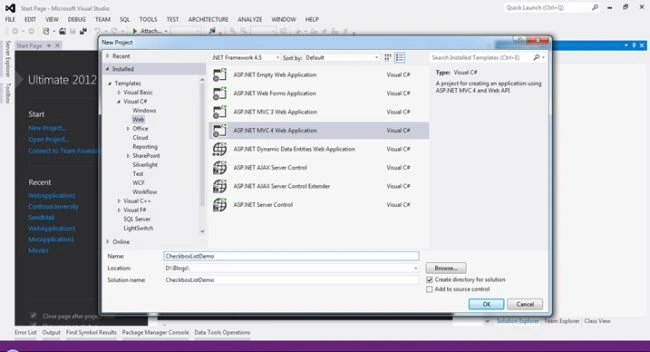
Figure 1: Create New MVC Project
Step 2
Select "ASP.Net MVC4 WebApplication", provide your Project Name, for example I used "CheckboxListDemo", then click "Ok".
Step 3
Now select "Internet Application", and then click "Ok".
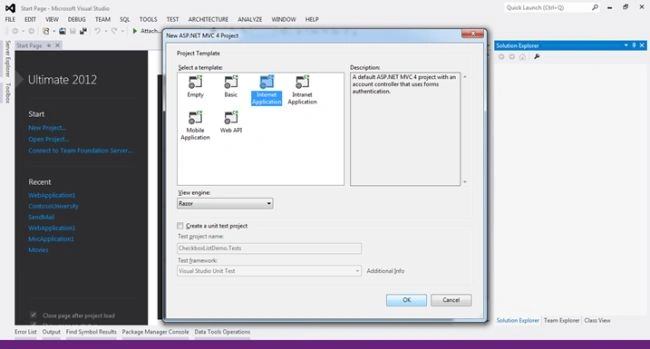
Figure 2: Select Project Template
Step 4
For this application we will create a Model. So right-click on the Model folder then click on "Add" -> "Class".
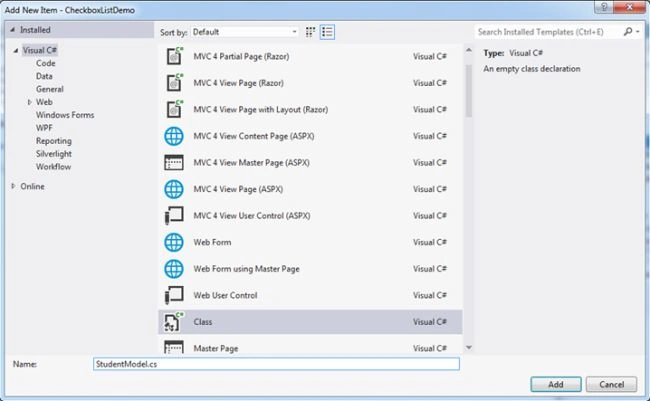
Figure 3: Add a New model.
Here we will create "StudentModel". Now click on the "Add" Button.
Now add the following code.
- using System;
- using System.Collections.Generic;
- using System.Linq;
- using System.Web;
- using System.Web.Mvc;
- namespace CheckboxListDemo.Models
- {
- public class StudentModel
- {
- public IList<SelectListItem> StudentNames { get; set; }
- }
- }
In the code above, I create am "IList<SelectListItem>" type propery. This SelectListItem returns both text and a value that is helpful for lists (like Dropdownlist, Listbox etcetera).
We will now write the code for a Controller.
Right-click on the Controller folder then seelct "Add" >> "Controller".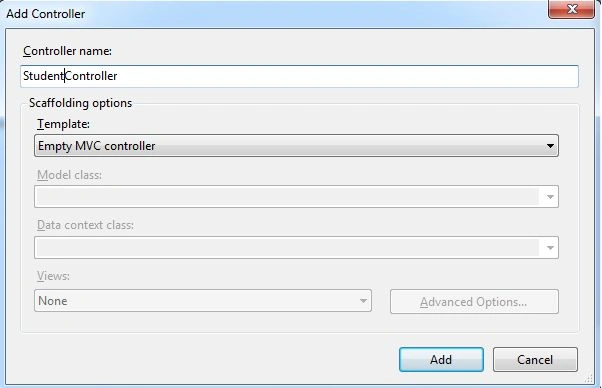
Figure 4: Add New Controller
Now this is our Empty MVC Controller, click on the "Add" button. We will now write the code.
- using System;
- using System.Collections.Generic;
- using System.Linq;
- using System.Web;
- using System.Web.Mvc;
- using CheckboxListDemo.Models;
- namespace CheckboxListDemo.Controllers
- {
- public class StudentController : Controller
- {
- public ActionResult Index()
- {
- return View();
- }
- // GET: /Student/
- public ActionResult Student()
- {
- StudentModel objStudentModel = new StudentModel();
- List<SelectListItem> names = new List<SelectListItem>();
- names.Add(new SelectListItem { Text = "Sourabh", Value = "1" });
- names.Add(new SelectListItem { Text = "Surbhee", Value = "2" });
- names.Add(new SelectListItem { Text = "Vinay", Value = "3" });
- names.Add(new SelectListItem { Text = "Tushar", Value = "4" });
- names.Add(new SelectListItem { Text = "John", Value = "5" });
- names.Add(new SelectListItem { Text = "Tom", Value = "6" });
- objStudentModel.StudentNames = names;
- return View(objStudentModel);
- }
- }
- }
In the code above, I create a new ActionMethod and Student. In this Action Method , I am returning a model, that has a list of student names.
If you notice in the code above, I use SelectListItem and SelectListItem having the two properties Text and Value, that are helpful for a list like Dropdownlist, Listbox etcetera.
Now add a new view, so right-click and click on "Add View".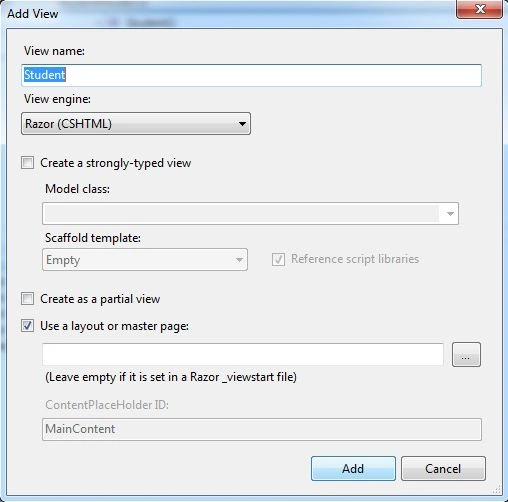
Figure 5: Add View
Now click on the "Add" button. Now add the following code:
Student.cshtml
- @model CheckboxListDemo.Models.StudentModel
- @{
- ViewBag.Title = "Student";
- }
- <h2>Student</h2>
- <script src="~/Scripts/jquery-1.7.1.min.js"></script>
- <script>
- $(document).ready(function () {
- $('.chkclass').click(function () {
- var getchkid = $(this).attr('id');
- var isChecked = $('#' + getchkid).is(':checked');
- if ($('#' + getchkid).is(':checked') == true) {
- $('#td' + $(this).val()).css("color", "white");
- $('#td' + $(this).val()).css("background-color", "blue");
- }
- else {
- $('#td' + $(this).val()).css("color", "black");
- $('#td' + $(this).val()).css("background-color", "white");
- }
- });
- $('#bttn_Click').click(function () {
- var studentListVal = null;
- studentListVal = [];
- $('input:checkbox:checked').each(function () {
- studentListVal.push($(this).attr('value'));
- });
- $.ajax({
- type: "post",
- url: "/Student/Studentl",
- data: { Name: studentListVal },
- datatype: "json",
- traditional: true,
- success: function (data) {
- var selectedIds;
- for (var i = 0; i < data.success.length; i++)
- {
- if (selectedIds != undefined) {
- selectedIds = selectedIds + " " + data.success[i];
- }
- else {
- selectedIds = data.success[i];
- }
- }
- alert('You have Selected Student Ids- '+selectedIds);
- }
- });
- });
- });
- </script>
- <div id="divStudentlist" style="height: 100px; overflow: auto;border:solid; width:150px;">
- @foreach (var names in @Model.StudentNames)
- {
- var checkBoxId = "chk" + names.Value;
- var tdId = "td" + names.Value;
- <table width="100%">
- <tr >
- <td width="20px">
- <input type="checkbox" id="@checkBoxId" class="chkclass" value="@names.Value" />
- </td>
- <td id="@tdId" width="100px">
- @names.Text
- </td>
- </tr>
- </table>
- }
- </div>
- <div>
- <input type="button" id="bttn_Click" value="Send Checked value to Controller" />
- </div>
- using System;
- using System.Collections.Generic;
- using System.Linq;
- using System.Web;
- using System.Web.Mvc;
- using CheckboxListDemo.Models;
- namespace CheckboxListDemo.Controllers
- {
- public class StudentController : Controller
- {
- //
- // GET: /Student/
- public ActionResult Index()
- {
- return View();
- }
- public ActionResult Student()
- {
- StudentModel objStudentModel = new StudentModel();
- List<SelectListItem> names = new List<SelectListItem>();
- names.Add(new SelectListItem { Text = "Sourabh", Value = "1" });
- names.Add(new SelectListItem { Text = "Surbhee", Value = "2" });
- names.Add(new SelectListItem { Text = "Vinay", Value = "3" });
- names.Add(new SelectListItem { Text = "Tushar", Value = "4" });
- objStudentModel.StudentNames = names;
- return View(objStudentModel);
- }
- [HttpPost]
- public ActionResult Studentl(string[] Name)
- {
- return Json(new { success = Name });
- }
- }
- }
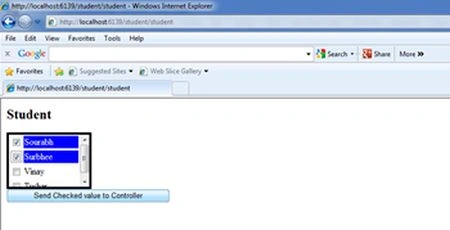
You might now wonder how this blue color appears in the background when I check a checkbox and disappears when I uncheck a checkbox. I did this using jQuery. But first you must understand how this checkbox list is created.
- <div id="divstudentlist" style="height: 110px; overflow: auto;border:solid; width:150px;">
- @foreach (var names in @Model.StudentNames)
- {
- var checkBoxId = "chk" + names.Value;
- var tdId = "td" + names.Value;
- <table width="100%">
- <tr >
- <td width="20px">
- <input type="checkbox" id="@checkBoxId" class="chkclass" value="@names.Value" />
- </td>
- <td id="@tdId" width="100px">
- @names.Text
- </td>
- </tr>
- </table>
- }
- </div>
- @foreach (var names in @Model.StudentNames)
- var checkBoxId = "chk" + names.Value;
- var tdId = "td" + names.Value;
- <table width="100%">
- <tr >
- <td width="20px">
- <input type="checkbox" id="@checkBoxId" class="chkclass" value="@names.Value" />
- </td>
- <td id="@tdId" width="100px">
- @names.Text
- </td>
- </tr>
- </table>
- <script src="~/Scripts/jquery-1.7.1.min.js"></script>
- <script>
- $(document).ready(function () {
- $('.chkclass').click(function () {
- var getchkid = $(this).attr('id');
- var isChecked = $('#' + getchkid).is(':checked');
- if ($('#' + getchkid).is(':checked') == true) {
- $('#td' + $(this).val()).css("color", "white");
- $('#td' + $(this).val()).css("background-color", "blue");
- }
- else {
- $('#td' + $(this).val()).css("color", "black");
- $('#td' + $(this).val()).css("background-color", "white");
- }
- });
- });
- </script>
- $('#bttn_Click').click(function () {
- var studentListVal = null;
- studentListVal = [];
- $('input:checkbox:checked').each(function () {
- studentListVal.push($(this).attr('value'));
- });
- $.ajax({
- type: "post",
- url: "/Student/Studentl",
- data: { Name: studentListVal },
- datatype: "json",
- traditional: true,
- success: function (data) {
- var selectedIds;
- for (var i = 0; i < data.success.length; i++)
- {
- if (selectedIds != undefined) {
- selectedIds = selectedIds + " " + data.success[i];
- }
- else {
- selectedIds = data.success[i];
- }
- }
- alert('You have Selected Student Ids- '+selectedIds);
- }
- });
- });
- $('input:checkbox:checked').each(function () {
- studentListVal.push($(this).attr('value'));
- });
- $.ajax({
- type: "post",
- url: "/Student/Studentl",
- data: { Name: studentListVal },
- datatype: "json",
- traditional: true,
- success: function (data) {
- var selectedIds;
- for (var i = 0; i < data.success.length; i++)
- {
- if (selectedIds != undefined) {
- selectedIds = selectedIds + " " + data.success[i];
- }
- else {
- selectedIds = data.success[i];
- }
- }
- alert('You have Selected Student Ids- '+selectedIds);
- }
- });
- [HttpPost]
- public ActionResult Studentl(string[] Name)
- {
- return Json(new { success = Name });
- }
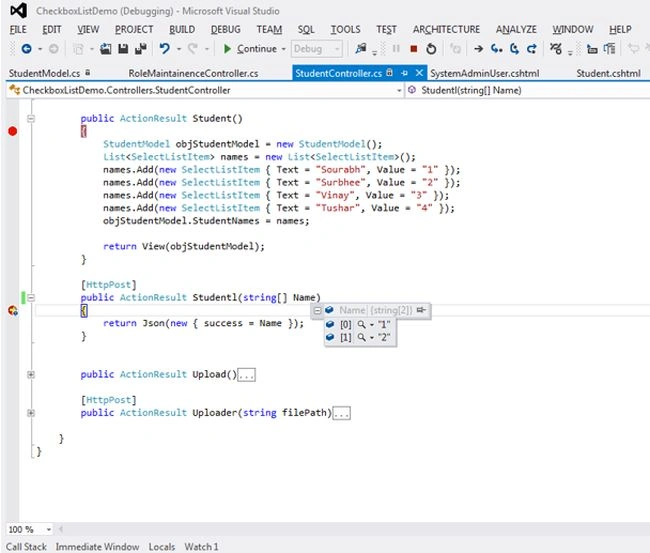
That's it. I hope you enjoy to create this checkboxlist in MVC. If you have any query, Please send your valuable Comments. Happy Programming!
Santhakumar MunuswamyPosted Jun 23, 2015, 3:11 PM
Thanks for nice article