

Introduction
We generally write a Httphandler to remove white space from a CSS and JS file or we use minifies versions of CSS and JS files. Like in jQuery they give us a min version of a JS file.
Now we don't need to write any external utility to remove white space because now we have Chirpy, which is a Visual Studio Add-in for handling CSS, JS, DotLess and T4 files.
Now let me try to explain how to use this add in.
Step 1
First go to http://nuget.org/packages/ChirpyVSI or http://chirpy.codeplex.com/ and download and install it.
Step 2
See in the following image, there is much white space:
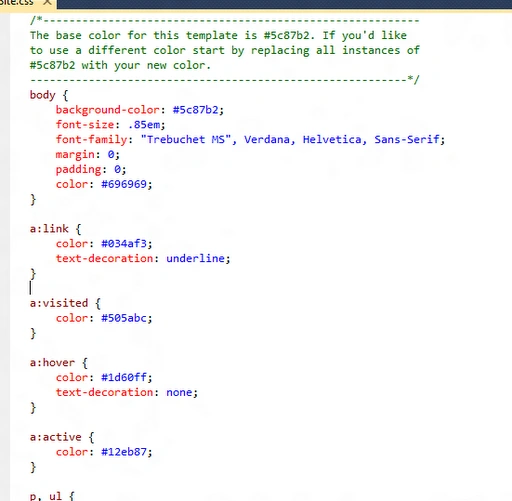
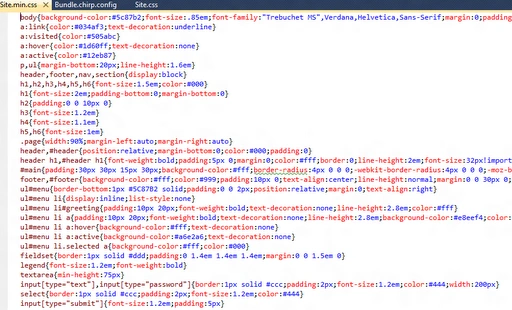
Now we will try to remove it using Chirpy.
Step 3:
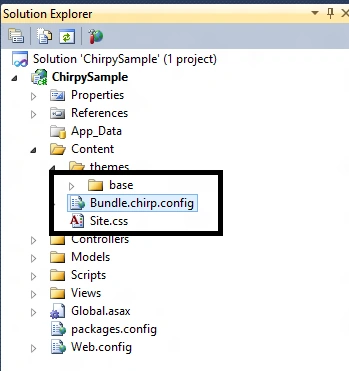
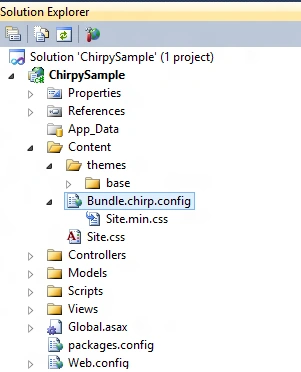
Add a new config file inside the content folder. The file name would be Bundle.chirp.config and the content will be:
Gohil JayendrasinhPosted Nov 25, 2012, 3:40 AM
Hi Nice tool. you can also Download the Microsoft Ajax Minifier from CodePlex http://ajaxmin.codeplex.com/. it's also provide same functionality. http://www.c-sharpcorner.com/UploadFile/jayendra/how-to-minify-your-javascript-and-css-file/
Amit PatelPosted Oct 9, 2012, 12:37 AM
Thanks Varesh
Megha GoyalPosted Oct 8, 2012, 10:59 PM
Is there is an abbreviation for chirpy
Varesh TuliPosted Oct 8, 2012, 10:57 PM
Thanks for sharing this knowledgeable article, it helps a lot.