Introduction
Adding AI video generation to an application looks simple on paper: send a prompt, get an MP4 back. In practice the first real question shows up before you write any code. Which model do you call?
Video models don't differ along a single "quality" axis. They differ in what they accept as input, which controls they expose, how long a clip they produce, what resolutions they allow, whether they can produce sound, how much a clip costs, and how long you wait for it. The best model for a product teaser can be the wrong one for a looping onboarding background.
This article takes an engineering view of the decision. We'll map common tasks to the constraints that actually matter, look at how one multi-model studio documents those constraints, set up a small comparison that is fair enough to trust, and finish with a C# console example showing the async submit, poll and download pattern most video generation APIs use.
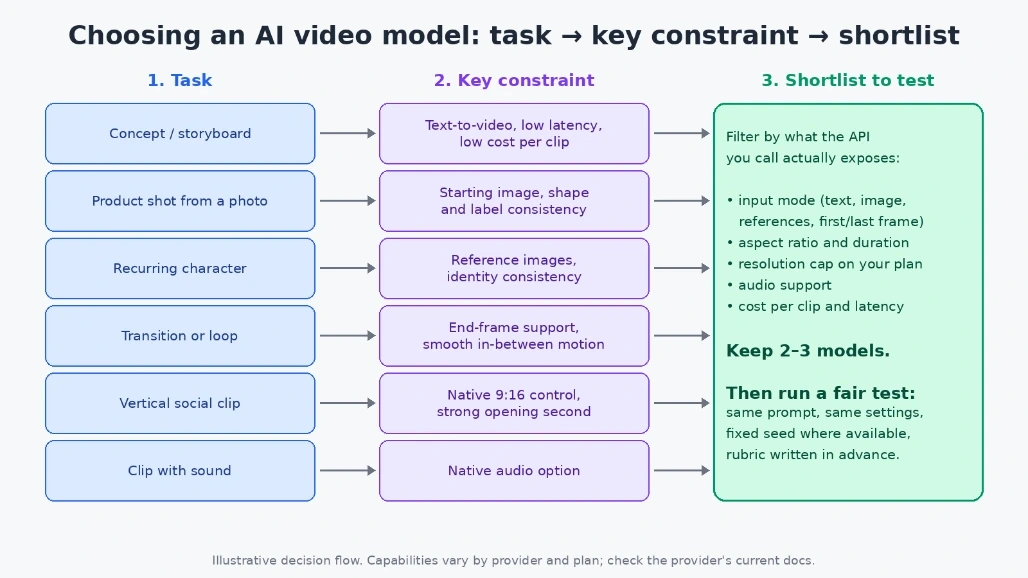
Figure 1. Work left to right: the task decides the constraint, and the constraint decides which models are worth testing.
Start with the task, not the model name
Teams that argue about models are often arguing about different jobs. The table below is a starting point. It describes what to prioritise for each task, not which vendor wins.
Task | Input mode | What to prioritise | What matters less |
|---|
Concept exploration, storyboards | Text-to-video | Prompt adherence, low latency, low cost per clip | Max resolution, audio |
Product shot from an approved photo | Image-to-video (starting image) | Shape and label consistency, camera control | Long duration |
Character that must look the same across clips | Reference images | Identity consistency across runs | Raw motion intensity |
Transition or seamless loop | First and last frame | Support for an end frame, smooth in-between motion | Prompt creativity |
Vertical social clip | Text or image | Native 9:16 aspect ratio control, a strong opening second | Clip length beyond a few seconds |
Clip that needs sound in one pass | Text or references | A native audio option | Highest resolution |
In-app feature with users waiting | Any | Latency, failure rate, predictable cost per clip | Peak visual quality |
Batch rendering overnight | Any | Cost per clip, throughput, rate limits | Latency |
A few notes on the columns that trip people up:
Motion consistency vs. motion amount. Big, dramatic movement and a stable subject pull in opposite directions. For anything with a logo, a face or text on a label, stability is the requirement.
Duration. Every extra second is more frames the model must keep coherent. Ask for the shortest clip that shows the action.
Resolution caps. Caps are often set by the provider or the plan you are on, not by the model's theoretical limit. Read the limit your account actually has.
Cost per clip and latency. Both usually scale with duration and resolution. Exact numbers change often, so check the provider's current docs and pricing page rather than hard-coding assumptions.
Read the capability matrix, not the launch post
The vendor announcement for a model describes its native capabilities. The API or studio you call may expose only part of that. This gap is the most common source of "but the demo could do it" bugs.
A good example of documenting this honestly is the guide on choosing an AI video model by task on everygenai.io, which states plainly that its comparison table covers the controls exposed in that studio, not each supplier's full native specification. At the time of writing (the page was last updated October 13, 2026), it lists:
Grok Imagine Video 1.5: a text prompt plus image references, with aspect ratio, duration and resolution controls.
Kling 3.0 Turbo: a text prompt plus a starting image, suggested when the opening composition matters.
Seedance 2.0 Mini: a text prompt plus image, video and audio references, or first and last frames in frame mode, along with a generate-audio toggle. Resolution in that studio is currently 480p.
The same page makes points that apply to any integration. Some models accept a reference image while others work from text only. An end frame is available only where it is supported. Sending an unsupported setting won't unlock a hidden capability, because requests are validated on the server. The page also says its workflow suggestions are not results from a controlled quality benchmark. Treat any similar table the same way: it tells you what you can send, not what will look best.
For your own project, build this matrix from whichever provider you integrate with. Keep it in code or config, not in someone's head, so the UI only offers settings the selected model accepts.
Run a small comparison you can trust
Once the constraint has cut the list to two or three models, test them. A test is only useful if the models get the same chance.
Hold everything constant except the model. Use the same prompt text, the same input image, the same aspect ratio and the same duration. If one model only offers 480p and another offers more, compare at the shared setting first.
Fix the seed where you can. Some APIs accept a seed parameter. When they do, use the same seed for each run so repeated runs are comparable. When they don't, generate at least three clips per model and judge the spread, not the best one.
Use the cheapest setting that still answers the question. Lower resolution and shorter clips are enough to judge composition and motion. Re-render the winner at higher quality later.
Score with a rubric written before you watch anything. Pick four or five criteria that match the task and weight them. For a product shot it might look like this:
Criterion | Weight | 1 point | 5 points |
|---|
Product shape and label hold | 3 | Warps or relabels | Stable to the last frame |
Follows the camera instruction | 2 | Ignores it | Does exactly what was asked |
Artifacts (hands, edges, flicker) | 2 | Distracting | None visible |
Opening second | 1 | Weak or static | Clear hook |
Wall-clock latency | 1 | Too slow for the use case | Acceptable |
Have two people score independently, then average. Log the prompt, model, settings, seed, latency and score in a CSV. After a few rounds, that file is a benchmark built from your own content.
The integration pattern: submit, poll, download
Video generation is slow compared with a normal API call, so most providers use an asynchronous job model. You submit a request and get a job ID back. You poll a status endpoint until the job succeeds or fails, then download the file. The details (endpoint names, status values, auth headers) vary by provider, but the shape is consistent.
The example below is illustrative only. It targets a hypothetical REST API at api.example.com. Field names and endpoints are invented for the example and do not describe any real service. Replace them with the ones from your provider's documentation.
// Illustrative example only: api.example.com is a placeholder, not a real video API.
// .NET 8 console app (top-level statements).
using System.Net;
using System.Net.Http.Headers;
using System.Net.Http.Json;

var apiKey = Environment.GetEnvironmentVariable("VIDEO_API_KEY")
             ?? throw new InvalidOperationException("Set VIDEO_API_KEY first.");

using var http = new HttpClient { BaseAddress = new Uri("https://api.example.com/") };
http.DefaultRequestHeaders.Authorization = new AuthenticationHeaderValue("Bearer", apiKey);

// Give the whole job a hard deadline, independent of individual request timeouts.
using var deadline = new CancellationTokenSource(TimeSpan.FromMinutes(10));
var ct = deadline.Token;

// 1. Submit the job.
var request = new GenerationRequest(
    Model: "model-a",
    Prompt: "Slow push-in on a ceramic mug on a wooden desk, morning light",
    AspectRatio: "16:9",
    DurationSeconds: 5,
    Seed: 42);

using var submit = new HttpRequestMessage(HttpMethod.Post, "v1/video-jobs")
{
    Content = JsonContent.Create(request)
};
// An idempotency key lets you retry the submit safely without creating duplicate jobs.
submit.Headers.Add("Idempotency-Key", Guid.NewGuid().ToString());

using var submitResponse = await http.SendAsync(submit, ct);
submitResponse.EnsureSuccessStatusCode();
var job = await submitResponse.Content.ReadFromJsonAsync<JobStatus>(cancellationToken: ct)
          ?? throw new InvalidOperationException("Empty submit response.");
Console.WriteLine($"Submitted job {job.Id}");

// 2. Poll with exponential backoff, jitter and a cap.
var delay = TimeSpan.FromSeconds(2);
var maxDelay = TimeSpan.FromSeconds(30);

while (job.Status is "queued" or "running")
{
    var jitter = TimeSpan.FromMilliseconds(Random.Shared.Next(0, 500));
    await Task.Delay(delay + jitter, ct);

    using var poll = await http.GetAsync($"v1/video-jobs/{job.Id}", ct);
    if (poll.StatusCode == HttpStatusCode.TooManyRequests)
    {
        // Respect the server's hint if it sends one, otherwise just back off further.
        delay = poll.Headers.RetryAfter?.Delta ?? Min(delay * 2, maxDelay);
        continue;
    }
    poll.EnsureSuccessStatusCode();

    job = await poll.Content.ReadFromJsonAsync<JobStatus>(cancellationToken: ct)
          ?? throw new InvalidOperationException("Empty status response.");
    Console.WriteLine($"Status: {job.Status}");
    delay = Min(delay * 2, maxDelay);
}

if (job.Status != "succeeded" || job.ResultUrl is null)
{
    Console.Error.WriteLine($"Job ended as '{job.Status}': {job.Error ?? "no details"}");
    return 1;
}

// 3. Stream the result to disk instead of buffering the whole video in memory.
using var download = await http.GetAsync(job.ResultUrl, HttpCompletionOption.ResponseHeadersRead, ct);
download.EnsureSuccessStatusCode();
await using (var file = File.Create($"{job.Id}.mp4"))
{
    await download.Content.CopyToAsync(file, ct);
}
Console.WriteLine($"Saved {job.Id}.mp4");
return 0;

static TimeSpan Min(TimeSpan a, TimeSpan b) => a < b ? a : b;

record GenerationRequest(string Model, string Prompt, string AspectRatio, int DurationSeconds, int? Seed);
record JobStatus(string Id, string Status, string? ResultUrl, string? Error);
A few design choices worth calling out:
Two kinds of timeout. HttpClient.Timeout limits a single request. The CancellationTokenSource limits the whole job, so a stuck "running" status can't keep your process alive forever. If the deadline passes, Task.Delay throws OperationCanceledException. In a real service you would catch it, record the job ID, and check the job again later rather than submitting a new one.
Backoff with jitter. Doubling the delay up to a cap keeps you from hammering the status endpoint. The random jitter stops many clients from polling in lockstep.
Honour 429 and Retry-After. Rate limits on video APIs are often tighter than on text APIs.
Idempotency on submit. If the submit call times out, you don't know whether the job was created. An idempotency key, if the provider supports one, makes the retry safe. Otherwise, check for an existing job before resubmitting.
Stream the download. ResponseHeadersRead plus CopyToAsync writes the file as it arrives.
Webhooks, where offered. Many providers can call your endpoint when a job finishes. For a web app that is usually better than polling, and polling remains a useful fallback.
In production you'd register HttpClient through IHttpClientFactory, keep the API key in a secret store, and log latency per model. That latency log feeds straight back into the comparison rubric above.
Summary
Choosing an AI video model is a constraints problem before it is a quality problem. Decide the task first. Let it tell you which input mode you need (text, a starting image, references or first and last frames) and which limits matter most: aspect ratio, duration, resolution caps, audio, cost per clip and latency. Check what the API you actually call exposes, because that can be narrower than the model's launch announcement. Then run a small, fair test with the same prompt, the same settings, a fixed seed where available, and a rubric written in advance.
On the code side, the async job pattern covers most providers: submit with an idempotency key, poll with capped exponential backoff and an overall deadline, and stream the result to disk. Swap the placeholder endpoints for your provider's real ones, check the provider's current docs for limits and pricing, and keep a log of every run. A few weeks of those logs will tell you more about which model fits your app than any leaderboard.

Join the conversation! Your thoughts help the community grow.