
Problem
This problem is centered around predicting whether a person is suffering from Chronic Kidney Disease or not. It is very important for doctors to diagnose Chronic Kidney Disease in patients so that proper treatment can be started.
The input dataset of Chronic Kidney Disease contains 25 attributes having 400 instances of patient data which can be collected nearly in 2 months of period.
Dataset
The dataset is originally sourced from Dr P. Soundarapandian M.D, D.M (Senior Consultant Nephrologist), Apollo Hospitals, India on July 2015.
Attribute Information
- age - age in years
- bp - blood pressure in mm/Hg
- sg - specific gravity - (1.005,1.010,1.015,1.020,1.025)
- al - albumin - (0,1,2,3,4,5)
- su - sugar - (0,1,2,3,4,5)
- rbc - red blood cells - (normal,abnormal)
- pc - pus cell - (normal,abnormal)
- pcc - pus cell clumps - (normal,abnormal)
- ba - bacteria - (present,notpresent)
- bgr - blood glucose random - mgs/dl
- bu - blood urea in mgs/dl
- sc - serum creatinine mgs/dl
- sod - sodium mEq/L
- pot - potassium mEq/L
- hemo - hemoglobin in gms
- pcv - packed cell volume
- wc - white blood cell count in cells/cumm
- rc - red blood cell count in million/cmm
- htn - hypertension - (yes, no)
- dm - diabetes mellitus - (yes, no)
- cad - coronary artery disease - (yes, no)
- appet - appetite - (good, poor)
- pe - pedal edema - (yes, no)
- ane - anemia - (yes, no)
- class - class - (ckd, notckd)
Solution
To solve this problem, first, we will build an ML model. Then we will train the model on existing data, evaluate how good it is, and lastly, we'll consume the model to predict our evaluation.

Prerequisites
- Visual Studio 2017 15.9.12 or later (I'm using VS2019)
- ML.NET Model Builder
- Chronic Kidney Disease dataset in CSV file with no empty or null values.
Let's start,
- Download and Install ML.NET Model Builder tool from Visual Studio Marketplace. Click Here
- After ML.NET Model Builder installation open your Visual Studio (in my case I'm using VS2019)
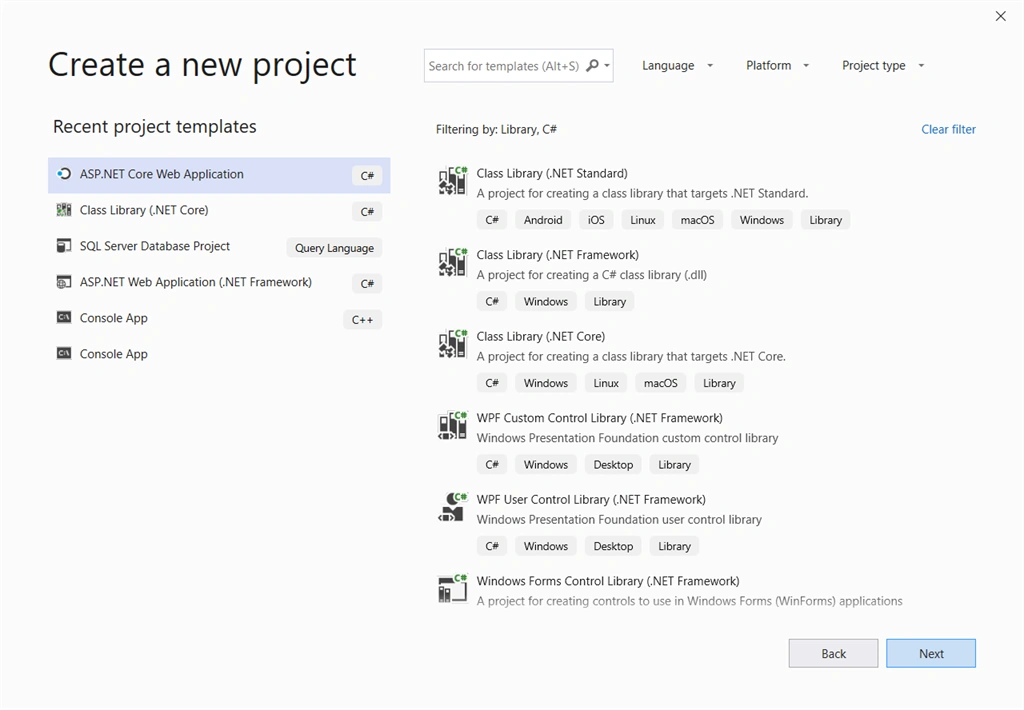
- Enter the project name and click on the Create button.
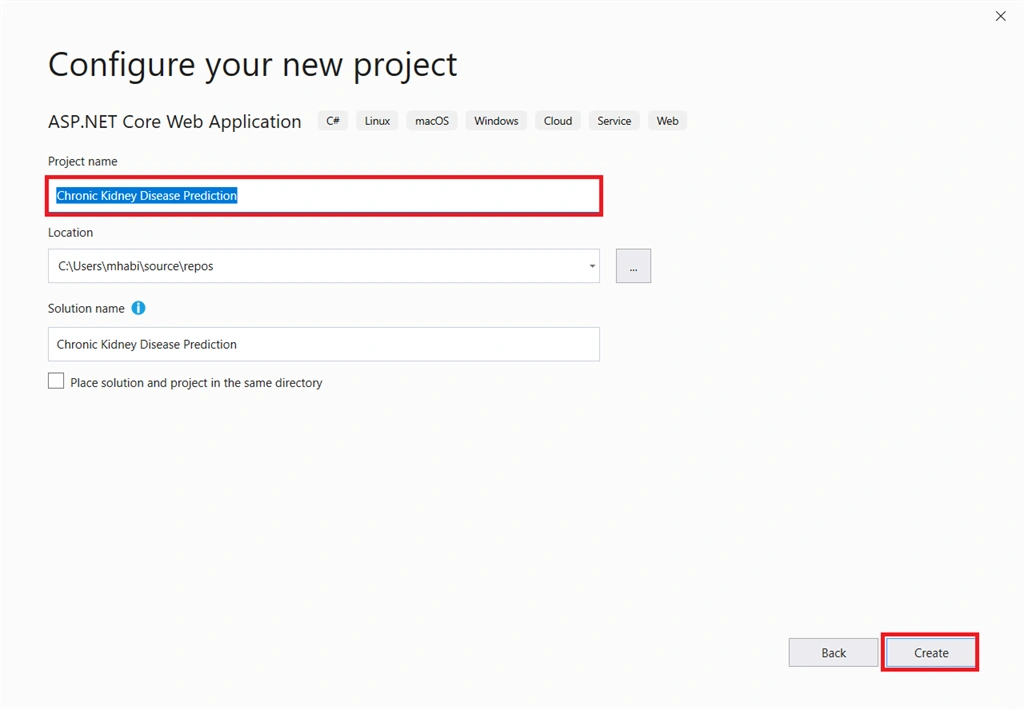
- Select ASP.NET Web Application (Model View Controller).
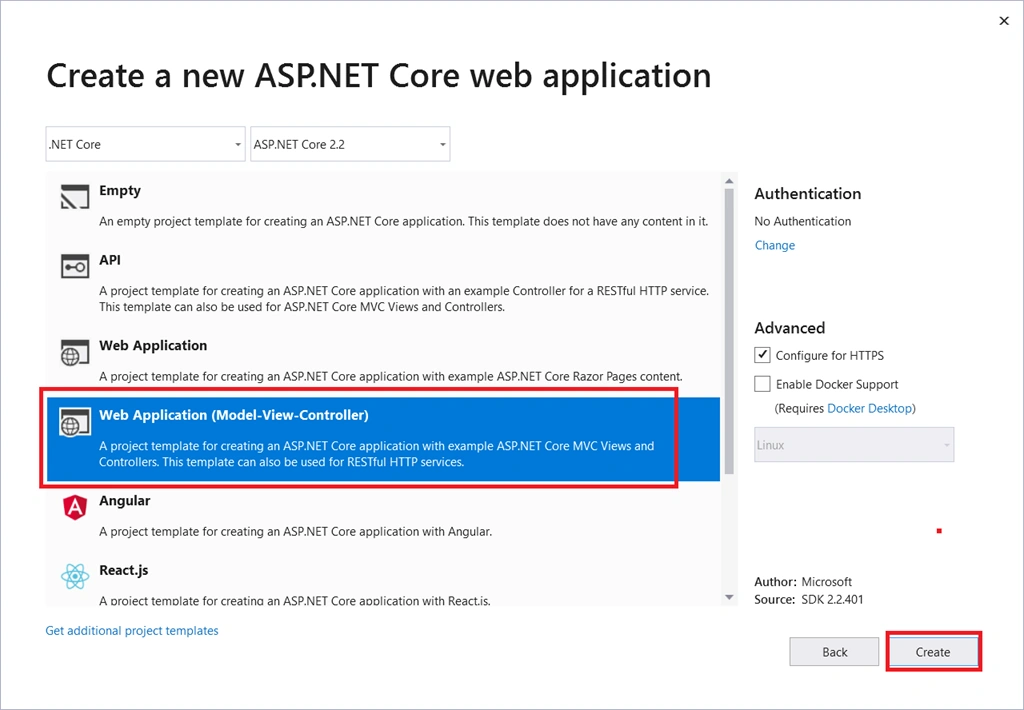
- Our Asp.NET Core MVC Web Application has been created successfully. Now we are going to build, train and evaluate our model using ML.NET Model Builder.
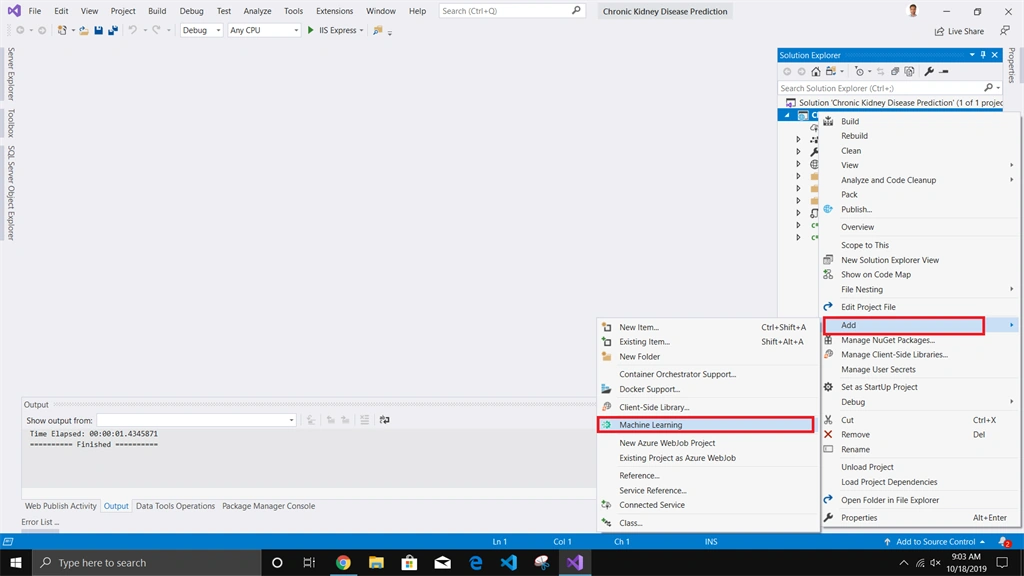
- Right-Click on the project and Select Add>Machine Learning.
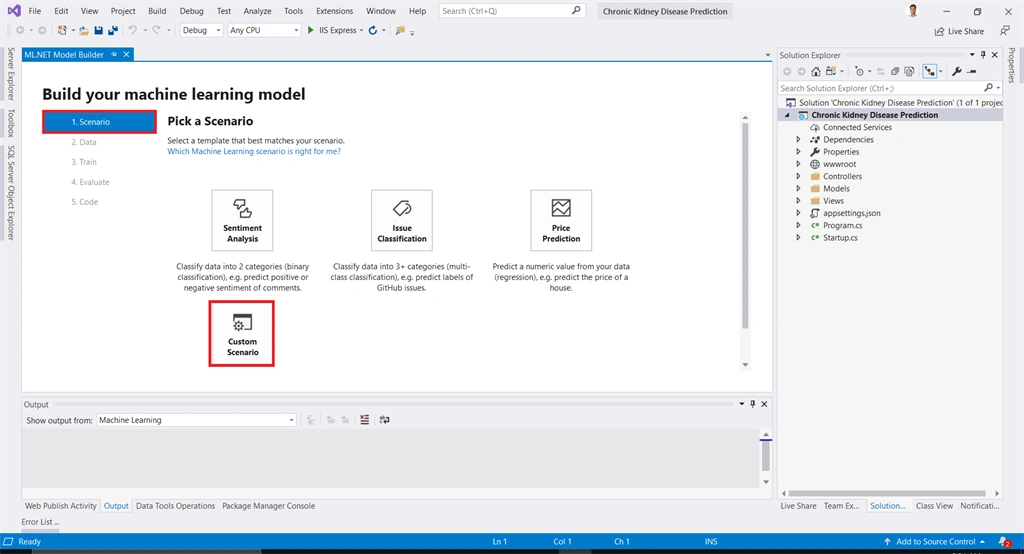
- ML.NET Model Builder window will be shown. Now select custom scenario because we are going to build our model from our Chronic Kidney Disease dataset.
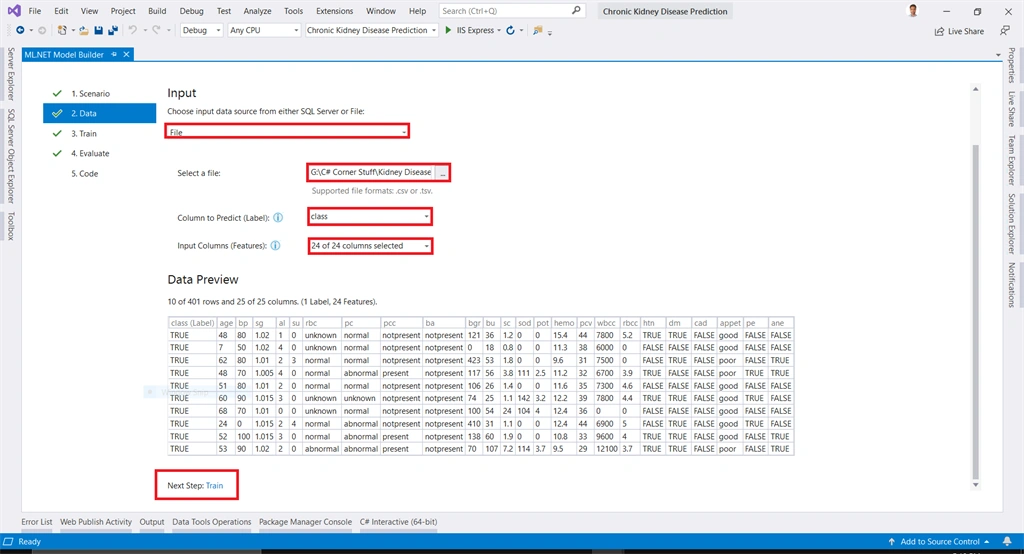
- After scenario selection, we will select the data set that will be used to train our model. You may add data from the file as well as using SQL Server Database. I will use chronic_kidney_disease_data.csv data to train my model. Originally I've downloaded this dataset from UCI Machine Learning Repo Kidney Disease Prediction Evaluation Dataset. You can download it from here. Select class column for prediction label and select input columns, after that click on Train link,
- After data source selection, enter the time for which you want to train the model and click on Start training button, and the model training will be started for the entered time.
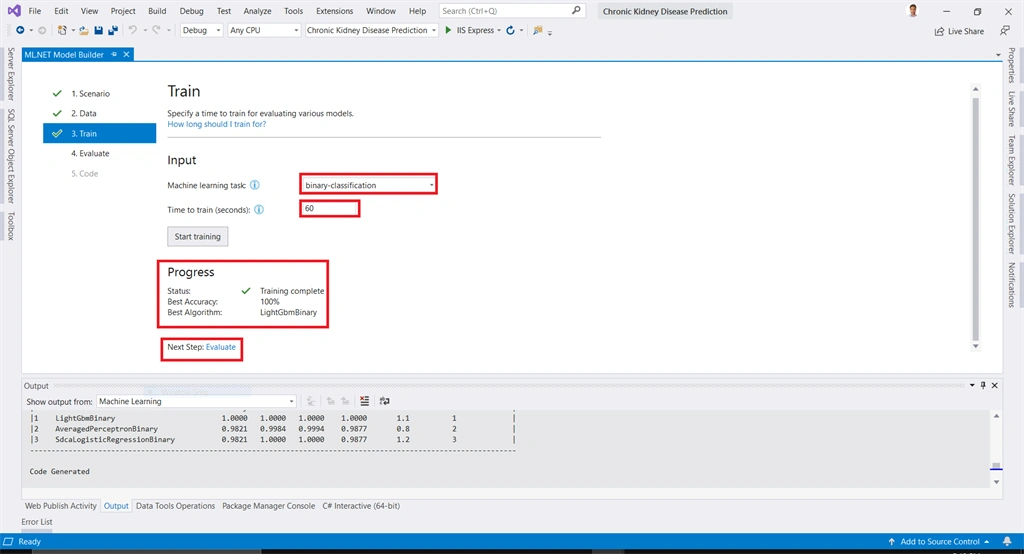
- After the model has been successfully trained click on the evaluation button.
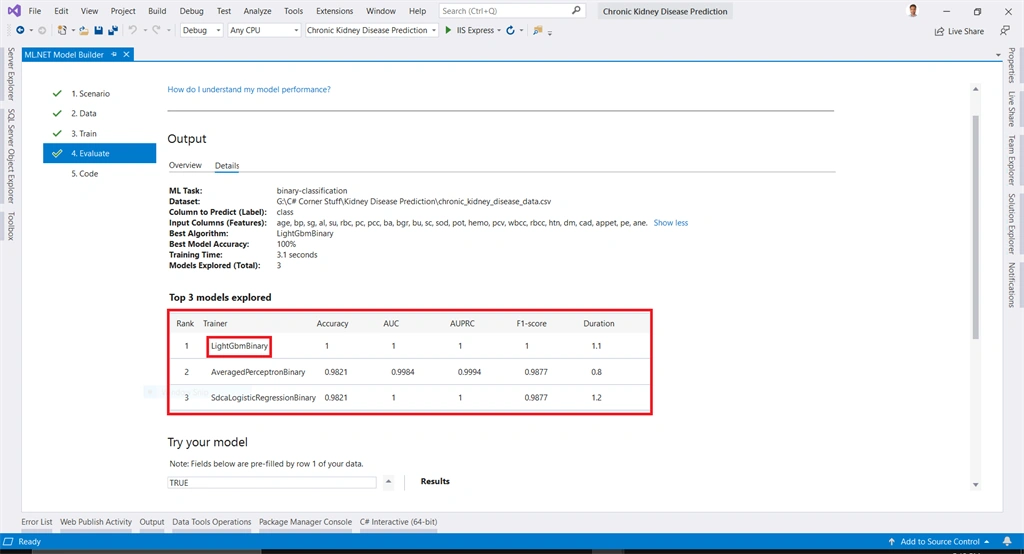
- In evaluating tab you can see the output details of model builder showing the best algorithm and other performance measures of the ML model.
- We can also predict the Car evaluation in ML.NET Model builder. Add your data and click on the Predict button to see the predicted evaluation from the trained ML model.
- You can see the new build machine learning model evaluation. Click on code button to consume the model into your project.
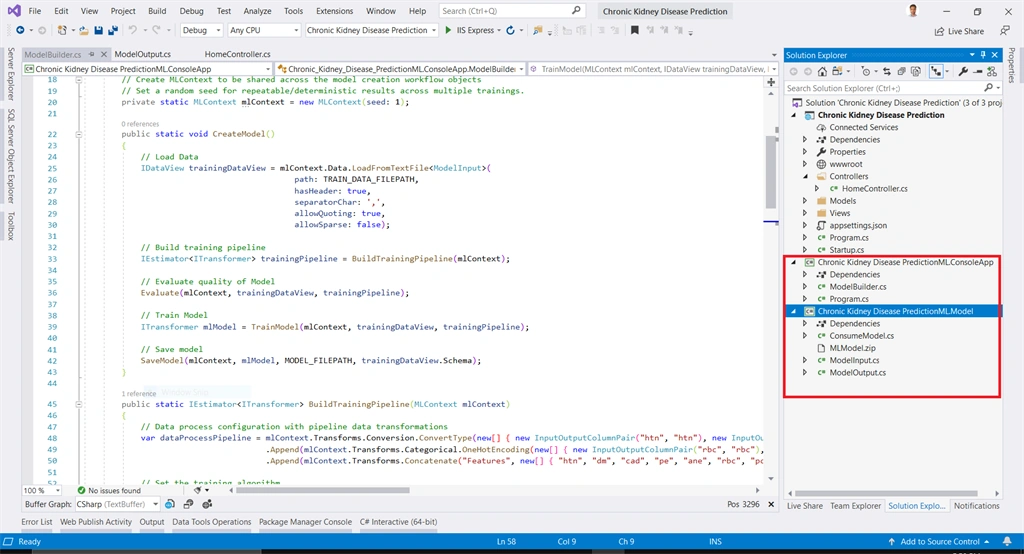
- As you can see in solution explorer, the ML.NET Machine Learning model has been created.
- Now we need to create a new controller named "KidneyDiseasePrediction" and paste the below snippet code.
- using Microsoft.AspNetCore.Mvc;
- using Microsoft.Extensions.Logging;
- using Chronic_Kidney_Disease_PredictionML.Model;
- namespace Chronic_Kidney_Disease_Prediction.Controllers
- {
- public class KidneyDiseasePredictionController : Controller
- {
- private readonly ILogger<KidneyDiseasePredictionController> _logger;
- public KidneyDiseasePredictionController(ILogger<KidneyDiseasePredictionController> logger)
- {
- _logger = logger;
- }
- public IActionResult Index()
- {
- return View();
- }
- [HttpPost]
- public IActionResult Index(ModelInput input)
- {
- ModelOutput prediction=ConsumeModel.Predict(input);
- ViewBag.Result = prediction;
- return View();
- }
- }
- }

Add a new view named Index in Views>KidneyDiseasePrediction Folder and copy the snippet code.
- @model Chronic_Kidney_Disease_PredictionML.Model.ModelInput
- @{
- ViewData["Title"] = "Predict";
- }
- <div class="row">
- <form asp-action="Index">
- <div class="row">
- <div class="col-md-4">
- <div asp-validation-summary="ModelOnly" class="text-danger"></div>
- <div class="form-group">
- <label asp-for="Age" class="control-label"></label>
- <input asp-for="Age" class="form-control" />
- <span asp-validation-for="Age" class="text-danger"></span>
- </div>
- <div class="form-group">
- <label asp-for="Bp" class="control-label"></label>
- <input asp-for="Bp" class="form-control" />
- <span asp-validation-for="Bp" class="text-danger"></span>
- </div>
- <div class="form-group">
- <label asp-for="Sg" class="control-label"></label>
- <input asp-for="Sg" class="form-control" />
- <span asp-validation-for="Sg" class="text-danger"></span>
- </div>
- <div class="form-group">
- <label asp-for="Al" class="control-label"></label>
- <input asp-for="Al" class="form-control" />
- <span asp-validation-for="Al" class="text-danger"></span>
- </div>
- <div class="form-group">
- <label asp-for="Su" class="control-label"></label>
- <input asp-for="Su" class="form-control" />
- <span asp-validation-for="Su" class="text-danger"></span>
- </div>
- <div class="form-group">
- <label asp-for="Rbc" class="control-label"></label>
- <input asp-for="Rbc" class="form-control" />
- <span asp-validation-for="Rbc" class="text-danger"></span>
- </div>
- <div class="form-group">
- <label asp-for="Pc" class="control-label"></label>
- <input asp-for="Pc" class="form-control" />
- <span asp-validation-for="Pc" class="text-danger"></span>
- </div>
- </div>
- <div class="col-md-4">
- <div class="form-group">
- <label asp-for="Pcc" class="control-label"></label>
- <input asp-for="Pcc" class="form-control" />
- <span asp-validation-for="Pcc" class="text-danger"></span>
- </div>
- <div class="form-group">
- <label asp-for="Ba" class="control-label"></label>
- <input asp-for="Ba" class="form-control" />
- <span asp-validation-for="Ba" class="text-danger"></span>
- </div>
- <div class="form-group">
- <label asp-for="Bgr" class="control-label"></label>
- <input asp-for="Bgr" class="form-control" />
- <span asp-validation-for="Bgr" class="text-danger"></span>
- </div>
- <div class="form-group">
- <label asp-for="Bu" class="control-label"></label>
- <input asp-for="Bu" class="form-control" />
- <span asp-validation-for="Bu" class="text-danger"></span>
- </div>
- <div class="form-group">
- <label asp-for="Sc" class="control-label"></label>
- <input asp-for="Sc" class="form-control" />
- <span asp-validation-for="Sc" class="text-danger"></span>
- </div>
- <div class="form-group">
- <label asp-for="Sod" class="control-label"></label>
- <input asp-for="Sod" class="form-control" />
- <span asp-validation-for="Sod" class="text-danger"></span>
- </div>
- <div class="form-group">
- <label asp-for="Pot" class="control-label"></label>
- <input asp-for="Pot" class="form-control" />
- <span asp-validation-for="Pot" class="text-danger"></span>
- </div>
- </div>
- <div class="col-md-4">
- <div class="form-group">
- <label asp-for="Hemo" class="control-label"></label>
- <input asp-for="Hemo" class="form-control" />
- <span asp-validation-for="Hemo" class="text-danger"></span>
- </div>
- <div class="form-group">
- <label asp-for="Pcv" class="control-label"></label>
- <input asp-for="Pcv" class="form-control" />
- <span asp-validation-for="Pcv" class="text-danger"></span>
- </div>
- <div class="form-group">
- <label asp-for="Wbcc" class="control-label"></label>
- <input asp-for="Wbcc" class="form-control" />
- <span asp-validation-for="Wbcc" class="text-danger"></span>
- </div>
- <div class="form-group">
- <label asp-for="Rbcc" class="control-label"></label>
- <input asp-for="Rbcc" class="form-control" />
- <span asp-validation-for="Rbcc" class="text-danger"></span>
- </div>
- <div class="form-group form-check">
- <label class="form-check-label">
- <input class="form-check-input" asp-for="Htn" /> @Html.DisplayNameFor(model => model.Htn)
- </label>
- </div>
- <div class="form-group form-check">
- <label class="form-check-label">
- <input class="form-check-input" asp-for="Dm" /> @Html.DisplayNameFor(model => model.Dm)
- </label>
- </div>
- <div class="form-group form-check">
- <label class="form-check-label">
- <input class="form-check-input" asp-for="Cad" /> @Html.DisplayNameFor(model => model.Cad)
- </label>
- </div>
- <div class="form-group">
- <label asp-for="Appet" class="control-label"></label>
- <input asp-for="Appet" class="form-control" />
- <span asp-validation-for="Appet" class="text-danger"></span>
- </div>
- <div class="form-group form-check">
- <label class="form-check-label">
- <input class="form-check-input" asp-for="Pe" /> @Html.DisplayNameFor(model => model.Pe)
- </label>
- </div>
- <div class="form-group form-check">
- <label class="form-check-label">
- <input class="form-check-input" asp-for="Ane" /> @Html.DisplayNameFor(model => model.Ane)
- </label>
- </div>
- </div>
- </div>
- <div class="form-group">
- <input type="submit" value="Predict" class="btn btn-primary" />
- </div>
- </form>
- @if (ViewBag.Result != null)
- {
- <div class="offset-md-1 col-md-3">
- <label>Have Chronic Kidney Disease:</label>
- <p>@ViewBag.Result.Prediction</p>
- <label>Score:</label>
- <p>@ViewBag.Result.Score</p>
- </div>
- }
- </div>
- @section Scripts {
- @{await Html.RenderPartialAsync("_ValidationScriptsPartial");}
- }
- Let's explore what's inside ConsumeModel.Predict method.
- First, it's creating MLContext and then creating and loading prediction engine or trained model from MLModel.zip file.
Then using the prediction engine to predict Kidney Disease Prediction on given input data.
- public class ConsumeModel
- {
- // For more info on consuming ML.NET models, visit https://aka.ms/model-builder-consume
- // Method for consuming model in your app
- public static ModelOutput Predict(ModelInput input)
- {
- // Create new MLContext
- MLContext mlContext = new MLContext();
- // Load model & create prediction engine
- string modelPath = AppDomain.CurrentDomain.BaseDirectory + "MLModel.zip";
- ITransformer mlModel = mlContext.Model.Load(modelPath, out var modelInputSchema);
- var predEngine = mlContext.Model.CreatePredictionEngine<ModelInput, ModelOutput>(mlModel);
- // Use model to make prediction on input data
- ModelOutput result = predEngine.Predict(input);
- return result;
- }
- }
Demo

Summary
So in this article, we have learned how to build, train, evaluate and consume machine learning model using ML.NET.
We have solved this problem in the following below given steps,
- Install ML.NET Model Builder extension.
- Create ASP.NET Core MVC application using Visual Studio 2019
- Download Chronic Kidney Disease dataset and fill null or empty values with the default values for training our Machine Learning model. Please download this dataset for preprocessed data Kidney Disease dataset.
- Use ML.NET Model builder to build, train, evaluate and consume ML.NET ML model.
- Integrate ML.NET Machine Learning model into ASP.NET Core MVC application.
- Design Front End to make interaction with the user.
Source Code
You can also access the source code from my Github repo.
Note
For more details about ML.NET Model Builder please visit Model Builder guide. For more details about ML.NET framework please visit Developer Docs.

usman azadPosted Feb 22, 2020, 2:06 AM
Thanks,Can we predict this disease in Asp.net mvc?
Ehsan SajjadPosted Jan 6, 2020, 10:59 PM
Thanks for putting in the efforts to explore and write this!
Sourav Kumar DasPosted Jan 2, 2020, 6:24 AM
Nice and useful article Sir.
Safyan YaqoobPosted Dec 31, 2019, 11:21 AM
Interesting
Dipa MehtaPosted Dec 30, 2019, 12:39 PM
Interesting article...
Ankur MistryPosted Dec 30, 2019, 10:03 AM
Awesome thank you for sharing