

When you convert a previously synchronized user to cloud-only status in Microsoft Entra ID, the account’s onPremisesSyncEnabled property correctly flips to False. However, several legacy attributes often remain populated including onPremisesObjectIdentifier, onPremisesImmutableId, onPremisesDistinguishedName, onPremisesSecurityIdentifier, and others. These residual values can cause unexpected behavior with hybrid device joins, password writeback, soft matching, and certain Graph-based operations.
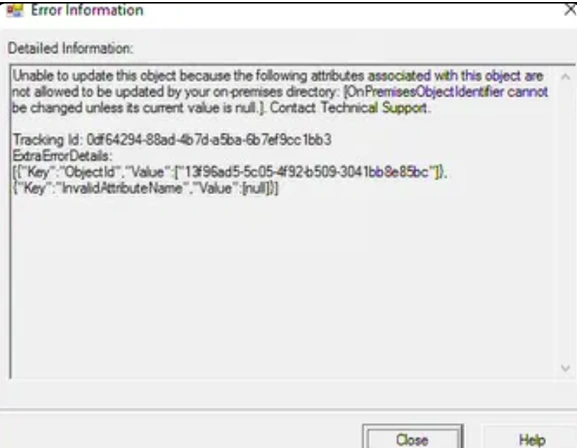
This article walks through a real-world cleanup of a cloud-only account that still carried these attributes, using the official Microsoft tools.
The Scenario
The target account ([email protected]) showed:
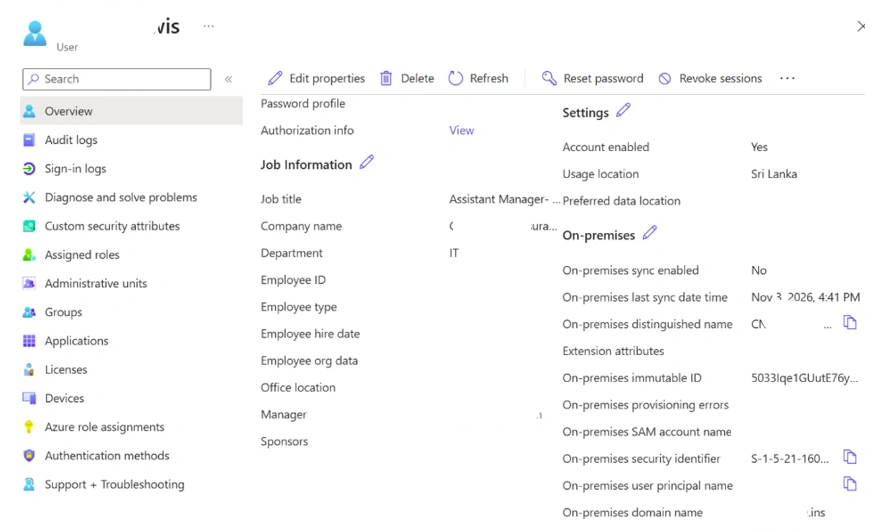
onPremisesSyncEnabled=False(correctly cloud-only)Yet still held values for:
onPremisesObjectIdentifieronPremisesImmutableIdonPremisesDistinguishedNameonPremisesSamAccountNameonPremisesSecurityIdentifieronPremisesUserPrincipalNameonPremisesDomainName
Because the object was already cloud-only, Microsoft Graph and the Entra portal allow these attributes to be cleared.
Prerequisites
PowerShell 5.1 or later (Windows PowerShell or PowerShell 7)
Microsoft Graph PowerShell SDK
ADSyncTools module version 2.5.0 or higher
Hybrid Identity Administrator or Global Administrator role
Graph scopes:
User.ReadWrite.AllandUser-OnPremisesSyncBehavior.ReadWrite.All
Install the required modules if they are not already present:
Install-Module Microsoft.Graph -Scope CurrentUser -Force
Install-Module ADSyncTools -MinimumVersion 2.5.0 -Scope CurrentUser -Force
Step 1 – Connect and Inspect
Connect-MgGraph -Scopes "User.ReadWrite.All","User-OnPremisesSyncBehavior.ReadWrite.All"
Import-Module ADSyncTools -Force

Get-MgUser -UserId "13f96ad5-5c05-4f92-b509-xxxxxxx" -Property `
    DisplayName, UserPrincipalName, OnPremisesImmutableId, OnPremisesSyncEnabled, `
    OnPremisesObjectIdentifier, OnPremisesSamAccountName, OnPremisesSecurityIdentifier, `
    OnPremisesDistinguishedName | Format-List

Get-ADSyncToolsOnPremisesAttribute -Id "[email protected]"
This confirms the residual attributes while verifying the account is no longer synchronized.
Step 2 – Clear the Attributes
The cleanest approach is to clear all residual on-premises attributes in one operation:
Clear-ADSyncToolsOnPremisesAttribute -Id "[email protected]" -AllIf you only need to remove a specific attribute (for example, just the object identifier):
PowerShell
Clear-ADSyncToolsOnPremisesAttribute -Id "[email protected]" -onPremisesObjectIdentifierStep 3 – Verify the Result
Re-run the inspection commands:
Get-ADSyncToolsOnPremisesAttribute -Id "[email protected]"

Get-MgUser -UserId "13f96ad5-5c05-4f92-b509-xxxxxxx" -Property `
    DisplayName, UserPrincipalName, OnPremisesImmutableId, OnPremisesSyncEnabled, `
    OnPremisesObjectIdentifier, OnPremisesSamAccountName, OnPremisesSecurityIdentifier, `
    OnPremisesDistinguishedName | Format-List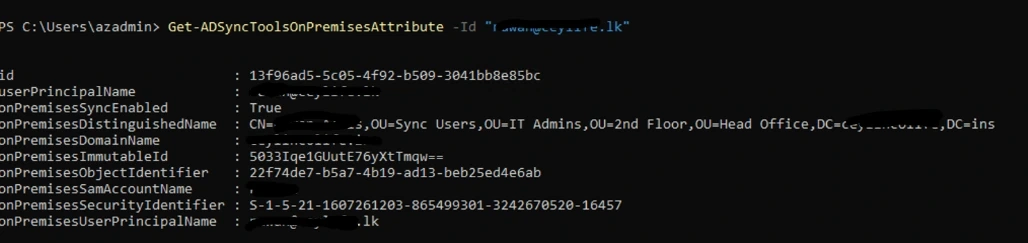
After a successful clear, the on-premises properties return as null or empty, while onPremisesSyncEnabled remains False.
Important Notes and Common Pitfalls
These attributes can only be cleared on cloud-only objects. Attempting the operation against a still-synchronized user will fail.
Always back up the current values before bulk operations:
Get-ADSyncToolsOnPremisesAttribute | Export-Csv backup-onprem-attributes.csv -Delimiter ';'Propagation can take one to two minutes. Re-query after a short pause.
Setting an
onPremisesImmutableIdvalue after the account is cloud-only is possible but generally unnecessary and can re-introduce matching complexity if the user is later brought back into scope.The
User-OnPremisesSyncBehavior.ReadWrite.Allpermission is specifically required foronPremisesObjectIdentifier.
Join the conversation! Your thoughts help the community grow.