

Introduction
Today, in this article let's play around with one of the interesting and most useful concepts in SharePoint 2010.
Question: What is ClientOMDelete?
In simple terms "To delete the data from client side environment for SharePoint applications, this is used".
Step 1: Open Visual Studio 2012 and select "ASP.Net Web Forms Application", as in:
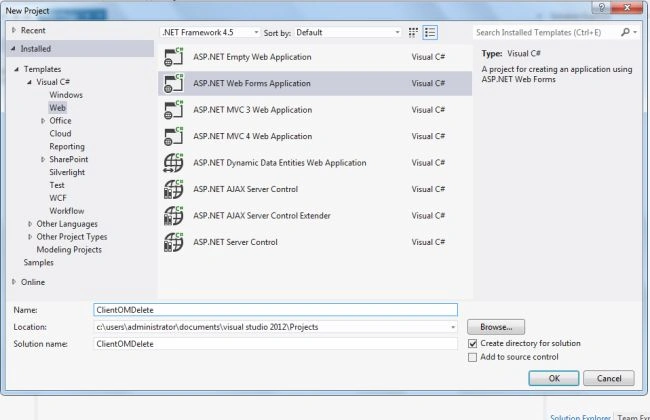
Now two references need to be added to the application; they are:
-
Microsoft.SharePoint.Client
-
Microsoft.SharePoint.Client.Runtime
Step 2: The complete code of webform1.aspx looks like this:
<%@ Page Language="C#" AutoEventWireup="true" CodeBehind="WebForm1.aspx.cs" Inherits="ClientOMDeletion.WebForm1" %>
<!DOCTYPE html>
<html xmlns="http://www.w3.org/1999/xhtml">
<head id="Head1" runat="server">
<title></title>
</head>
<body>
<form id="form1" runat="server">
<center>
<div>
<table style="text-align: center">
<tr>
<td colspan="2">
<asp:Label ID="Label1" runat="server" Text="Client Object Model Deletion - SharePoint 2010 Programatically"
Font-Bold="true" Font-Size="Large" Font-Names="Verdana" ForeColor="Maroon"></asp:Label>
</td>
</tr>
<tr>
<td>
<asp:Label ID="Label4" runat="server" Text="Please Enter List Name" Font-Size="Large"
Font-Names="Verdana" Font-Italic="true"></asp:Label>
</td>
<td>
<asp:TextBox ID="TextBox4" runat="server" Width="117px"></asp:TextBox>
</td>
</tr>
<tr>
<td>
<asp:Label ID="Label7" runat="server" Text="Please Enter ID" Font-Size="Large" Font-Names="Verdana"
Font-Italic="true"></asp:Label>
</td>
<td>
<asp:TextBox ID="TextBox5" runat="server" Width="117px"></asp:TextBox>
</td>
</tr>
<tr>
<td colspan="2">
<br />
<asp:Button ID="Button1" runat="server" Text="Delete Data" Font-Names="Verdana" Width="282px"
BackColor="Orange" Font-Bold="True" OnClick="Button1_Click" />
</td>
</tr>
<tr>
<td colspan="2">
<br />
<asp:Label ID="Label5" runat="server" Font-Bold="true" Font-Names="Verdana"></asp:Label>
</td>
</tr>
</table>
</div>
</center>
</form>
</body>
</html>
Step 3: The complete code of webform1.aspx.cs looks like this:
using Microsoft.SharePoint.Client;
using System;
using System.Collections.Generic;
using System.Linq;
using System.Web;
using System.Web.UI;
using System.Web.UI.WebControls;
namespace ClientOMDeletion
{
public partial class WebForm1 : System.Web.UI.Page
{
protected void Page_Load(object sender, EventArgs e)
{
TextBox4.Focus();
}
protected void Button1_Click(object sender, EventArgs e)
{
if (string.IsNullOrEmpty(TextBox4.Text) || string.IsNullOrEmpty(TextBox5.Text))
{
Label5.Text = "Please Enter Some Values";
Label5.ForeColor = System.Drawing.Color.Red;
}
else
{
ClientContext objContext = new ClientContext("http://win-5c3g1lanj3k:46908/");
List list = objContext.Web.Lists.GetByTitle(TextBox4.Text);
Microsoft.SharePoint.Client.ListItem item = list.GetItemById(TextBox5.Text);
item.DeleteObject();
objContext.ExecuteQuery();
Label5.Text = "Data deleted Successfully";
Label5.ForeColor = System.Drawing.Color.Green;
TextBox4.Text = string.Empty;
TextBox5.Text = string.Empty;
}
}
}
}
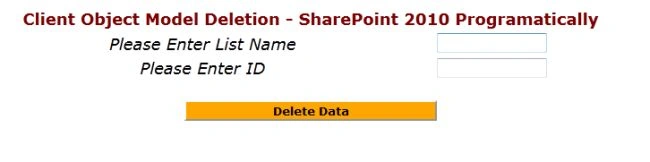
Step 4: The output of the application looks like this:
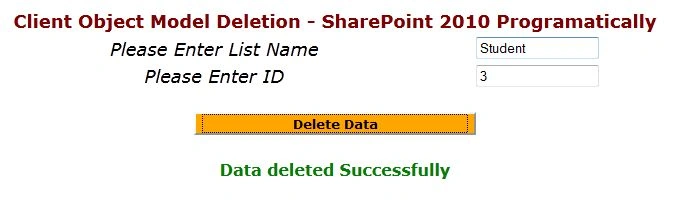
Step 5: Data entering output of the application looks like this:
Step 6: The output of the list on SharePoint application looks like this:

I hope this article is useful for you.
Join the conversation! Your thoughts help the community grow.