

Introduction
In this article, we will have a demonstration of Client/Server applications in C#.
In the first part, we will set up a client that sends a Web Request to a defined Web Server (http://google.com) and show you the response.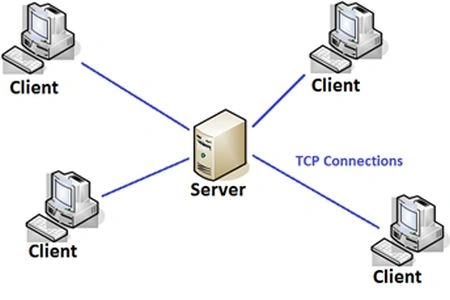
In the second part, we will set up a server (Local host) where multiple clients can send a request to the server and the server will process it.
Background
- TCP: Is a Communication Protocol essential for network communication.
- Client: Someone trying to communicate with a server.
- Server: A program that waits for someone for communication.
- IP Address: Each machine on an Internet or LAN is assigned a unique Identity Number in a special format (xxx.xxx.xxx.xxx), where X is in the range from 0-127.
- Socket: A connecting point between a server and a client. There is a connecting point for both the server and the client.
- Port Number: A positive number to identify connecting points. The first 1024 port numbers are used by system processes. So, you can use numbers other than that.
Client Demonstration
In this, we send a Web Request to Google.com (or any) and receive the request sent by the Web Server.
Actually, we are trying to do the same what a web browser does. Since a web browser sends a web request to a Web Server and process the HTML web response to be displayed in the browser window. An end-user only procedure.
Let’s start our project to set up a client.
Step 1
Include the desired namespace in your project.
Using Syste,IO;
Using System.System.Net.Sockets;
Step 2
So, you need a server and its port to connect.
Do it yourself or ask a user to provide that.
Here, I will ask the server’s name from user and assigned port number myself.
Console.WriteLine("Name of Server : ");
string server = Console.ReadLine();
Step 3
I now have the server name and port number 80 (default HTTP port) from the user.
try
{
// Connect To Server
TcpClient client = new TcpClient(server, 80);
//Setup the Stream to read/write data on Network
StreamReader sr = new StreamReader(client.GetStream());
StreamWriter sw = new StreamWriter(client.GetStream());

Sam HobbsPosted Dec 29, 2013, 5:57 PM
As for IP addresses, note that originally IP numbers were 32-bit numbers that are typically formatted for use by people in the xxx.xxx.xxx.xxx format.. Most IP addresses in current use are still like that, called Internet Protocol Version 4 (IPv4) numbers. Some IP address numbers are 128 bit numbers and are called Internet Protocol Version 6 (IPv6) numbers. See: http://www.iana.org/numbers
Sam HobbsPosted Dec 29, 2013, 5:48 PM
As for port numbers, there are actually very many "Registered ports" in the range 1024 to 49151. We can use some of the Registered ports but some we need to avoid. We can use the others in the range 1024 to 49151. See: https://www.iana.org/assignments/service-names-port-numbers/service-names-port-numbers.txt
AmanPosted Dec 29, 2013, 3:31 PM
it is really a very helpful Article, actually i was searching this but dint get the right one and now i got it... will you please clear one thing the working of the statement "sw.WriteLine("GET / HTTP/1.0 \n\n");" , will you please clear it... i m very thankful to you..