

Introduction
Background
Simple Clock
This clock is a very basic clock that will look like the following screenshot:
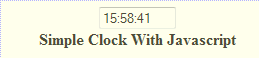
Use the following procedure to create this 24-hour format clock.
Step 1
Add a new page to the application and write the following script in the head section of the page as in the following:
- <head>
- <script language="JavaScript">
- var clockID = 0;
- function UpdateClock() {
- if (clockID) {
- clearTimeout(clockID);
- clockID = 0;
- }
- var tDate = new Date();
- if ((tDate.getSeconds()) <= 9) {
- document.theClock.theTime.value = ""
- + tDate.getHours() + ":"
- + tDate.getMinutes() + ":0"
- + tDate.getSeconds();
- document.title = "The time is: "
- + tDate.getHours() + ":"
- + tDate.getMinutes() + ":0"
- + tDate.getSeconds();
- } else if ((tDate.getMinutes()) <= 9) {
- document.theClock.theTime.value = ""
- + tDate.getHours() + ":0"
- + tDate.getMinutes() + ":"
- + tDate.getSeconds();
- document.title = "The time is: "
- + tDate.getHours() + ":0"
- + tDate.getMinutes() + ":"
- + tDate.getSeconds();
- } else if (((tDate.getSeconds()) <= 9) && ((tDate.getMinutes()) <= 9)) {
- document.theClock.theTime.value = ""
- + tDate.getHours() + ":0"
- + tDate.getMinutes() + ":0"
- + tDate.getSeconds();
- document.title = "The time is: "
- + tDate.getHours() + ":0"
- + tDate.getMinutes() + ":0"
- + tDate.getSeconds();
- } else {
- document.theClock.theTime.value = ""
- + tDate.getHours() + ":"
- + tDate.getMinutes() + ":"
- + tDate.getSeconds();
- document.title = "The time is: "
- + tDate.getHours() + ":"
- + tDate.getMinutes() + ":"
- + tDate.getSeconds();
- }
- clockID = setTimeout("UpdateClock()", 1000);
- }
- function StartClock() {
- clockID = setTimeout("UpdateClock()", 500);
- }
- function KillClock() {
- if (clockID) {
- clearTimeout(clockID);
- clockID = 0;
- }
- }
- </script>
- </head>
We have the script ready. We now need to call the StartClock and StopClock functions in the body section as in the following
- <body onload="StartClock()" onunload="KillClock()">
Step 3
In the form now create the control to display the time. We will create a TextBox input control of HTML to display the time.
- <input name="theTime" size="8" type="text"/>
Clock With Images
This clock looks like a very effective clock because this clock uses it's GUI with images to display the time to the client. This clock looks as in the following image.
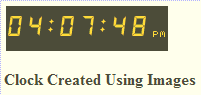
Use the following procedure to create this clock.
Step 1 Add a new page to your application; copy the images uploaded with attachments and paste it into your root directory.
Step 2
In the body, the section writes the script given below. Initially, we need to display the static images and then write the script
- <body>
- <form id="form1" runat="server">
- <div>
- <table>
- <tr>
- <td bgcolor="black" height="45">
- <img src="dg8.gif" name="hr1">
- <img src="dg8.gif" name="hr2">
- <img src="dgc.gif" name="c">
- <img src="dg8.gif" name="mn1">
- <img src="dg8.gif" name="mn2">
- <img src="dgc.gif" name="c">
- <img src="dg8.gif" name="se1">
- <img src="dg8.gif" name="se2">
- <img src="dgpm.gif" name="ampm">
- </td></tr></table>
- <script language="javascript"><!-- start
- dg0 = new Image(); dg0.src = "dg0.gif";
- dg1 = new Image(); dg1.src = "dg1.gif";
- dg2 = new Image(); dg2.src = "dg2.gif";
- dg3 = new Image(); dg3.src = "dg3.gif";
- dg4 = new Image(); dg4.src = "dg4.gif";
- dg5 = new Image(); dg5.src = "dg5.gif";
- dg6 = new Image(); dg6.src = "dg6.gif";
- dg7 = new Image(); dg7.src = "dg7.gif";
- dg8 = new Image(); dg8.src = "dg8.gif";
- dg9 = new Image(); dg9.src = "dg9.gif";
- dgam = new Image(); dgam.src = "dgam.gif";
- dgpm = new Image(); dgpm.src = "dgpm.gif";
- dgc = new Image(); dgc.src = "dgc.gif";
- function dotime() {
- theTime = setTimeout('dotime()', 1000);
- d = new Date();
- hr = d.getHours() + 100;
- mn = d.getMinutes() + 100;
- se = d.getSeconds() + 100;
- if (hr == 100) { hr = 112; am_pm = 'am'; }
- else if (hr < 112) { am_pm = 'am'; }
- else if (hr == 112) { am_pm = 'pm'; }
- else if (hr > 112) { am_pm = 'pm'; hr = (hr - 12); }
- tot = '' + hr + mn + se;
- document.hr1.src = 'dg' + tot.substring(1, 2) + '.gif';
- document.hr2.src = 'dg' + tot.substring(2, 3) + '.gif';
- document.mn1.src = 'dg' + tot.substring(4, 5) + '.gif';
- document.mn2.src = 'dg' + tot.substring(5, 6) + '.gif';
- document.se1.src = 'dg' + tot.substring(7, 8) + '.gif';
- document.se2.src = 'dg' + tot.substring(8, 9) + '.gif';
- document.ampm.src = 'dg' + am_pm + '.gif';
- }
- dotime();
- //end -->
- </script>
- </div>
- </form>
- <p>
- <strong>Clock Created Using Images</strong></p>
- </body>
This clock is a very attractive and animated clock along with the previous two clocks. This clock will appear only in IE; it is not supported in other browsers. This clock will look like the following.
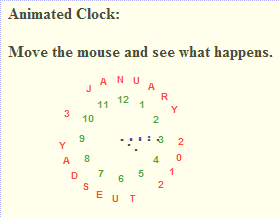
Use the following procedure to create this clock.
Step 1
Add a new form and by default, our form has some lines written as in the following.
- <!DOCTYPE html PUBLIC "-//W3C//DTD XHTML 1.0 Transitional//EN" "http://www.w3.org/TR/xhtml1/DTD/xhtml1-transitional.dtd">
Here it's specifying the XHTML 1.0 but we need to modify this to HTML 4.0 as in the following
- <!DOCTYPE HTML PUBLIC "-//W3C//DTD HTML 4.0 Transitional//EN">
Step 2
Write the following script in the body
- <body>
- <script language="JavaScript" type="text/javascript"><!--
- dCol = 'Red'; //date colour.
- fCol = 'Green'; //face colour.
- sCol = 'Black'; //seconds colour.
- mCol = 'Blue'; //minutes colour.
- hCol = '000000'; //hours colour.
- ClockHeight = 40;
- ClockWidth = 40;
- ClockFromMouseY = 0;
- ClockFromMouseX = 100;
- //Alter nothing below! Alignments will be lost!
- d = new Array("SUNDAY", "MONDAY", "TUESDAY", "WEDNESDAY", "THURSDAY", "FRIDAY", "SATURDAY");
- m = new Array("JANUARY", "FEBRUARY", "MARCH", "APRIL", "MAY", "JUNE", "JULY", "AUGUST", "SEPTEMBER", "OCTOBER", "NOVEMBER", "DECEMBER");
- date = new Date();
- day = date.getDate();
- year = date.getYear();
- if (year < 2000) year = year + 1900;
- TodaysDate = " " + d[date.getDay()] + " " + day + " " + m[date.getMonth()] + " " + year;
- D = TodaysDate.split('');
- H = '...';
- H = H.split('');
- M = '....';
- M = M.split('');
- S = '.....';
- S = S.split('');
- Face = '1 2 3 4 5 6 7 8 9 10 11 12';
- font = 'Arial';
- size = 1;
- speed = 0.5;
- ns = (document.layers);
- ie = (document.all);
- Face = Face.split(' ');
- n = Face.length;
- a = size * 10;
- ymouse = 0;
- xmouse = 0;
- scrll = 0;
- props = "<font face=" + font + " size=" + size + " color=" + fCol + "><B>";
- props2 = "<font face=" + font + " size=" + size + " color=" + dCol + "><B>";
- Split = 360 / n;
- Dsplit = 360 / D.length;
- HandHeight = ClockHeight / 4.5
- HandWidth = ClockWidth / 4.5
- HandY = -7;
- HandX = -2.5;
- scrll = 0;
- step = 0.06;
- currStep = 0;
- y = new Array(); x = new Array(); Y = new Array(); X = new Array();
- for (i = 0; i < n; i++) { y[i] = 0; x[i] = 0; Y[i] = 0; X[i] = 0 }
- Dy = new Array(); Dx = new Array(); DY = new Array(); DX = new Array();
- for (i = 0; i < D.length; i++) { Dy[i] = 0; Dx[i] = 0; DY[i] = 0; DX[i] = 0 }
- if (ns) {
- for (i = 0; i < D.length; i++)
- document.write('<layer name="nsDate' + i + '" top=0 left=0 height=' + a + ' width=' + a + '><center>' + props2 + D[i] + '</font></center></layer>');
- for (i = 0; i < n; i++)
- document.write('<layer name="nsFace' + i + '" top=0 left=0 height=' + a + ' width=' + a + '><center>' + props + Face[i] + '</font></center></layer>');
- for (i = 0; i < S.length; i++)
- document.write('<layer name=nsSeconds' + i + ' top=0 left=0 width=15 height=15><font face=Arial size=3 color=' + sCol + '><center><b>' + S[i] + '</b></center></font></layer>');
- for (i = 0; i < M.length; i++)
- document.write('<layer name=nsMinutes' + i + ' top=0 left=0 width=15 height=15><font face=Arial size=3 color=' + mCol + '><center><b>' + M[i] + '</b></center></font></layer>');
- for (i = 0; i < H.length; i++)
- document.write('<layer name=nsHours' + i + ' top=0 left=0 width=15 height=15><font face=Arial size=3 color=' + hCol + '><center><b>' + H[i] + '</b></center></font></layer>');
- }
- if (ie) {
- document.write('<div id="Od" style="position:absolute;top:0px;left:0px"><div style="position:relative">');
- for (i = 0; i < D.length; i++)
- document.write('<div id="ieDate" style="position:absolute;top:0px;left:0;height:' + a + ';width:' + a + ';text-align:center">' + props2 + D[i] +'</B></font></div>');
- document.write('</div></div>');
- document.write('<div id="Of" style="position:absolute;top:0px;left:0px"><div style="position:relative">');
- for (i = 0; i < n; i++)
- document.write('<div id="ieFace" style="position:absolute;top:0px;left:0;height:' + a + ';width:' + a + ';text-align:center">' + props + Face[i] + '</B></font></div>');
- document.write('</div></div>');
- document.write('<div id="Oh" style="position:absolute;top:0px;left:0px"><div style="position:relative">');
- for (i = 0; i < H.length; i++)
- document.write('<div id="ieHours" style="position:absolute;width:16px;height:16px;font-family:Arial;font-size:16px;color:' + hCol + ';text-align:center;font-weight:bold">' + H[i] + '</div>');
- document.write('</div></div>');
- document.write('<div id="Om" style="position:absolute;top:0px;left:0px"><div style="position:relative">');
- for (i = 0; i < M.length; i++)
- document.write('<div id="ieMinutes" style="position:absolute;width:16px;height:16px;font-family:Arial;font-size:16px;color:' + mCol + ';text-align:center;font-weight:bold">' + M[i] + '</div>');
- document.write('</div></div>')
- document.write('<div id="Os" style="position:absolute;top:0px;left:0px"><div style="position:relative">');
- for (i = 0; i < S.length; i++)
- document.write('<div id="ieSeconds" style="position:absolute;width:16px;height:16px;font-family:Arial;font-size:16px;color:' + sCol + ';text-align:center;font-weight:bold">' + S[i] + '</div>');
- document.write('</div></div>')
- }
- (ns) ? window.captureEvents(Event.MOUSEMOVE) : 0;
- function Mouse(evnt) {
- ymouse = (ns) ? evnt.pageY + ClockFromMouseY - (window.pageYOffset) : event.y + ClockFromMouseY;
- xmouse = (ns) ? evnt.pageX + ClockFromMouseX : event.x + ClockFromMouseX;
- }
- (ns) ? window.onMouseMove = Mouse : document.onmousemove = Mouse;
- function ClockAndAssign() {
- time = new Date();
- secs = time.getSeconds();
- sec = -1.57 + Math.PI * secs / 30;
- mins = time.getMinutes();
- min = -1.57 + Math.PI * mins / 30;
- hr = time.getHours();
- hrs = -1.575 + Math.PI * hr / 6 + Math.PI * parseInt(time.getMinutes()) / 360;
- if (ie) {
- Od.style.top = window.document.body.scrollTop;
- Of.style.top = window.document.body.scrollTop;
- Oh.style.top = window.document.body.scrollTop;
- Om.style.top = window.document.body.scrollTop;
- Os.style.top = window.document.body.scrollTop;
- }
- for (i = 0; i < n; i++) {
- var F = (ns) ? document.layers['nsFace' + i] : ieFace[i].style;
- F.top = y[i] + ClockHeight * Math.sin(-1.0471 + i * Split * Math.PI / 180) + scrll;
- F.left = x[i] + ClockWidth * Math.cos(-1.0471 + i * Split * Math.PI / 180);
- }
- for (i = 0; i < H.length; i++) {
- var HL = (ns) ? document.layers['nsHours' + i] : ieHours[i].style;
- HL.top = y[i] + HandY + (i * HandHeight) * Math.sin(hrs) + scrll;
- HL.left = x[i] + HandX + (i * HandWidth) * Math.cos(hrs);
- }
- for (i = 0; i < M.length; i++) {
- var ML = (ns) ? document.layers['nsMinutes' + i] : ieMinutes[i].style;
- ML.top = y[i] + HandY + (i * HandHeight) * Math.sin(min) + scrll;
- ML.left = x[i] + HandX + (i * HandWidth) * Math.cos(min);
- }
- for (i = 0; i < S.length; i++) {
- var SL = (ns) ? document.layers['nsSeconds' + i] : ieSeconds[i].style;
- SL.top = y[i] + HandY + (i * HandHeight) * Math.sin(sec) + scrll;
- SL.left = x[i] + HandX + (i * HandWidth) * Math.cos(sec);
- }
- for (i = 0; i < D.length; i++) {
- var DL = (ns) ? document.layers['nsDate' + i] : ieDate[i].style;
- DL.top = Dy[i] + ClockHeight * 1.5 * Math.sin(currStep + i * Dsplit * Math.PI / 180) + scrll;
- DL.left = Dx[i] + ClockWidth * 1.5 * Math.cos(currStep + i * Dsplit * Math.PI / 180);
- }
- currStep -= step;
- }
- function Delay() {
- scrll = (ns) ? window.pageYOffset : 0;
- Dy[0] = Math.round(DY[0] += ((ymouse) - DY[0]) * speed);
- Dx[0] = Math.round(DX[0] += ((xmouse) - DX[0]) * speed);
- for (i = 1; i < D.length; i++) {
- Dy[i] = Math.round(DY[i] += (Dy[i - 1] - DY[i]) * speed);
- Dx[i] = Math.round(DX[i] += (Dx[i - 1] - DX[i]) * speed);
- }
- y[0] = Math.round(Y[0] += ((ymouse) - Y[0]) * speed);
- x[0] = Math.round(X[0] += ((xmouse) - X[0]) * speed);
- for (i = 1; i < n; i++) {
- y[i] = Math.round(Y[i] += (y[i - 1] - Y[i]) * speed);
- x[i] = Math.round(X[i] += (x[i - 1] - X[i]) * speed);
- }
- ClockAndAssign();
- setTimeout('Delay()', 40);
- }
- if (ns || ie) window.onload = Delay;
- // --></script>
- <p>
- <strong>Animated Clock:</strong></p>
- <p>
- <strong>Move the mouse and see what happens.</strong></p>
- </body>
KalaiPosted Mar 11, 2014, 6:49 AM
Good Article
Biswa Pujarini MohapatraPosted Mar 10, 2014, 1:31 PM
Good one
Mahesh ChandPosted Mar 10, 2014, 9:24 AM
Nice. I like the third clock design. Very cool.
Nasurudeen YasuPosted Dec 4, 2012, 5:59 AM
Very Nice.
Abhi KumarPosted Jan 4, 2012, 11:35 PM
Great job. Good article.
Monika AroraPosted Jan 4, 2012, 11:24 PM
Very nicely presented.
mohammad nabhanPosted Jan 4, 2012, 5:15 PM
thanks mr. But i face error when i want to load or execute the page. the error is " Unable to get value of the property 'theTime': object is null or undefined " help me please.