

Abstract
In this article, you'll drill deeper into the details of how an assembly is hosted by the CLR and come to understand the relationship between an application domain (app domain) and a process. The app domain is, in a nutshell, logical segments within a given process that host a set of related .NET assemblies. In addition to that, this article also explores the manipulation of currently running processes.
Process
A process is a fixed, safe boundary for a running program and is an operating system-level concept used to describe a set of resources and the necessary memory allocations used by a running application. The operating system creates a separate and isolated process for each executable loaded into memory. Furthermore, in application isolation, the result is much more stable and robust of a runtime environment because the failure of one process does not affect the functioning of another process. Data in one process can't be directly accessed by another process unless you make use of Distributed API programs such as WCF, COM+, and Remoting.
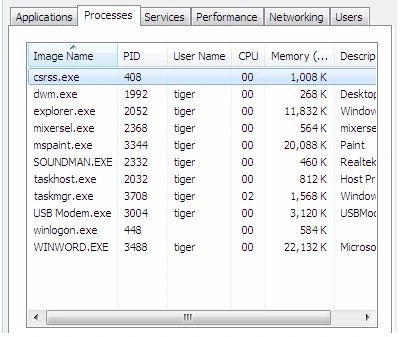
Every Windows process is assigned a unique process identifier (PID) and may be independently loaded and unloaded by the OS. You can view the various running processes of the Windows OS using the Task Manager as in the following.
Every Windows process contains an initial thread that functions as an entry point for the application. Formally speaking, a thread is a path of execution within a process. Processes that contain a single primary thread of execution are considered to be thread-safe.
Process in Depth
The System. Diagnostics namespace defines a number of types that allow you to programmatically interact with processes and various other manipulations such as Performance Counters and Event Logs.
To illustrate the process of manipulating the Process object, assume you have a console application that displays all the currently running processes in the system.
using System;
using System.Diagnostics;

namespace ProcessDemo
{
    class Program
    {
        static void Main(string[] args)
        {
            Process[] p = Process.GetProcesses("system-machine");

            foreach (Process a in p)
            {
                Console.WriteLine("Current Running Processes\n");
                string str = string.Format("PID::{0} \t Name::{1}", a.Id, a.ProcessName);
                Console.WriteLine(str);
                Console.ReadKey();
            }
        }
    }
}
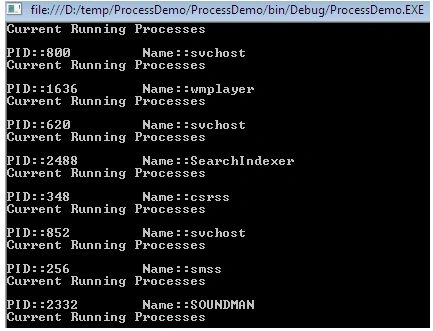
You will see the PID and names for all processes on your local computer as in the following.
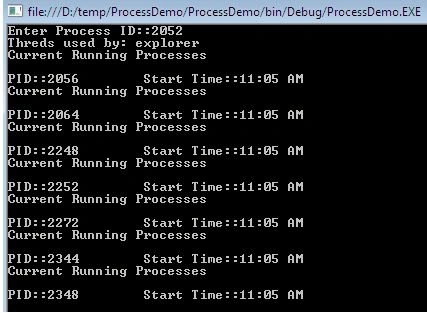
In addition to obtaining a full list of all running processes on a given machine the GetProcessById() method allows you to obtain a single Process object via associated PID.
using System;
using System.Diagnostics;

namespace ProcessDemo
{
    class Program
    {
        static void Main(string[] args)
        {
            Console.Write("Enter Process ID::");
            string pid = Console.ReadLine();
            Process p = null;
            try
            {
                p = Process.GetProcessById(int.Parse(pid));
            }
            catch (Exception)
            {
                Console.WriteLine("PID not Found");
            }

            Console.WriteLine("Threads used by: {0}", p.ProcessName);
            ProcessThreadCollection ptc = p.Threads;
            foreach (ProcessThread a in ptc)
            {
                Console.WriteLine("Current Running Processes\n");
                string str = string.Format("PID::{0} \t Start Time::{1}", a.Id, a.StartTime.ToShortTimeString());
                Console.WriteLine(str);
                Console.ReadKey();
            }
        }
    }
}
The following sample examines the Start() method. This method provides a way to programmatically launch and terminate a process as in the following.
using System;
using System.Diagnostics;

namespace ProcessDemo
{
    class Program
    {
        static void Main(string[] args)
        {
            Process p = null;
            try
            {
                p = Process.Start("chrome.exe", "www.google.com");
            }
            catch (Exception)
            {
                Console.WriteLine("Error!!!");
            }

            Console.WriteLine("Process Start: {0}", p.ProcessName);
            Console.ReadKey();
        }
    }
}
Application Domain
An Application Domain is a logical container for a set of assemblies in which an executable is hosted. As you have seen, a single process may contain multiple application domains, each of which is hosting a .NET executable. The first appdomain created when the CLR is initialized is called the default AppDomain and this default one is destroyed when the Windows process is terminated. Here are some specific features offered by AppDomain.
- AppDomain can be independently secured: When an app domain is created, it can have a permission set applied to it that determines the maximum rights granted to assemblies running in the AppDomain that ensure the code cannot be corrupted.
- AppDomain can be unloaded: The CLR doesn't endorse the ability to unload a single assembly from an AppDomain. However, the CLR will notify to unload entire currently contained assemblies from an app domain.
- Independently configured: An AppDomain can have a cluster of configuration settings associated with it, for instance, how the CLR loads assemblies into an app domain, searches paths, and does loader optimization.
- No mutual intervention by multiple app domains: When code in an AppDomain creates an object, it is not allowed to live beyond the lifetime of the AppDomain. Code in another AppDomain can access another object only by Marshal by reference or Marshal by value. This enforces a clean separation because code in one app domain can't have a direct reference to an object created by another code in a different app domain.
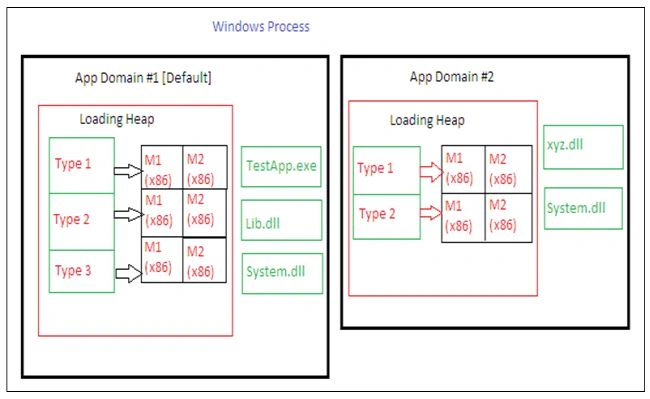
- Performance: The application domains are less expensive, thus the CLR is able to load and unload an application domain much faster than the formal process and improve the performance. The following image shows a single Windows process that has one CLR COM server running in it. This CLR is currently managing two application domains. Each app domain has its own Heap and has a record of which type has been accessed since the app domain was created. Apart from that, each application domain has some Assemblies loaded into it. AppDomain #1 (the default) has three assemblies and AppDomain #2 has two assemblies loaded: xyz.dll and System.dll.
So the entire purpose of an Application Domain is to provide the isolation the CLR needs to be able to unload an appdomain and free up all of its resources without adversely affecting any other appdomain.
System.AppDomain Class
The AppDomain class is used to create and terminate application domains, load and unload assemblies and types, and enumerate assemblies and threads in a domain. The following table shows some useful methods of the AppDomain class as in the following.
| Methods | Description |
| CreateDomain() | It allows us to create a new application domain. |
| CreateInstance() | Creates an instance of a type in an external assembly. |
| ExecuteAssembly() | It executes a *.exe assembly in the application domain. |
| Load() | This method is used dynamically to load an assembly into the current app domain. |
| UnLoad() | It allows us to unload a specified AppDomain within a given process. |
| GetCurrentThreadID() | Return the ID of the active thread in the current application domain. |
In addition, the AppDomain class also defines a set of properties that can be useful when you wish to monitor the activity of a given application domain.
| Properties | Description |
| CurrentDomain | Gets the application domain for the currently executing thread. |
| FriendlyName | Gets the friendly name of the current application domain. |
| SetupInformation | Get the configuration details for a given application domain. |
| BaseDirectory | Gets the directory path that the assembly resolver uses to probe for assemblies. |
The following sample illustrates that a created assembly is called from another application domain. So, first, create a console application AppDomainTest. In the main() add a Console.WriteLine() so that you can see when this method is called.
using System;

namespace AppDomainTest
{
    class Program
    {
        static void Main(string[] args)
        {
            // Main assembly that is called from another AppDomain
            Console.WriteLine("AppDomainTest in new created Domain '{0}' called"
                              , AppDomain.CurrentDomain.FriendlyName);
            Console.WriteLine("ID of the Domain '{0}'"
                              , AppDomain.CurrentDomain.Id);
            Console.ReadKey();
        }
    }
}
Then create a second project named "DemoTest". Here, first display the name of the current domain using the property FriendlyName. With the CreateDomain() method, a new application domain with the friendly name New AppDomain is created. Then load the assembly AppDomainTest.exe into the new domain and call the Main() method by calling ExecuteAssembly().
using System;

// Add a reference to AppDomainTest.exe
namespace DemoTest
{
    class Program
    {
        static void Main(string[] args)
        {
            AppDomain d1 = AppDomain.CurrentDomain;
            Console.WriteLine(d1.FriendlyName);

            AppDomain d2 = AppDomain.CreateDomain("New AppDomain");
            d2.ExecuteAssembly("AppDomainTest.exe");
        }
    }
}
When you compile the DemoTest project, first the Current domain-friendly name will be displayed followed by the called assembly as in the following.

Loading Assemblies into Custom Application Domain
The CLR will always load assemblies into the default application domain when required. If you want to manually load assemblies into an application domain, then you can do that by the AppDomain.Load() method. Here, suppose that you want to load a previously created library TestLib.dll into a secondary application domain.
using System;
using System.IO;
using System.Linq;

namespace DemoTest
{
    class Program
    {
        static void Main(string[] args)
        {
            AppDomain newDomain = AppDomain.CreateDomain("New AppDomain");
            try
            {
                newDomain.Load("TestLib");
            }
            catch (FileNotFoundException)
            {
                Console.WriteLine("Not Found");
            }
            ListAssemblies(newDomain);
            Console.ReadKey();
        }

        static void ListAssemblies(AppDomain ad)
        {
            var la = from a in ad.GetAssemblies()
                     orderby a.GetName().Name
                     select a;

            Console.WriteLine("Assemblies Loaded {0}\n", ad.FriendlyName);

            foreach (var a in la)
            {
                Console.WriteLine("Name:: {0}:", a.GetName().Name);
                Console.WriteLine("Version:: {0}:\n", a.GetName().Version);
            }
        }
    }
}
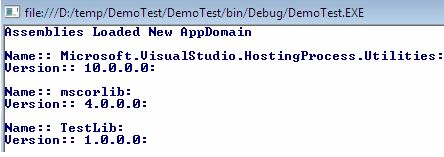
This time the output of the previous program is as in the following.
Dennis ThomasPosted Dec 28, 2017, 7:18 AM
Good one, nicely explains process and application domain. Thank you!
Sr KarthigaPosted May 6, 2016, 9:17 PM
good one sir
Mohit SharmaPosted Feb 2, 2015, 12:45 AM
Fantastic Sir
Dhanik SahniPosted Jul 10, 2013, 4:38 AM
Very nice.
kasi babuPosted May 29, 2013, 1:00 AM
nice article ..excepting a serice of articles
Anurag SarkarPosted May 28, 2013, 2:32 PM
Thanks Sir.