Today, in this article
let's dig out one of the useful feature related to windows phone. This concept
is useful in choosing the eMails and performing necessary tasks as per the user
requirements.
Question Arises: What
is an eMail Chooser Task?
This Class allows user to
choose eMail from the contact list, where it specifically retrieves only email
address with name which is useful to perform further operations by the user.
The Complete Code of
MainPage.xaml looks like this:
<phone:PhoneApplicationPage
x:Class="Email_Chooser_Task.MainPage"
xmlns="http://schemas.microsoft.com/winfx/2006/xaml/presentation"
xmlns:x="http://schemas.microsoft.com/winfx/2006/xaml"
xmlns:phone="clr-namespace:Microsoft.Phone.Controls;assembly=Microsoft.Phone"
xmlns:shell="clr-namespace:Microsoft.Phone.Shell;assembly=Microsoft.Phone"
xmlns:d="http://schemas.microsoft.com/expression/blend/2008"
xmlns:mc="http://schemas.openxmlformats.org/markup-compatibility/2006"
mc:Ignorable="d"
d:DesignWidth="480"
d:DesignHeight="768"
FontFamily="{StaticResource
PhoneFontFamilyNormal}"
FontSize="{StaticResource
PhoneFontSizeNormal}"
Foreground="{StaticResource
PhoneForegroundBrush}"
SupportedOrientations="Portrait"
Orientation="Portrait"
shell:SystemTray.IsVisible="True">
<!--LayoutRoot
is the root grid where all page content is placed-->
<Grid
x:Name="LayoutRoot"
Background="Transparent">
<Grid.RowDefinitions>
<RowDefinition
Height="Auto"/>
<RowDefinition
Height="*"/>
</Grid.RowDefinitions>
<!--TitlePanel
contains the name of the application and page title-->
<StackPanel
x:Name="TitlePanel"
Grid.Row="0"
Margin="12,17,0,28">
<TextBlock
x:Name="ApplicationTitle"
Text="Vijay's Email Chooser Task"
FontFamily="Verdana"
FontSize="22"
Style="{StaticResource
PhoneTextNormalStyle}"/>
<TextBlock
x:Name="PageTitle"
Text="Windows 7 Phone"
Margin="9,-7,0,0" Style="{StaticResource
PhoneTextTitle1Style}"/>
</StackPanel>
<!--ContentPanel
- place additional content here-->
<Grid
x:Name="ContentPanel"
Grid.Row="1"
Margin="12,0,12,0">
<Button
Content="Choose eMail"
FontFamily="Verdana"
FontSize="22"
Height="72"
Margin="127,54,132,0"
Name="button1"
VerticalAlignment="Top"
Click="button1_Click"
/>
</Grid>
</Grid>
<!--Sample code showing usage of
ApplicationBar-->
<!--<phone:PhoneApplicationPage.ApplicationBar>
<shell:ApplicationBar
IsVisible="True" IsMenuEnabled="True">
<shell:ApplicationBarIconButton IconUri="/Images/appbar_button1.png"
Text="Button 1"/>
<shell:ApplicationBarIconButton IconUri="/Images/appbar_button2.png"
Text="Button 2"/>
<shell:ApplicationBar.MenuItems>
<shell:ApplicationBarMenuItem Text="MenuItem 1"/>
<shell:ApplicationBarMenuItem Text="MenuItem 2"/>
</shell:ApplicationBar.MenuItems>
</shell:ApplicationBar>
</phone:PhoneApplicationPage.ApplicationBar>-->
</phone:PhoneApplicationPage>
The Complete Code of
MainPage.xaml.cs looks like this:
using
System;
using
System.Collections.Generic;
using
System.Linq;
using
System.Net;
using
System.Windows;
using
System.Windows.Controls;
using
System.Windows.Documents;
using
System.Windows.Input;
using
System.Windows.Media;
using
System.Windows.Media.Animation;
using
System.Windows.Shapes;
using
Microsoft.Phone.Controls;
using
Microsoft.Phone.Tasks;
namespace
Email_Chooser_Task
{
public partial
class MainPage
: PhoneApplicationPage
{
// Constructor
public MainPage()
{
InitializeComponent();
}
private
void button1_Click(object
sender, RoutedEventArgs e)
{
EmailAddressChooserTask objEmailChooser =
new EmailAddressChooserTask();
objEmailChooser.Completed += new
EventHandler<EmailResult>(EmailCompleted);
objEmailChooser.Show();
}
void EmailCompleted(object
sender, EmailResult e)
{
switch (e.TaskResult)
{
case TaskResult.OK:
MessageBox.Show(" The eMail of:
" + e.DisplayName + " is " + e.Email);
break;
case
TaskResult.Cancel:
MessageBox.Show("Operation
Cancelled");
break;
case
TaskResult.None:
MessageBox.Show("Nothing
Performed");
break;
}
}
}
}
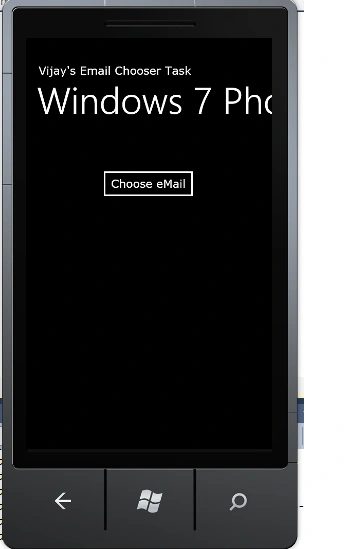
The Output of the
Application looks like this:
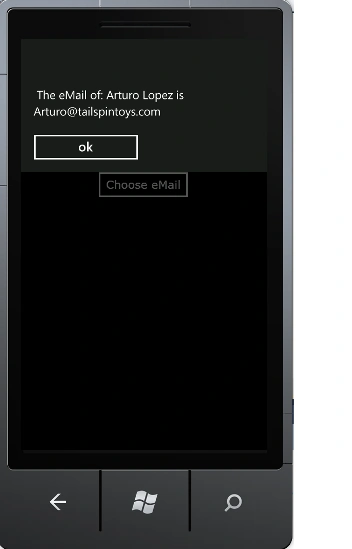
The Selected eMail Output
Application looks like this:
I hope this article is
useful for you.


Sanjoli GuptaPosted Jan 30, 2012, 11:49 PM
good work...really appreciable...:)
Maria JohnsonPosted Jan 30, 2012, 11:07 PM
Hi Vijay. Very good concept of your article. I will surely try this.
Arjun PanwarPosted Jan 30, 2012, 11:54 AM
really,this article is intresting