

So I think we all are now good to go and implement this concept.
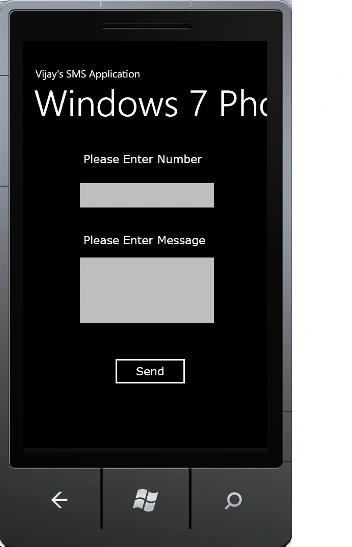
The Complete Code of MainPage.xaml looks like this:
<phone:PhoneApplicationPage
x:Class="Windows_SMS_Application.MainPage"
xmlns="http://schemas.microsoft.com/winfx/2006/xaml/presentation"
xmlns:x="http://schemas.microsoft.com/winfx/2006/xaml"
xmlns:phone="clr-namespace:Microsoft.Phone.Controls;assembly=Microsoft.Phone"
xmlns:shell="clr-namespace:Microsoft.Phone.Shell;assembly=Microsoft.Phone"
xmlns:d="http://schemas.microsoft.com/expression/blend/2008"
xmlns:mc="http://schemas.openxmlformats.org/markup-compatibility/2006"
mc:Ignorable="d"
d:DesignWidth="480"
d:DesignHeight="768"
FontFamily="{StaticResource
PhoneFontFamilyNormal}"
FontSize="{StaticResource
PhoneFontSizeNormal}"
Foreground="{StaticResource
PhoneForegroundBrush}"
SupportedOrientations="Portrait"
Orientation="Portrait"
shell:SystemTray.IsVisible="True">
<!--LayoutRoot
is the root grid where all page content is placed-->
<Grid
x:Name="LayoutRoot"
Background="Transparent">
<Grid.RowDefinitions>
<RowDefinition
Height="Auto"/>
<RowDefinition
Height="*"/>
</Grid.RowDefinitions>
<!--TitlePanel
contains the name of the application and page title-->
<StackPanel
x:Name="TitlePanel"
Grid.Row="0"
Margin="12,17,0,28">
<TextBlock
x:Name="ApplicationTitle"
Text="Vijay's SMS Application"
Style="{StaticResource
PhoneTextNormalStyle}"/>
<TextBlock
x:Name="PageTitle"
Text="Windows 7 Phone"
Margin="9,-7,0,0" Style="{StaticResource
PhoneTextTitle1Style}"/>
</StackPanel>
<!--ContentPanel
- place additional content here-->
<Grid
x:Name="ContentPanel"
Grid.Row="1"
Margin="12,0,12,0">
<TextBlock
Height="30"
HorizontalAlignment="Left"
FontSize="22"
Margin="106,24,0,0"
Name="textBlock1"
Text="Please Enter
Number" FontFamily="Verdana"
VerticalAlignment="Top"
Width="245"
/>
<TextBox
Height="72"
HorizontalAlignment="Left"
Margin="87,73,0,0"
x:Name="textBox1"
VerticalAlignment="Top"
Width="287"
FontFamily="Verdana"
FontSize="22"/>
<TextBlock
Height="30"
HorizontalAlignment="Left"
Margin="106,183,0,0"
Name="textBlock2"
Text="Please Enter
Message" VerticalAlignment="Top"
Width="240"
FontFamily="Verdana"
FontSize="22"/>
<TextBox
Height="153"
HorizontalAlignment="Left"
Margin="87,219,0,0"
Name="textBox2"
FontFamily="Verdana"
FontSize="22"
VerticalAlignment="Top"
Width="287"
/>
<Button
Content="Send"
Height="72"
FontFamily="Verdana"
FontSize="22"
x:Name="button1"
HorizontalAlignment="Left"
Margin="157,418,0,0"
VerticalAlignment="Top"
Width="160"
Click="button1_Click"
/>
<TextBlock
Height="30"
FontFamily="Verdana"
FontSize="22"
HorizontalAlignment="Left"
Margin="87,528,0,0"
x:Name="textBlock3"
VerticalAlignment="Top"
Width="335"
/>
</Grid>
</Grid>
venkateswaranPosted Jul 17, 2012, 3:24 PM
is there a way to handle backbutton on this window http://forums.silverlight.net/t/258219.aspx/1
pafi pafiPosted Mar 21, 2012, 1:28 PM
Is there a way to parse the text of a received SMS to my app?
Arjun PanwarPosted Jan 24, 2012, 3:14 PM
Thanks for this great work
Stephen JohnsonPosted Jan 24, 2012, 6:37 AM
Hi Vijai. Its a very useful and good article.