

Introduction
CodeDom and Reflection give you the ability to dynamically build C# Code into a string, compile it, and run it all inside your program. This very powerful feature in .NET allows us to create the CodeDom calculator, a calculator that evaluates expressions (and even lines of C# code) inside a Windows Form. We primarily use the System.Math class to do the calculations, but we've coded the CodeDom calculator in such a way so that we don't need to apply the Math. prefix before our functions. We'll show you in a minute how this is done.
Usage
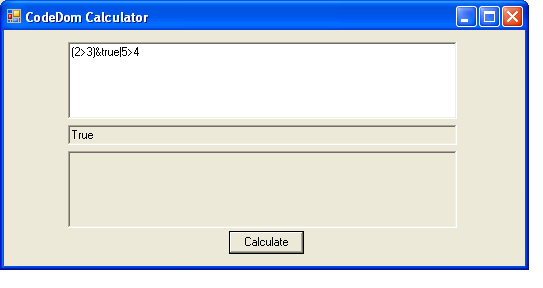
The CodeDom Calculator can be used in one of two ways: a) just enter some math expression you want to evaluate using C# Syntax. b) write a block of code in C# to evaluate something more complex. The first method (method a) only requires you to type in the math expression as shown in figure 2.
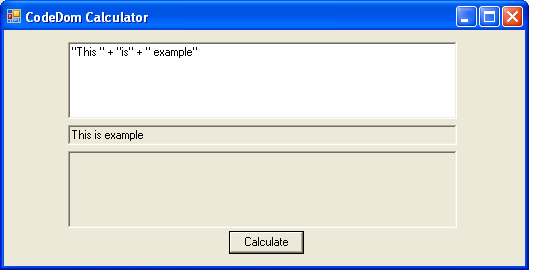
Figure 2 - Evaluating a long function in the CodeDom Calculator
In method b, we do something a bit different. At the top line you place the word answer terminated with a semicolon. After that you write any C# code you wish. At the end of your code fragment, remember to assign the final answer to the variable answer. You may still leave off the Math class prefix when writing this code. Figure 3 is an example of summing numbers from 1 to 10 using C# in CodDom.

Figure 3 - Summing numbers from 1 to 10 using code Dom
Creating and Running the Calculator Class
The three steps to evaluating the expression are: 1) Create C# code around the function using CodeDom 2) compile the code into an assembly using the CodeDom Compiler 3) Create an instance of the Calculator class 4) Call the Calculate method on the Calculator Class to obtain the answer. Figure 2 shows the CodeDom class we wish to generate. The Calculate method will contain the expression we typed into our CodeDom calculator

Figure 4 - Calculator class in UML Reverse Engineered using WithClass
The assembly that is actually generated by CodeDom for figure 3 is shown in the listing below. We will talk more about how we generated this class with all the cool methods in CodeDom in the next section, but as you can see, our evaluation code was just slapped right into the Calculate method. The reason we place answer; at the top line is so we can just force a dummy line at the top of the Calculate method for large blocks of code (the dummy line being Answer = answer;) If we had just put in a simple evaluation expression, such as 1 + 1, this same line becomes a Answer = 1 + 1; inside our code.
Listing 1 - CodeDom generated code for the Calculator
- namespace ExpressionEvaluator
- {
- using System;
- using System.Windows.Forms;
- public class Calculator
- {
- private double answer;
- /// Default Constructor for class
- public Calculator()
- {
- //TODO: implement default constructor
- }
- // The Answer property is the returned result
- public virtual double Answer
- {
- get
- {
- return this.answer;
- }
- set
- {
- this.answer = value;
- }
- }
- /// Calculate an expression
- public virtual double Calculate()
- {
- Answer = answer;
- for (int i = 1; i <= 10; i++)
- answer = answer + i;
- return this.Answer;
- }
- }
- }
Upon clicking the Calculate button, the code is generated, compiled and run. Listing 2 shows the calculate event handler that executes all of these steps in sequence. Although the details aren't shown here, all of the steps are contained in the methods: BuildClass, CompileAssembly, and RunCode.
Listing 2 - Event Handler for calculating the Math Expression
- private void btnCalculate_Click(object sender, System.EventArgs e)
- {
- // Blank out result fields and compile result fields
- InitializeFields();
- // change evaluation string to pick up Math class members
- tring expression = RefineEvaluationString(txtCalculate.Text);
- // build the class using codedom
- BuildClass(expression);
- // compile the class into an in-memory assembly.
- // if it doesn't compile, show errors in the window
- CompilerResults results = CompileAssembly();
- // write out the source code for debugging purposes
- Console.WriteLine("...........................\r\n");
- Console.WriteLine(_source.ToString());
- // if the code compiled okay,
- // run the code using the new assembly (which is inside the results)
- if (results != null && results.CompiledAssembly != null)
- {
- // run the evaluation function
- RunCode(results);
- }
- }
| CodeDom Object | Purpose |
| CSharpCodeProvider | Provider for generating C# Code |
| CodeNamespace | Class for constructing namespace generation |
| CodeNamespaceImport | Generates using statements |
| CodeTypeDeclaration | Generates class structure |
| CodeConstructor | Generates constructor |
| CodeTypeReference | Generates reference for a type |
| CodeCommentStatement | Generates a C# Comment |
| CodeAssignStatement | Generates assignment statement |
| CodeFieldReferenceExpression | Generates a field reference |
| CodeThisReferenceExpression | Generates a this pointer |
| CodeSnippetExpression | Generates any literal string you specify into the code (used to place our evaluation string) |
| CodeMemberMethod | Generates a new method |
Table 1 - CodeDom classes used to build the Calculator
Let's look at our CodeDom method for generating code shown in listing 3. As you can see its easier to get your head around code generation with CodeDom, because it breaks down the generation into simple pieces. First we create the generator and in this case we are generating C#, so we create a C# Generator. Then we begin to create and assemble the pieces. First we create the namespace, then we add to it the different import libraries we want to include. Next we create the class. We add to the class a constructor, a property and a method. In the method we add statements for the method. Inside these statements, we stick the expression that we typed into the text box to evaluate. The expression we typed in is used in the CodeSnippetExpression constructor so we can generate the code directly from our evaluation string. The expression also uses the constructor of the CodeAssignStatement so we can assign it to the Answer property. When we are finished assembling the composite pieces of the CodeDom hierarchy, we just call GenerateCodeFromNamespace with the CodeDom generator on our assembled namespace. This gets streamed out to our StringWriter and assigned internally to a StringBuilder class where we can extract the whole assembly code from a string.
Listing 3 - Building the Calculator class using CodeDom classes
- /// <summary>
- /// Main driving routine for building a class
- /// </summary>
- void BuildClass(string expression)
- {
- // need a string to put the code into
- _source = new StringBuilder();
- StringWriter sw = new StringWriter(_source);
- //Declare your provider and generator
- CSharpCodeProvider codeProvider = new CSharpCodeProvider();
- ICodeGenerator generator = codeProvider.CreateGenerator(sw);
- CodeGeneratorOptions codeOpts = new CodeGeneratorOptions();
- CodeNamespace myNamespace = new CodeNamespace("ExpressionEvaluator");
- myNamespace.Imports.Add(new CodeNamespaceImport("System"));
- myNamespace.Imports.Add(new CodeNamespaceImport("System.Windows.Forms"));
- //Build the class declaration and member variables
- CodeTypeDeclaration classDeclaration = new CodeTypeDeclaration();
- classDeclaration.IsClass = true;
- classDeclaration.Name = "Calculator";
- classDeclaration.Attributes = MemberAttributes.Public;
- classDeclaration.Members.Add(FieldVariable("answer", typeof(double), MemberAttributes.Private));
- //default constructor
- CodeConstructor defaultConstructor = new CodeConstructor();
- defaultConstructor.Attributes = MemberAttributes.Public;
- defaultConstructor.Comments.Add(new CodeCommentStatement("Default Constructor for class", true));
- defaultConstructor.Statements.Add(new CodeSnippetStatement("//TODO: implement default constructor"));
- classDeclaration.Members.Add(defaultConstructor);
- //home brewed method that uses CodeDom to make a property
- classDeclaration.Members.Add(this.MakeProperty("Answer", "answer", typeof(double)));
- //Our Calculate Method
- CodeMemberMethod myMethod = new CodeMemberMethod();
- myMethod.Name = "Calculate";
- myMethod.ReturnType = new CodeTypeReference(typeof(double));
- myMethod.Comments.Add(new CodeCommentStatement("Calculate an expression", true));
- myMethod.Attributes = MemberAttributes.Public;
- myMethod.Statements.Add(new CodeAssignStatement(new CodeSnippetExpression("Answer"),
- new CodeSnippetExpression(expression)));
- // Include the generation below if you want your answer to pop up in a message box
- // myMethod.Statements.Add(new CodeSnippetExpression("MessageBox.Show(String.Format(\"Answer = {0}\", Answer))"));
- // return answer
- myMethod.Statements.Add(new CodeMethodReturnStatement(new CodeFieldReferenceExpression(
- new CodeThisReferenceExpression(), "Answer")));
- classDeclaration.Members.Add(myMethod);
- //write code
- myNamespace.Types.Add(classDeclaration);
- generator.GenerateCodeFromNamespace(myNamespace, sw, codeOpts);
- // cleanup
- sw.Flush();
- sw.Close();
- }
pratibha pratibhaPosted Sep 28, 2020, 6:22 AM
It is not giving sin /cos/tan value correctly .it gives sin(1)=0.841470984807897 where as actual value is 0.01745240644
Dheerendra joshiPosted Aug 26, 2020, 1:36 AM
I am try to use this but i got always integer result example :- 3/2= 1 need result 3/2=1.5
Leandro NicolasPosted Jun 9, 2013, 11:05 PM
Thanks!
Luke PerrinPosted Apr 4, 2011, 9:29 AM
Why is it if I declare two variables as public at the top.. , int x = 10; int y = 10; and then I type x*y in the calculator this doesnt work? how would I get this to work? I can see if you can dynamically create variables with this but what about if you have a string that has "x*y" in it and you want to evaluate this? Thanks. Luke
minhhai_cdPosted Dec 9, 2010, 11:57 PM
I have a calculation: 2000*2000000 but it is raise Compile Error:The operation overflows at compile time in checked mode, please help me how to upgrade higher with billion calculation? Thank you
minhhai_cdPosted Dec 8, 2010, 11:03 PM
Hello Mike Gold Now i want to round a group of long method like example: 2*100 + Round(200/6)=217 How to do that on your calculator by "Round", what method to replace for "Round"? Thank you so much
EugenePosted Nov 26, 2010, 5:27 AM
dont usable, very slow
minhhai_cdPosted Nov 24, 2010, 2:53 AM
Hello Edward Ziberman My axample: 100/(1+2*3)*5 your result=70 but in exactly is 71.43 Please help about this bug, almost be round(<1) Thank you
Horacio MarchioniPosted Oct 8, 2010, 10:33 AM
Thank you Mike, it 's an excelent article, very helpfull. Thank you once again
Lloyd FranklinPosted Sep 4, 2010, 6:36 AM
Thanks - this article was a huge help - also the additional logical expression content.
JacopoPosted Jun 2, 2010, 11:34 AM
Hi,really thanks for the evaluator,i really thank you to post it. I've one question,does it support function or method? Thanks.
AZA BAZAPosted May 20, 2010, 8:58 AM
Nice article. Exactly what i was looking for dynamical code generation :) thankyou very much
Sameep ShahPosted Jan 2, 2010, 7:31 AM
Hi Mike, This is Really Nice article and helps me a lot.. Thanks.
li longPosted Sep 4, 2009, 7:33 AM
thank you very much.
Baatarkhuu EnkhtuyaPosted Jul 14, 2009, 10:45 PM
Good job. Very appreciated.
TravisPosted Jan 2, 2009, 10:09 AM
That was a cool idea. I am looking to do some dynamic calculations. During my testing of your app, some calculations return incorrect values. For example, if you put in 1 / 2, you will get 0, instead of .5 . Another example is 30 / 5 you get 6, but if you do 5 / 30 you get 0. I am not sure why its not returning the double, it seems to just strip off the remainders if the value is less than a whole number? I'll note this project as a possible solution, but I will keep looking. Thanks for the good ideas though. Well written and explained.
Heike OelschlaegeleditedPosted Jul 23, 2007, 9:28 AMEdited Jul 26, 2007, 1:30 AM
What is done in the Method InitializeFields()? Where are defined FieldVariable and MakeProperty are used in Method BuildClass(string expression). I would be very delighted about an answer.