

Look at the following points
- Create a new project (I created a Console Application).
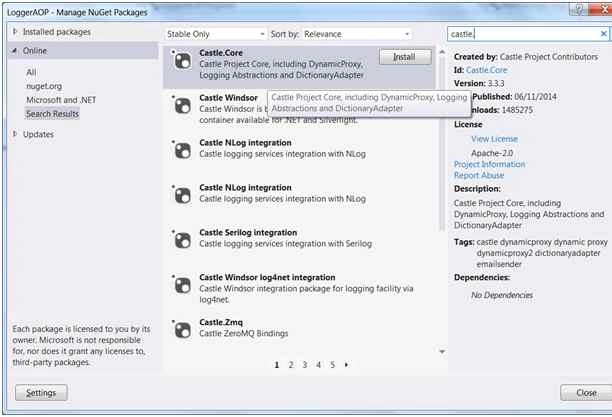
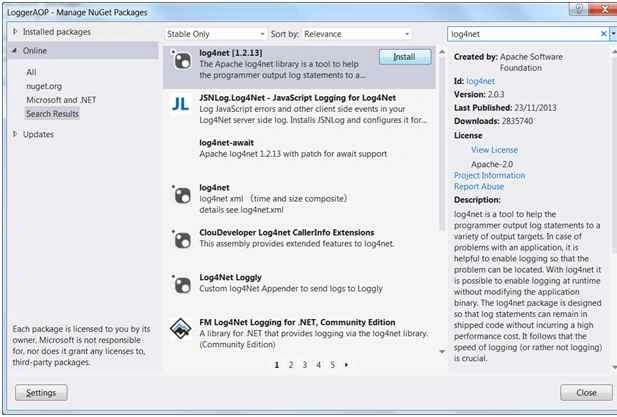
- Add NuGet package Castle.Core, Castle.Windsor and Log4Net.
- Castle.Core: Allow we to use Proxy
For example, NHibernate, an object/relational mapper uses DynamicProxy to provide lazy loading of data without the domain model classes being aware of this functionality.
- Castle.Widsor: IoC (Inversion of control container).
- Log4net: Lib to log our application.
- Implementing a simple calculator to logger their operations:
- public interface ICalculator
- {
- double Add(double x, double y);
- double Divide(double x, double y);
- }
- public class Calculator: ICalculator
- {
- public double Add(double x, double y)
- {
- return x + y;
- }
- public double Divide(double x, double y)
- {
- return x / y;
- }
- }
- Now we can proceed to coding our logger. We want to log every call function including their parameters and the return value.
- Let’s create a simple Class Calculator to be logged as follows.
- Now we need to configure log4net,
Open the AssemblyInfo.cs and insert the follow line:
[assembly: log4net.Config.XmlConfigurator(Watch = true)]
Configure the application config (app.config) as follows:- <?xml version="1.0" encoding="utf-8" ?>
- <configuration>
- <configSections>
- <section name="log4net" type="log4net.Config.Log4NetConfigurationSectionHandler, log4net" /> </configSections>
- <startup>
- <supportedRuntime version="v4.0" sku=".NETFramework,Version=v4.5" /> </startup>
- <log4net>
- <appender name="MyLogger" type="log4net.Appender.RollingFileAppender">
- <file type="log4net.Util.PatternString" value="MyLog.txt" />
- <appendToFile value="true" />
- <rollingStyle value="Size" />
- <maxSizeRollBackups value="20" />
- <maximumFileSize value="1000KB" />
- <layout type="log4net.Layout.PatternLayout">
- <param name="ConversionPattern" value="%date [%thread] %-5level %logger [%ndc] - %message%newline" /> </layout>
- </appender>
- <root>
- <level value="DEBUG" />
- <appender-ref ref="MyLogger" /> </root>
- </log4net>
- </configuration>
- Now we need to create an Interceptor to be invoked in every method call to create our log.
- public class LogInterceptor: IInterceptor
- {
- void IInterceptor.Intercept(IInvocation invocation)
- {
- var logger = LogManager.GetLogger(invocation.TargetType);
- try
- {
- StringBuilder sb = null;
- if (logger.IsDebugEnabled)
- {
- sb = new StringBuilder(invocation.TargetType.FullName).Append(".").Append(invocation.Method).Append("("); //getting method name
- //getting parameters
- for (int i = 0; i < invocation.Arguments.Length; i++)
- {
- if (i > 0) sb.Append(", ");
- sb.Append(invocation.Arguments[i]);
- }
- sb.Append(")");
- logger.Debug(sb);
- }
- invocation.Proceed();
- if (logger.IsDebugEnabled)
- {
- //getting return
- logger.Debug("Return of " + sb + " is: " + invocation.ReturnValue);
- }
- }
- catch (Exception e)
- {
- logger.Error(e);
- throw;
- }
- }
- }
- Now we need to test our Logger.
At my console application main I have the following code:- class Program
- {
- static void Main(string[] args)
- {
- InitCalc();
- }
- private static void InitCalc()
- {
- //A little of IoC here
- //Here I put our LogInterceptor into my Calculator
- var container = new WindsorContainer().Register(Component.For < LogInterceptor > (), Component.For < ICalculator > ().ImplementedBy < Calculator > ().Interceptors(new InterceptorReference(typeof (LogInterceptor))).First);
- BasicConfigurator.Configure(); // configure log4net
- //Create my ICalculator Object to be able to log method calls
- var c = container.Resolve < ICalculator > ();
- try
- {
- c.Add(1, 2);
- c.Divide(1, 2);
- c.Divide(1, 0);
- }
- catch (Exception)
- {}
- Console.ReadKey();
- }
- }
- Check the MyLog.txt at bin folder:
- 2015 - 10 - 28 16: 30: 07, 455[10] DEBUG LoggerAOP.Calculator[(null)] - LoggerAOP.Calculator.Double Add(Double, Double)(1, 2)
- 2015 - 10 - 28 16: 30: 07, 529[10] DEBUG LoggerAOP.Calculator[(null)] - Return of LoggerAOP.Calculator.Double Add(Double, Double)(1, 2) is: 3
- 2015 - 10 - 28 16: 30: 07, 530[10] DEBUG LoggerAOP.Calculator[(null)] - LoggerAOP.Calculator.Double Divide(Double, Double)(1, 2)
- 2015 - 10 - 28 16: 30: 07, 530[10] DEBUG LoggerAOP.Calculator[(null)] - Return of LoggerAOP.Calculator.Double Divide(Double, Double)(1, 2) is: 0, 5
- 2015 - 10 - 28 16: 30: 07, 531[10] DEBUG LoggerAOP.Calculator[(null)] - LoggerAOP.Calculator.Double Divide(Double, Double)(1, 0)
- 2015 - 10 - 28 16: 30: 07, 531[10] DEBUG LoggerAOP.Calculator[(null)] - Return of LoggerAOP.Calculator.Double Divide(Double, Double)(1, 0) is: +Infinito
References
Mukesh KumarPosted Oct 30, 2015, 2:13 AM
Thanks for your sharing
Harshad PansuriyaPosted Oct 30, 2015, 1:38 AM
Nice one
Gowtham KPosted Oct 29, 2015, 1:36 PM
Good One
André de Mattos FerrazPosted Oct 29, 2015, 7:47 AM
thank you!
Sibeesh VenuPosted Oct 29, 2015, 1:34 AM
Nice Share