

Knowing your data is very important when it comes to writing code. Now I’ll admit that I am very far from being a developer, however as a DBA, I spend much of my day’s performance tuning code. In doing so, I get to see many ways code can introduce excess database reads.,
One of the most recent things I have come across has to do with NULLs. The environment I was working in had no default values in their table design, so it was riddled with NULL values. Over the years they had implemented coding standards to try and mitigate these NULL values within their code.
In every column search or join they would start with (VALUE ISNULL or VALUE IS NOT NULL and VALUE = @parameter) as one example. Adding this syntax to a query reduces SARGAbility causing a lot of unnecessary reads and overhead. This is especially true when the column definition is set to NOT NULL and the check was just put in place as part of a standard. For clarification SARGAbility just means searchability and the ability to seek within an index for faster performance.
Another practice I’ve seen lately is the use of LTRIM and RTRIM functions as a standard clean up method. First, I highly recommend doing this on the application side or upon whatever insert method you use as the data is being populated into your tables. It is a much better practice to clean up the data once rather than coding for the clean up in every WHERE, JOIN or CASE statement in each query you write.
Let’s look at a simple query that incorporates both of these methods. Note: we will be turning on STATISTICS IO, TIME to look at our performance improvements.
First let’s look at our table design and note a few things. We will be querying WorldWideImporters Sales.Invoices table using SalesPersonID which is an INT set to NOT NULL, IsCreditNote a BIT NOT NULL and ConfirmedRecievedBy which is a nvarchar(4000) that allows NULLs.
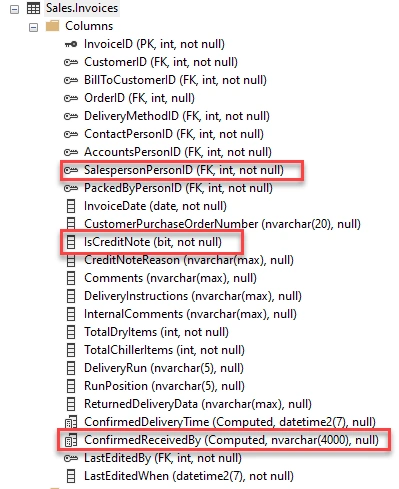
After looking at our table let’s take note of the WHERE clause. The first check is validating if IsCreditNote IS NOT NULL, then we check on SalespersonPersonID for a specific value and lastly, we a cleaning up our free form field ConfirmedRecievedBy for a specific person’s name.
- SET STATISTICS IO, TIME ON
- SELECT BillToCustomerID, OrderID, InvoiceDate
- FROM [WideWorldImporters].[Sales].[Invoices]
- WHERE IsCreditNote IS NOT NULL
- AND SalespersonPersonID = 7
- AND LTRIM(RTRIM(ConfirmedReceivedBy)) ='Aile Mae' ;
Let’s run this and see what the Stats and Query plans shows us.
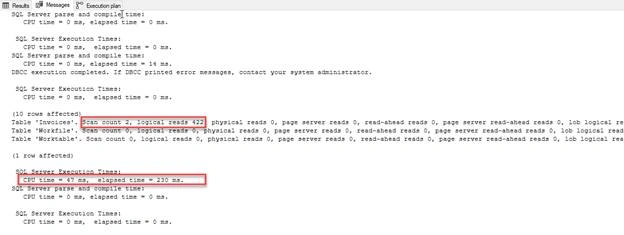
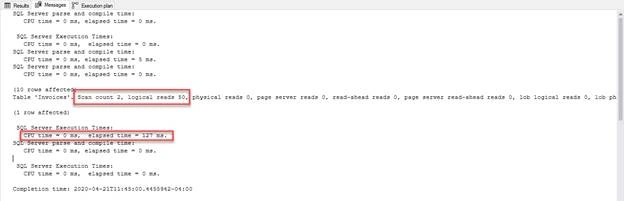
As I do with any performance tuning the first things that I note is CPU time and elapsed time then Ill note table scans and reads. We will use these metrics to measure our improvements. I would like you to take note of the tables it uses to complete the query. There is the Invoices table along with a Workfile and a Worktable it needed to use in order to return the desired results.
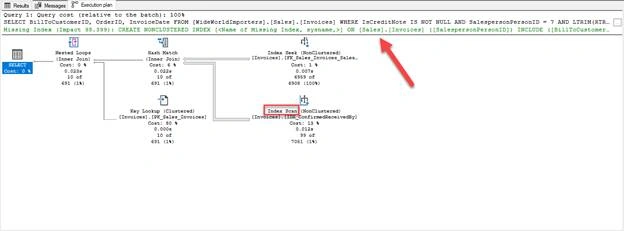
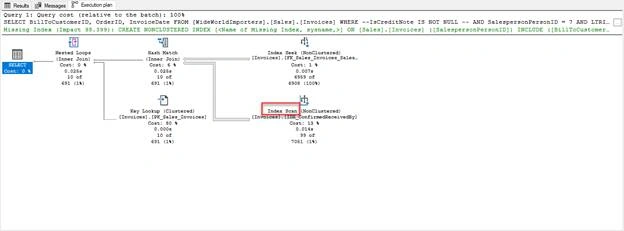
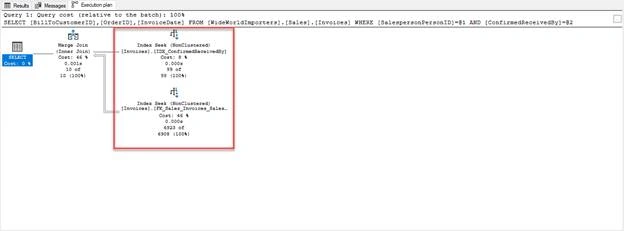
Next let’s look at our execution plan and note our seeks and scans. You can clearly see we are getting, and Index seek on the Primary Key as well as a Scan on our index for ConfirmedRecievedBy. It’s also letting us know that we have a missing index but let’s ignore that for now.
Ehsan SajjadPosted Apr 29, 2020, 7:43 PM
Helpful, good dive in to how we can improve our queries.
Yonerboy Bbz YoeledowayPosted Apr 29, 2020, 6:13 PM
Good monica
Thirumoorthy LakshmananPosted Apr 25, 2020, 1:21 AM
Informative :)