

Microsoft Cognitive Services provides large number of APIs and Services for developers to help create more intelligent applications.
You can add many features, like people’s emotions, video recognition, and language understanding into your applications. Face API is a cloud based service that provides the most advanced face recognition algorithm. Face API has two main functions: face detection and identifying all attributes of face recognition.
Now, we will see how to create Cognitive Services in Azure.
Microsoft Face algorithm enables us face attribute detection and face recognition. Face recognition is widely used at many places and in many scenarios, like security, natural user interface, mobile apps, and robotics.
Let’s start with a demo.
- Sign into Azure portal using Live account credentials.
- Click on "+ New" in the left side of your screen.
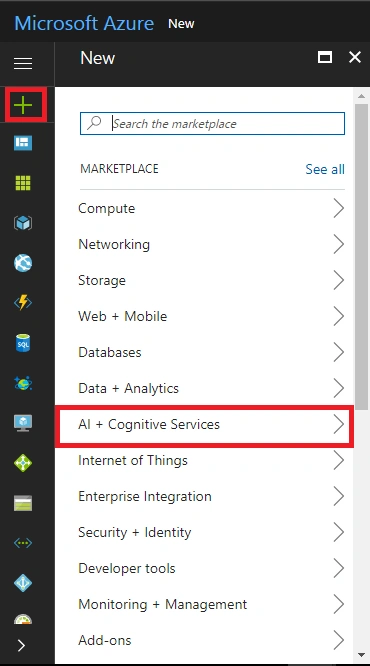
- Now, click on "AI + Cognitive Services", and you will see the full list of Cognitive Services APIs.
- Click on any API.
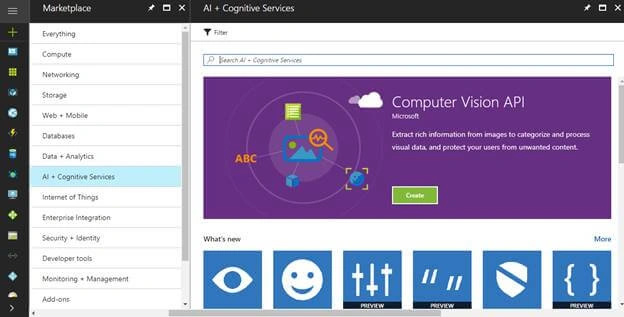
- Read about the API for your knowledge and click on “Create”.
- Name
Give appropriate unique name to your service, for example - <common name><APIName>Account. - Subscription
Select your subscription. - Location
Select your service location - means the data center where you want to deploy your service. - Pricing tier
Choose your pricing tier. F0 is for free service and S0 is paid service. Based on your usage, you can choose any price tier. - Resource Group
Select existing or create new resource according to your usage.
Then, confirm the Microsoft notice and click on “Create” button.
Select the Resource group > confirm the Microsoft notice and click on "Create" again for creating the account.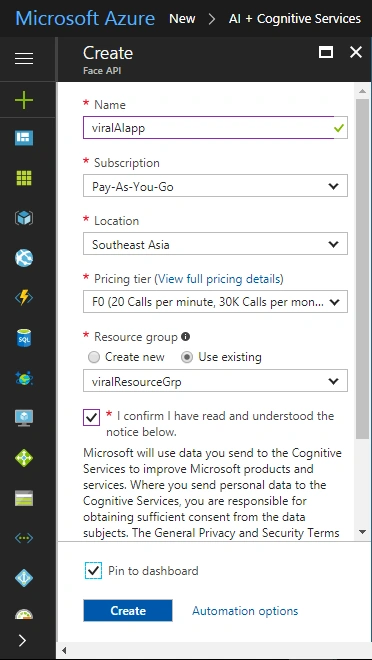
- Now, you will get notification after completion. Click on notification to view account information.
- Open the service, and now your service endpoint is ready to use. Copy the Endpoint URL in the Overview section.
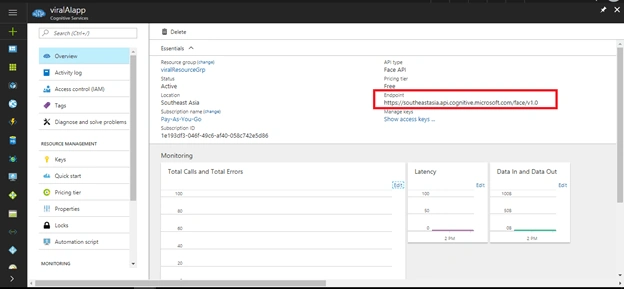
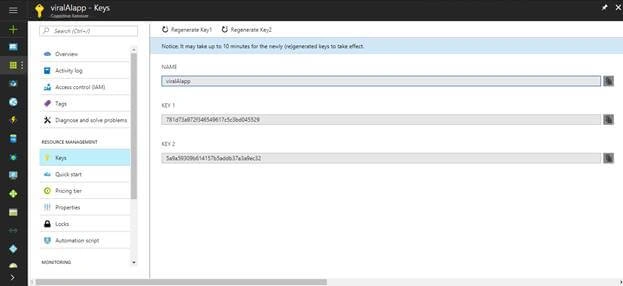
- You can also use the API keys in the Resource Management section, so copy the keys from keys section and start making API calls in your .NET, Xamarin, and UWP applications.
Summary
In this article, we learned how to create a Cognitive Service on the Azure portal.
If you have any questions, please do comment below.
Join the conversation! Your thoughts help the community grow.