

Introduction: A gray scale image is an image in which the value of each pixel is a single sample, that is, it carries only intensity information. The gray scale image is also known as a black-and-white Image that is composed exclusively of shades of gray, varying from black at the weakest intensity to white at the strongest.
Use the following procedure to create a simple application for converting a color image to a gray scale image. ( Note: steps 1 to 5 are similar to my previous article: Control Image Brightness Using ASP.NET.)
Step 1: First open Visual Studio.
Step 2: In the menu bar click on "File" > "New Web Site" or press "Shift + Alt + N".
Step 3: Now a dialog box will be shown; select "ASP.NET Empty Web Site" and provide the website name (like: "GrayScaleConverter") and press "OK".
Step 4: Now open Solution Explorer and right-click on the project and click on "Add" > "Add New Item" or simply press "Ctrl + Shift + A".
Step 5: A dialog will be opened. Select "Web Form" and provide the name of the Web Form (like: "GrayScaleConverter.aspx") and click on the "Add" button.
Step 6: Now a Web Form will be front of you and that code will be as in the following:
- <%@ Page Language="C#" AutoEventWireup="true" CodeFile="GrayScaleConverter.aspx.cs" Inherits="GrayScaleConverter" %>
- <!DOCTYPE html>
- <html xmlns="http://www.w3.org/1999/xhtml">
- <head runat="server">
- <title></title>
- </head>
- <body>
- <form id="form1" runat="server">
- <div>
- </div>
- </form>
- </body>
- </html>
- One File Upload control
- One Button control for uploading
-
One Button control to convert a color image to a gray scale image
After doing all this, my GrayScaleConverter.aspx page code is:
- <%@ Page Language="C#" AutoEventWireup="true" CodeFile="GrayScaleConverter.aspx.cs" Inherits="GrayScaleConverter" %>
- <!DOCTYPE html>
- <html xmlns="http://www.w3.org/1999/xhtml">
- <head runat="server">
- <title></title>
- </head>
- <body>
- <form id="form1" runat="server">
- <div>
- Upload an Image:<asp:FileUpload ID="FileUpload1" runat="server" />
- <asp:Button ID="btnUpload" runat="server" Text="Upload" />
- <br />
- <asp:Button ID="btnGrayScale" runat="server" Text="Click Me To Conevert Gray Scale" />
- <br /><br />
- <asp:Image ID="Img" runat="server" />
- </div>
- </form>
- </body>
- </html>
Step 8: Now open the code behind of this Web Form:
- Add the "System.Drawing" namespace
- Use a global variable, Bitmap _current.
- Write the following code for the "page_load" event:
- protected void Page_Load(object sender, EventArgs e)
- {
- if (Session["filepath"] != null)
- {
- Img.ImageUrl = Session["filepath"].ToString();
- _current = (Bitmap)Bitmap.FromFile(Server.MapPath(Session["filepath"].ToString()));
- }
- }
- Write the following code in the "Upload" Button's click event:
- protected void btnUpload_Click(object sender, EventArgs e)
- {
- if (FileUpload1.HasFile)
- {
- string filePath = Server.MapPath("Images/" + FileUpload1.FileName);
- FileUpload1.SaveAs(filePath);
- Img.ImageUrl = "Images/" + FileUpload1.FileName;
- Session["filepath"] = "Images/" + FileUpload1.FileName;
- }
- else
- {
- Response.Write("Please Select The File");
- }
- }
- Write the following code in the "Gray Scale Converter" Button's click event:
- protected void btnGrayScale_Click(object sender, EventArgs e)
- {
- if (Session["filepath"] != null)
- {
- Bitmap temp = (Bitmap)_current;
- Bitmap bmap = (Bitmap)temp.Clone();
- Color col;
- for (int i = 0; i < bmap.Width; i++)
- {
- for (int j = 0; j < bmap.Height; j++)
- {
- col = bmap.GetPixel(i, j);
- byte gray = (byte)(.299 * col.R + .587 * col.G + .114 * col.B);
- bmap.SetPixel(i, j, Color.FromArgb(gray, gray, gray));
- }
- }
- _current = (Bitmap)bmap.Clone();
- Random rnd = new Random();
- int a = rnd.Next();
- _current.Save(Server.MapPath("Images/" + a + ".png"));
- Img.ImageUrl = "Images/" + a + ".png";
- }
- }
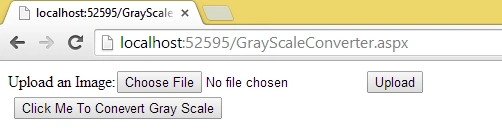
- When the project is initially run:
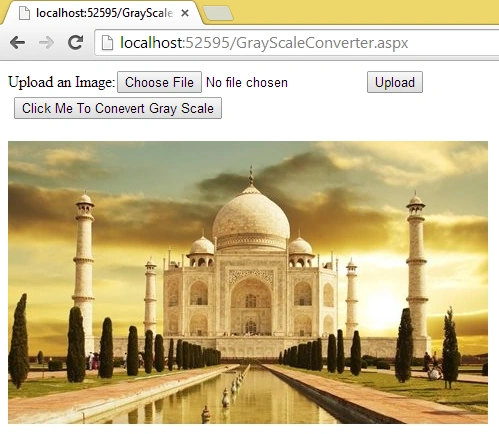
- After uploading an image:
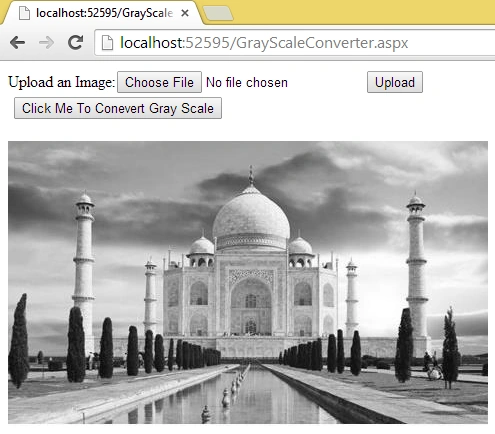
- After clicking on the covert gray scale button:
The following is the complete code:
- Code for GrayScaleConverter.aspx:
- <%@ Page Language="C#" AutoEventWireup="true" CodeFile="GrayScaleConverter.aspx.cs" Inherits="GrayScaleConverter" %>
- <!DOCTYPE html>
- <html xmlns="http://www.w3.org/1999/xhtml">
- <head runat="server">
- <title></title>
- </head>
- <body>
- <form id="form1" runat="server">
- <div>
- Upload an Image:<asp:FileUpload ID="FileUpload1" runat="server" />
- <asp:Button ID="btnUpload" runat="server" Text="Upload" OnClick="btnUpload_Click" />
- <br />
- <asp:Button ID="btnGrayScale" runat="server" Text="Click Me To Conevert Gray Scale" OnClick="btnGrayScale_Click"/>
- <br /><br />
- <asp:Image ID="Img" runat="server" />
- </div>
- </form>
- </body>
- </html>
- Code for GrayScaleConverter.aspx.cs:
- using System;
- using System.Collections.Generic;
- using System.Drawing;
- using System.Linq;
- using System.Web;
- using System.Web.UI;
- using System.Web.UI.WebControls;
- public partial class GrayScaleConverter : System.Web.UI.Page
- {
- Bitmap _current;
- protected void Page_Load(object sender, EventArgs e)
- {
- if (Session["filepath"] != null)
- {
- Img.ImageUrl = Session["filepath"].ToString();
- _current = (Bitmap)Bitmap.FromFile(Server.MapPath(Session["filepath"].ToString()));
- }
- }
- protected void btnUpload_Click(object sender, EventArgs e)
- {
- if (FileUpload1.HasFile)
- {
- string filePath = Server.MapPath("Images/" + FileUpload1.FileName);
- FileUpload1.SaveAs(filePath);
- Img.ImageUrl = "Images/" + FileUpload1.FileName;
- Session["filepath"] = "Images/" + FileUpload1.FileName;
- }
- else
- {
- Response.Write("Please Select The File");
- }
- }
- protected void btnGrayScale_Click(object sender, EventArgs e)
- {
- if (Session["filepath"] != null)
- {
- Bitmap temp = (Bitmap)_current;
- Bitmap bmap = (Bitmap)temp.Clone();
- Color col;
- for (int i = 0; i < bmap.Width; i++)
- {
- for (int j = 0; j < bmap.Height; j++)
- {
- col = bmap.GetPixel(i, j);
- byte gray = (byte)(.299 * col.R + .587 * col.G + .114 * col.B);
- bmap.SetPixel(i, j, Color.FromArgb(gray, gray, gray));
- }
- }
- _current = (Bitmap)bmap.Clone();
- Random rnd = new Random();
- int a = rnd.Next();
- _current.Save(Server.MapPath("Images/" + a + ".png"));
- Img.ImageUrl = "Images/" + a + ".png";
- }
- }
- }
sajitha nazerPosted Mar 25, 2015, 6:39 AM
Thank you. It helped me for a project