
Introduction : ColorPicker is an ASP.NET
AJAX extender that can be attached to any ASP.NET TextBox control. It provides
client-side color-picking functionality with UI in a popup control.We can
interact with the ColorPicker by clicking on a colored area to set a color. It
requires a binary reference to the ASP.NET AJAX Control Toolkit. ColorPicker
extender is multi-browser compatible: it works with IE 6/7/8, Firefox, Safari
and Goggle Chrome. ColorPicker is built on top of ASP.NET AJAX Control Toolkit
and internally utilizes a Popup extender. ColorPicker is compatible with the
UpdatePanel: can be placed inside the UpdatePanel.
ColorPicker Property :
- TargetControlID.
- PopupButtonID.
- PopupPositionID.
Step 1 : Open Visual Studio 2010.
- Go to File-> New>WebSite.
- Select ASP.NET WebSite.

Step 2 : Go to Solution Explorer and right-click.
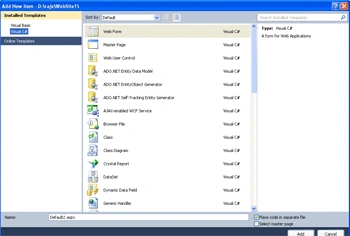
- Go to Add->New Item.
- Select Web From.
- Default.aspx page open.
Step 3 : Drag and drop AJAX Control from Toolbox.
- Select ColorPicker Control, Label,TextBox.
Step 4 : Now go to the Default.aspx page write a simple code for application.
Code :
<html
xmlns="http://www.w3.org/1999/xhtml">
<head
runat="server">
<title></title>
</head>
<body>
<form
id="form1"
runat="server">
<asp:ScriptManager
ID="ScriptManager1"
runat="server">
</asp:ScriptManager>
<div>
<h1>Create
a Business Card</h1>
<asp:Label
ID="lblCardText"
Text="Card
Text"
AssociatedControlID="txtCardText"
runat="server"
/>
<br
/>
<asp:TextBox
ID="txtCardText"
Runat="server"
/>
<br
/><br
/>
<asp:Label
ID="lblCardColor"
Text="Card
Color"
AssociatedControlID="txtCardColor"
runat="server"
/>
<br
/>
Fore ground color
<asp:TextBox
ID="txtCardColor"
AutoCompleteType="None"
Runat="server"
/>
<asp:Button
ID="btnPickColor"
Text="Pick
Color"
Runat="server"
/>
<asp:Label
ID="lblSample"
Runat="Server">
Sample </asp:Label>
<asp:ColorPickerExtender
ID="txtCardColor_ColorPickerExtender"
TargetControlID="txtCardColor"
PopupButtonID="btnPickColor"
PopupPosition="TopRight"
SampleControlID="lblSample"
Enabled="True"
runat="server">
</asp:ColorPickerExtender>
<br
/>
<br
/>
Back ground color
<asp:TextBox
ID="txtCardColor0"
AutoCompleteType="None"
Runat="server"
/>
<asp:Button
ID="btnPickColor0"
Text="Pick
Color"
Runat="server"
onclick="btnPickColor0_Click"
/>
<asp:Label
ID="lblSample0"
Runat="Server">
Sample1</asp:Label>
<asp:ColorPickerExtender
ID="ColorPickerExtender1"
TargetControlID =
"txtCardcolor0"
PopupButtonID="btnPickColor"
PopupPosition="TopRight"
SampleControlID="lblSample0"
Enabled="True"
runat="server">
</asp:ColorPickerExtender
<br
/>
<br
/>
<asp:Button
ID="btnSubmit"
Text="Submit"
Runat="server"
OnClick="btnSubmit_Click"
/>
<br
/>
<br
/>
<br
/>
<asp:Label
ID="Label1"
runat="server"
Text="Label"
style="z-index:
1; left: 10px;
top: 361px;
position:
absolute; height:
133px; width:
275px; text-align:
center; font-family:
'Times New
Roman', Times, serif; font-size:
xx-large"></asp:Label>
<br
/>
<br
/>
<br
/>
<br
/>
<br
/>
<br
/>
<br
/>
<br
/>
<br
/>
<br
/>
<asp:Panel
ID="pnlResults"
Visible="false"
runat="server">
<h2>Your
Selection</h2>
Selected Card Text:
<asp:Label
ID="lblSelectedText"
Runat="server"
/>
<br
/>
Selected Card Color:
<asp:Label
ID="lblSelectedColor"
Runat="server"
/>
</asp:Panel>
</div>
</form>
</body>
</html>
Step 5 : Now go to Design
option on Default.aspx page and double-click in submit Button and write a code.
Code :
protected
void btnSubmit_Click(object
sender, EventArgs e)
{
// Show the panel
pnlResults.Visible = true;
// Show the selected values
lblSelectedText.Text = txtCardText.Text;
lblSelectedColor.Text = txtCardColor0.Text;
Label1.Text = txtCardText.Text;
//Int32 x = Convert.ToInt32();
Label1.ForeColor = System.Drawing.ColorTranslator.FromHtml("#"+
txtCardColor.Text);
Label1.BackColor = System.Drawing.ColorTranslator.FromHtml("#"
+ txtCardColor0.Text);
}
Step 6 : Now add the ScriptManager for the run in AJAX application.
Step 7 : Now go Default.aspx.cs option and see the simple page_load event option and define the namespace.
Step 8 : Now Press F5 and run the applicaiton.
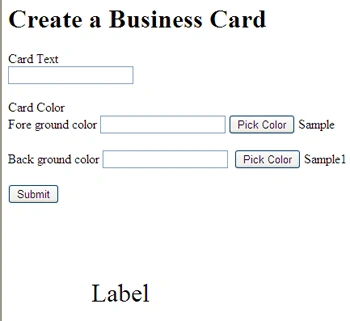
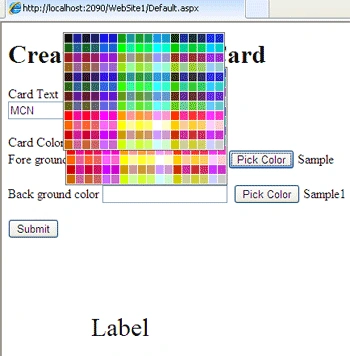
Step 9 : Define the value of card text and click in picker color and select the color.
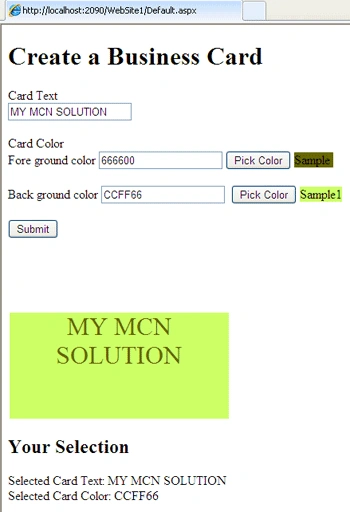
Step 10 : Now we click in Submit Button and find the output.
Join the conversation! Your thoughts help the community grow.