
Introduction
This article will describe the DataGrid in Edit mode while the edit cell requires a list of data. We are going to achieve that using the ComboBox.
Crating WPF Application Project
Fire up Visual Studio 2008 and Create a WPF Application and name the project as DatePickerDGWPF.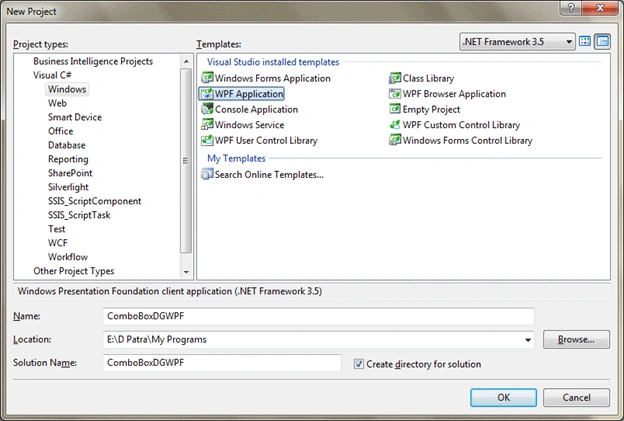
Here is the basic idea of our sample application; we would have sample data with one property that can be selected from a list of values displayed in ComboBox.
When the particular cell will be edit mode, we would be able to select from the list displayed in the ComboBox.
So let's have a class and have sample data.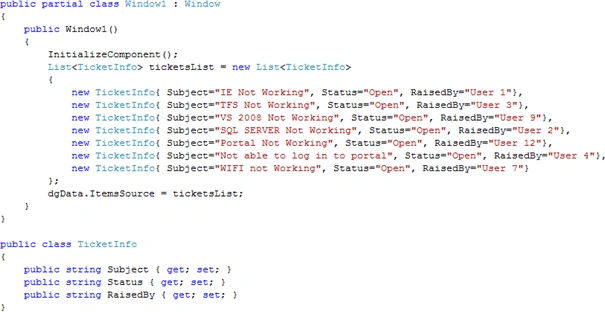
Now we will add a DataGrid to the Window and design the Columns inside of it.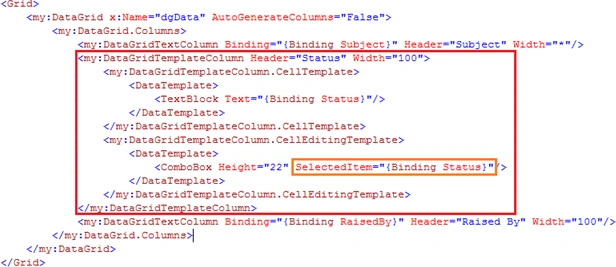
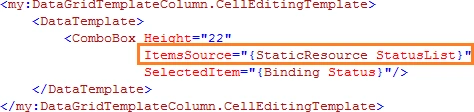
We need to set the ItemSource Property; for that I have created a Class that would generate the list and in XAML I have accessed it and assigned it. The following figures will clarify what I have done: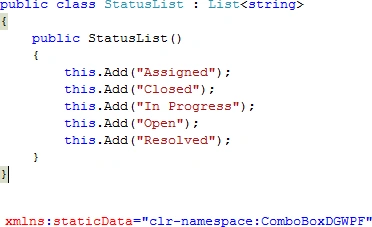
...
...
It seems we are done with the design of our DataGrid columns.
Run the application and try to edit the column "Status", you would get ComboBox control to handle the Status List.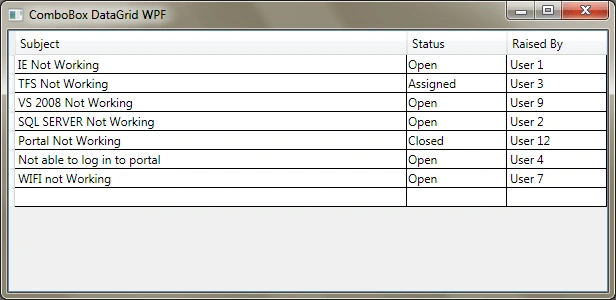
And when in Edit mode: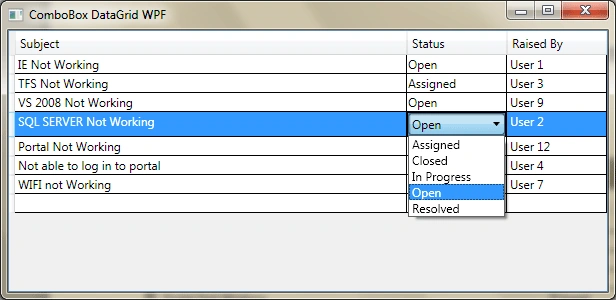
After Updating: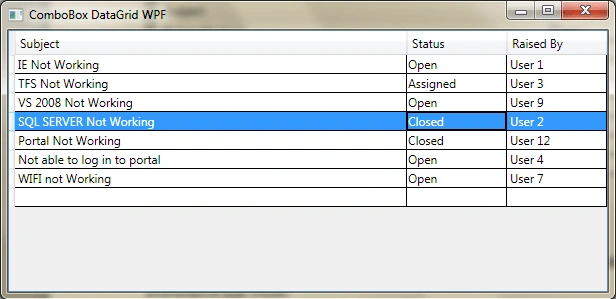
Hope this article helps.

ComboBox in DataGrid in WPF
Join the conversation! Your thoughts help the community grow.
Sign in to leave a comment
It is the same account you read, post and publish with — and you will come straight back to this page.
Rishikesh PandaPosted Dec 15, 2018, 6:14 AM
Ow to retrieve the data from combo box. Would be better if that was could be explained as well. Nice article
Ali HamzaPosted Mar 16, 2018, 12:10 AM
It is helpful. Nice. But i want to add combobox selected value path and display member path.
arif ansariPosted Mar 2, 2017, 5:43 AM
It is helpful. Nice
shameer kPosted Jan 13, 2016, 11:39 PM
thanks a lot
Mrunal LelePosted Aug 6, 2015, 11:23 AM
hey, I have combobox in datagrid whose list list has to be updated based on the value of another combobox, outside the grid. Do you know how I can implement this?
_siddh MPosted May 30, 2015, 2:12 AM
but how can i save the containt of combox in Database..? The value of selected combo box is need to save , How can we do this ..??
Ezequias RochaPosted Nov 13, 2013, 1:16 PM
Have you tried to make a tutorial for dynamic binding?
Ezequias RochaPosted Nov 13, 2013, 7:05 AM
Many thanks :)
shehin kkPosted Sep 10, 2013, 10:24 AM
It really helped me a lot.. Great Work!! Thanks a lot for sharing..
SridharPosted Sep 5, 2013, 6:52 AM
not working
Sandun DhanushkaeditedPosted May 9, 2013, 7:41 AMEdited May 9, 2013, 7:42 AM
Great work. can you tell me how to store "value" and "item" in ComboBox. (To get Different arguments as "SelectedValue" and "SelectedItem")
Ratnesh KhandelwaleditedPosted Apr 25, 2013, 7:14 AMEdited Apr 25, 2013, 7:18 AM
really helpfull, but I want to open the combo when we write into that "Status" cell. For example when I add a new row and after adding subject, as I enter a letter in "Status" cell this combo should open. Plz tell me If we can achieve this one also.
Jay HamlinPosted Jan 22, 2013, 4:31 PM
Great. Simple example and very clear. Thanks.
fang SterlingPosted Nov 19, 2012, 9:56 AM
Thanks for sharing! it is helpful for me !Thanks again!
emmett maguirePosted Oct 31, 2012, 6:06 AM
This is the first article i've read about this control that actually gives propper explaination of how it should work. Thank you sir.
gaurav vermaeditedPosted May 17, 2012, 7:07 AMEdited May 17, 2012, 7:07 AM
Thanx a lot buddy for this solution... :)
gioPosted Mar 17, 2011, 1:47 PM
I'm trying to do it the same but binding with ListBox or ComboBox, but I can't. I need some Template? maybe i lost in the XAML.
Shiv Kumar SharmaPosted Feb 21, 2011, 2:49 AM
thanks a lot for your solutions.
Jacky LeePosted Jan 7, 2011, 8:48 AM
favorite it!
John LundyPosted Dec 14, 2010, 2:56 AM
I have tried a mode=twoway on this solution but am still having problems making this work from a db. If I remove SelectedItem="{Binding Path=Code}" from the code below then everything works fine except the edited cell returns to the original value when I move off it. If I leave it in then that still happens but when I move to a new row the grid locks. Any help would be greatly appreciated. <ComboBox IsEditable="False" SelectedItem="{Binding Path=Code, mode=TwoWay}" DisplayMemberPath="Name" ItemsSource="{Binding Source={StaticResource brokersViewSource}}" />
John LundyeditedPosted Dec 13, 2010, 8:41 PMEdited Dec 13, 2010, 8:43 PM
I cannot seem to get this code to work when I replace the data created in code with tableadapters from a dataset to my sql server 2008 database. The data item I select in the combobox drops correctly into the edit cell but when i leave the edit cell on the same row it reverts to the original data item. When I change rows the grid completely locks up. Any ideas what I'm doing wrong?
Sergey LurkPosted Aug 18, 2010, 1:46 PM
Thanks, good work
PhilippePosted May 11, 2010, 10:59 AM
I've made the auto-edit work by 1) setting the focus on the cell I want to edit (using http://wpf.codeplex.com/Thread/View.aspx?ThreadId=34065) 2) performing a BeginEdit() on the DataGrid hope this helps
PhilippeeditedPosted May 11, 2010, 9:47 AMEdited May 11, 2010, 9:50 AM
Thanks, this solved my problem! btw, I'm going to try and figure out what the user above me requested. I've got an image column, when this is clicked, the cell should be made editable and become readOnly again when it looses focus
Sarbland MalikeditedPosted May 4, 2010, 2:16 AMEdited May 4, 2010, 2:17 AM
Good work. I have an edit able dropdown and how can I avoid F2+Tab to do editing? I need to start editing when the cell got focus..