

I'm creating a simple Comment Box web application using Angular 1.0.7.
Introduction to AangularJS
AngularJS is a JavaScript framework. It can be added to an HTML page with a <script> tag. AngularJS extends HTML attributes using Directives and binds the data to the HTML using Expressions.
- <script type="text/javascript" src="http://ajax.googleapis.com/ajax/libs/angularjs/1.0.7/angular.min.js"></script>
- AngularJS extends HTML with ng-directives.
- The ng-app directive defines an AngularJS application.
- The ng-model directive binds the value of HTML controls (input, select, textarea) to the application data.
- The ng-bind directive binds the application data to the HTML View.
Let's focus on our Comment Box project.
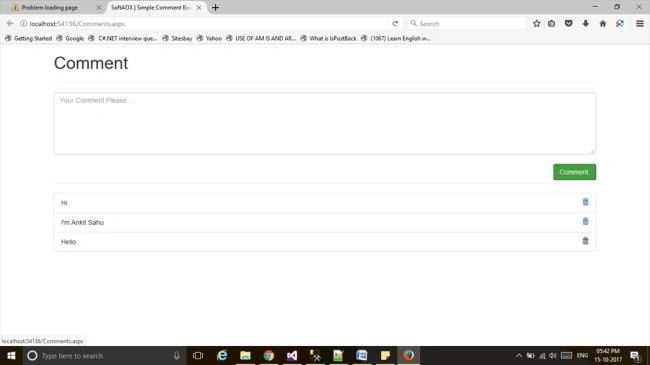
Follow the below steps to create this project.
Follow the below steps to create this project.
Step 1
Add a new web form to your project.
Add a new web form to your project.
- <%@ Page Language="C#" AutoEventWireup="true" CodeBehind="Comments.aspx.cs" Inherits="CommentBox.Comments" %>
- <!DOCTYPE html>
- <html xmlns="http://www.w3.org/1999/xhtml">
- <head runat="server">
- <title></title>
- </head>
- <body>
- <form id="form1" runat="server">
- <div>
- </div>
- </form>
- </body>
- </html>
Step 2
Add Angular.js and bootstrap cdn links in the head section.
Add Angular.js and bootstrap cdn links in the head section.
- <head runat="server">
- <link href="https://maxcdn.bootstrapcdn.com/bootstrap/3.3.7/css/bootstrap.min.css" rel="stylesheet">
- <script type="text/javascript" src="http://ajax.googleapis.com/ajax/libs/angularjs/1.0.7/angular.min.js"></script>
- </head>
Step 3
Define the ng-app directive in the <body> tag.
Define the ng-app directive in the <body> tag.
- <body ng-app>
- </body>
Step 4
Define HTML tag in Body section.
Define HTML tag in Body section.
- <div class="container">
- <h1>Comment
- </h1>
- <hr />
- <div class="form-group" >
- <form ng-controller="commentControler">
- <textarea class="form-control" rows="5" placeholder="Your Comment Please....." ng-model="CommentText"></textarea>
- <br />
- <button class="btn btn-success pull-right" ng-click="addComment()">Comment.</button>
- <br />
- <hr />
- <ul class="list-group" >
- <li class="list-group-item" ng-repeat="cmt in commentArray">{{cmt}}
- <a href="" ng-click="romoveComment($comText);" ><span class="glyphicon glyphicon-trash" style="float:right"> </span></a>
- </li>
- </ul>
- </form>
- </div>
- </div>
Step 5
Define Angular functions inside the <script> tag.
Define Angular functions inside the <script> tag.
- <script>
- function commentControler($scope) {
- $scope.commentArray = []; //Main Object hare I'm adding all Comment informations
- $scope.addComment = function () { // Comment Button click Event
- if($scope.CommentText!=null)
- {
- $scope.commentArray.push($scope.CommentText);
- $scope.CommentText = "";
- }
- }
- $scope.romoveComment = function ($comText) { // Delete button click Event
- $scope.commentArray.splice($comText,1);
- }
- }
- </script>
Note - When you make a Controller in AngularJS, you pass the $scope object as an argument.
Uses of AngularJS Scope
- The scope is the binding part between the HTML (View) and the JavaScript (Controller).
- Scope is an object with the available properties and methods.
- Scope is available for both, the View and the Controller.
I hope it's helpful.
Join the conversation! Your thoughts help the community grow.