

Introduction
Nowadays commenting or replying to a post is the most common thing in all social networks. Hence, in this article, I am going to explain how it works in SharePoint using AngularJS. With the help of this article, you will learn how to set comment or reply feature to a post in SharePoint using AngularJS.
ObjectiveComments allow your website's visitors to have a discussion with you and each other. So, the main objective of this article is you to know how to set a comment feature to a post while developing your website or a page in SharePoint using AngularJS.
Overview- Create a picture library or a list in SharePoint to retrieve the posts to the web page
- Create a web page with nice UI for displaying the posts and users to comment on the posts
- Create appropriate HTML and AngularJS script for the web page
- Create a list for storing the comments or replies for the posts
- Create a list to store the posts. Where I am naming “Discussions” to the list and creating appropriate columns, as shown below.
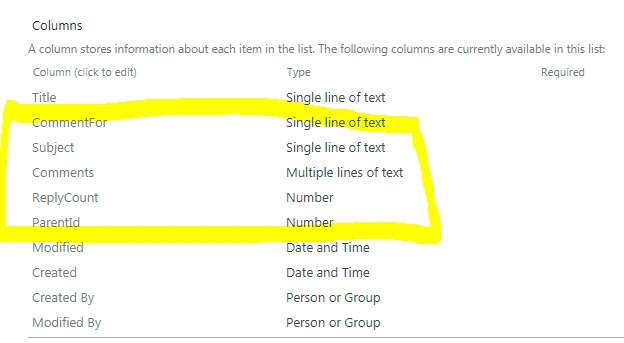
- Create one more list to store all the replies or comments for the post, as shown below.

- Write a script code to retrieve the discussions from the above list
- Display all discussions in a webpage, where user can reply or comment for the post as shown below,
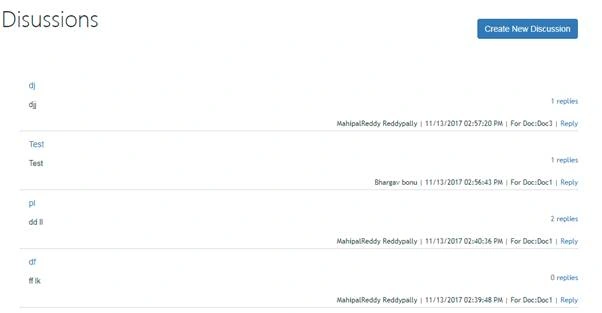
Where user can reply to every discussion individually by clicking on “Reply”. Also, they can read the all replies by clicking the “replies”
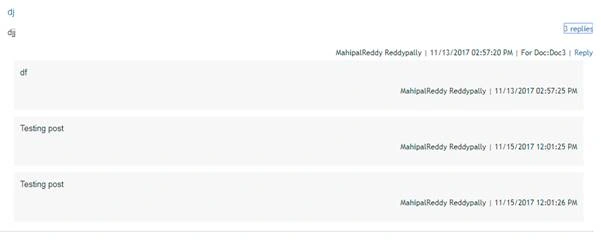
Let’s have a look at “Reply” and “replies” as below:
- When we click “Reply”, it shows as the below,
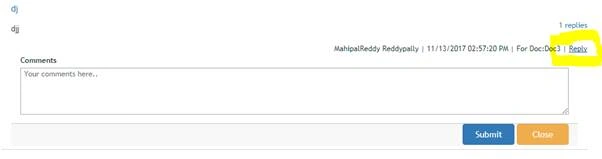
- By the click on submit, you can post your reply to the post.
- When clicking on “replies”, it shows all respected replies as below
- When click on “Create new discussion”, it shows as following,
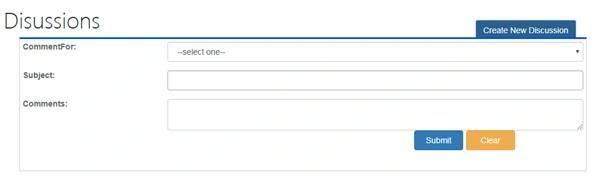
- You can add new discussion to the above page by using the above form
- <div class="container-fluid" ng-app="DiscussionApp" ng-controller="DiscussionController">
- <div class="form-horizontal col-lg-12 col-md-12 col-sm-12 col-xs-12">
- <button type="button" ng-click="CreateDisc();" style="float:right" class="btn btn-primary">Create New Discussion</button>
- <br/>
- <br/>
- <br/>
- <div class="form-group" id="HideWhenNew">
- <br/>
- <br/>
- <br/>
- <div class="col-lg-12 col-md-12 col-sm-12 col-xs-12">
- <div class="comment-maincol mb5" ng-repeat="Item in myarr">
- <div class="discussions-details ovrh pb5" id="replyDialogContainer">
- <strong class="fltl col-xs-10"><a title="{{Item.Subject}}" href="javascript:(void)" class="tdn flight14 ct fbold color-liblack">{{Item.Subject}}</a></strong>
- <p title="{{Item.Comments}}" class="pt5 pb5 flight13 fltl clrl" tabindex="0">{{Item.Comments}}</p>
- <div class="replies-text cp fltr" tabindex="0"><span title="{{Item.ReplyCount}}" class="replies-count flight12">
- {{Item.ReplyCount}}</span><span title="0" class="replies-count flight12" ng-if="Item.ReplyCount==null">
- 0</span><a class="replyarrow-up flight12" ng-click="ReadComment(Item.ID)" title="replies "> replies</a>
- </div>
- <div class="flight12 fltr clrl" id="childComment"><span title="{{Item.AuthorTitle}}" tabindex="0" class="fitalic">
- {{Item.AuthorTitle}}</span> | <span title="{{Item.Created|date:'M/d/yyyy hh:mm:ss a'}}" tabindex="0" class="fitalic">
- {{Item.Created|date:'M/d/yyyy hh:mm:ss a'}}</span> | <span title="{{Item.CommentFor}}" tabindex="0" class="fitalic">For Doc:{{Item.CommentFor}}</span> <a title="" href="javascript:(void)" class="tdn curd" style="color: #008272;">
- </a> | <a title="Reply" href="javascript:(void)" class="tdn" data-toggle="modal" data-target="#myModal" ng-click="replyComment(Item.ID)">
- Reply</a>
- </div>
- <div id="showReplyBox{{Item.ID}}" style="display:none" class="showReplyBox">
- <div class="col-xs-12 adddiscussion-popup replycomment-popup mt10 flight12" style="display: block;">
- <div class="adddiscussion-fields mt5 ml15 mr15" id="ReplyTxtArea">
- <label title="Comments" tabindex="0">
- Comments </label>
- <textarea placeholder="Your comments here.." id="replyCommentContent" ng-model="db.Reply" rows="5" class="replyCommentContent"></textarea>
- <span class="ErMsg">
- This field is required</span>
- </div>
- <br/>
- <div class="footer col-xs-12 mt20">
- <div class="fltr mr5 mt10">
- <button type="button" ng-click="SubmitToReplyList(DiscussionId,db);" class="btn btn-primary">Submit</button>
- <button type="reset" ng-click="ForClose(Item.ID);" class="btn btn-warning">Close</button>
- </div>
- </div>
- </div>
- </div>
- <div class="col-xs-12 col-lg-12 col-sm-12 col-md-12" ng-if="ActiveMe==Item.ID" id="RespReply{{Item.ID}}">
- <div class="replycomment-area" style="display: block;" ng-repeat="Rply in myarrs">
- <div class="comment-child-container" id="parent_48">
- <div class="replycomment-inner mt10">
- <p title="{{Rply.Reply}}" class="pt10 flight13 pb10 pl10 pr10" tabindex="0">
- {{Rply.Reply}}
- </p>
- <p class="flight12 fitalic pr10 pb10 ovrh"><span class="fltr block"><span title="{{Rply.ReplyAuthorTitle}}" tabindex="0">
- {{Rply.ReplyAuthorTitle}}</span> | <span title="{{Rply.ReplyCreated|date:'M/d/yyyy hh:mm:ss a'}}" tabindex="0">
- {{Rply.ReplyCreated|date:'M/d/yyyy hh:mm:ss a'}}</span> </span>
- </p>
- </div>
- </div>
- </div>
- </div>
- </div>
- </div>
- </div>
- </div>
- <div id="ShowWhenNeedCreate">
- <div class="form-group">
- <label class="col-lg-3 col-md-3 col-sm-3 col-xs-3">CommentFor:</label>
- <div class="col-lg-9 col-md-9 col-sm-3 col-xs-9">
- <select class="form-control" ng-model="DataBind.CommentFor" >
- <option value="">--select one--</option>
- <option value="Doc1">Doc1</option>
- <option value="Doc2">Doc2</option>
- <option value="Doc3">Doc3</option>
- </select>
- </div>
- </div>
- <div class="form-group">
- <label class="col-lg-3 col-md-3 col-sm-3 col-xs-3">Subject:</label>
- <div class="col-lg-9 col-md-9 col-sm-3 col-xs-9">
- <input class="form-control" ng-model="DataBind.Subject" type="text" id="TxtSub"/>
- <span class="ErMsg" id="TxtSubMsg">Please fill out this!</span>
- </div>
- </div>
- <div class="form-group">
- <label class="col-lg-3 col-md-3 col-sm-3 col-xs-3">Comments:</label>
- <div class="col-lg-9 col-md-9 col-sm-3 col-xs-9">
- <textarea class="form-control" ng-model="DataBind.Comments" id="txtCommentFor"></textarea>
- <span class="ErMsg" id="CmntMsg">Please write some comments!</span>
- </div>
- <hr id="HrLine">
- </hr>
- <div class="form-group">
- <div class="col-lg-8 col-md-8 col-sm-8 col-xs-8"></div>
- <div class="col-lg-4 col-md-4 col-sm-4 col-xs-4"><button type="button" ng-click="SubmitToList(DataBind);" class="btn btn-primary BtnsAlign">Submit</button><button type="reset" class="btn btn-warning BtnsAlign">Clear</button></div>
- </div>
- </div>
- </div>
- </div>
- </div>
The above HTML includes all functionalities like “Create new discussion”, “Reply”, “replies”, count for replies etc.
Script code for the above UI
- var myApp = angular.module('DiscussionApp', []); //,'ui.bootstrap'
- var hash = [];
- var hashs = [];
- var ThisisforCommentFor = '';
- myApp.controller('DiscussionController', ['$scope', '$http', '$q', function($scope, $http, $q, $compile) {
- $scope.showModal = false;
- $("#ShowWhenNeedCreate").hide();
- GetCustListProperties($scope, "Discussions");
- GetReplyListProperties($scope, "RepliesOfDiscussions");
- GetDiscussionsItems($scope);
- $scope.ReadComment = function(Thissd) {
- // alert(Thissd);
- $scope.ActiveMe = Thissd;
- $("#RespReply" + Thissd).toggle();
- GetReplies($scope, Thissd);
- }
- $scope.replyComment = function(ThsId) {
- //$scope.showModal = true;
- //$("#myModal").show();
- $scope.DiscussionId = ThsId;
- $("#showReplyBox" + ThsId).toggle();
- }
- $scope.CreateDisc = function() {
- $("#ShowWhenNeedCreate").toggle('slow');
- //$("#HideWhenNew").hide();
- }
- $scope.ForClose = function(RespId) {
- $("#showReplyBox" + RespId).hide();
- }
- $scope.SubmitToReplyList = function(ToId, db) {
- if (JSON.stringify(db) === undefined) {
- $("#replyCommentContent").focus();
- $("span.ErMsg").show();
- } else {
- var Comments = JSON.stringify(db);
- Comments = Comments.replace(/[{}]/g, '');
- var datavalueOfModal = "{__metadata:{'type':'SP.Data.RepliesOfDiscussionsListItem'}," + Comments + ",DiscussionId:" + ToId + "}";
- //alert(datavalueOfModal);
- $.ajax({
- url: _spPageContextInfo.webAbsoluteUrl + "/_api/web/lists/GetByTitle('RepliesOfDiscussions')/items",
- type: "POST",
- headers: {
- "accept": "application/json;odata=verbose",
- "X-RequestDigest": $("#__REQUESTDIGEST").val(),
- "content-Type": "application/json;odata=verbose"
- },
- data: datavalueOfModal,
- success: function(data) {
- $scope.ReadComment(ToId);
- GetReplyCountOfItem($scope, ToId);
- },
- error: function(error) {
- alert(JSON.stringify(error));
- }
- });
- }
- }
- //
- $("#ReplyTxtArea textarea").keyup(function() {
- alert("textarea");
- if ($(this).val()) {
- $(this).css("border", "1px solid #ababab");
- $("span.ErMsg").hide();
- }
- });
- //
- $scope.SubmitToList = function(FormValues) {
- if ($("#TxtSub").val() === "") {
- $("#TxtSub").css("border", "2px solid #FF0000");
- $("#TxtSub").focus();
- $("span#TxtSubMsg").show();
- } else if ($("#txtCommentFor").val() === "") {
- $("#txtMeetName").css("border", "2px solid #FF0000");
- $("#txtCommentFor").focus();
- $("span#CmntMsg").show();
- } else {
- var data = JSON.stringify(FormValues);
- data = data.replace(/[{}]/g, '');
- var datavalue = "{__metadata:{'type':'SP.Data.DiscussionsListItem'}," + data + ",ParentId: " + $scope.MtParentId + "}";
- // console.log(datavalue);
- $.ajax({
- url: _spPageContextInfo.webAbsoluteUrl + "/_api/web/lists/GetByTitle('Discussions')/items",
- type: "POST",
- headers: {
- "accept": "application/json;odata=verbose",
- "X-RequestDigest": $("#__REQUESTDIGEST").val(),
- "content-Type": "application/json;odata=verbose"
- },
- data: datavalue,
- success: function(data) {
- $("#ShowWhenNeedCreate").hide();
- $("#HideWhenNew").show();
- GetDiscussionsItems($scope);
- $scope.$apply(function() {
- //$scope.Items=$scope.Items;
- $scope.myarr = $scope.myarr;
- })
- console.log(data);
- },
- error: function(error) {
- alert(JSON.stringify(error));
- }
- });
- }
- }
- $("#ShowWhenNeedCreate textarea[id='txtCommentFor']").keyup(function() {
- if ($(this).val()) {
- $(this).css("border", "1px solid #ababab");
- $("span#CmntMsg").hide();
- }
- });
- $("#ShowWhenNeedCreate input").keyup(function() {
- if ($(this).val()) {
- $(this).css("border", "1px solid #ababab");
- $("span#TxtSubMsg").hide();
- // $("span#CmntMsg").hide();
- }
- });
- }])
- function GetDiscussionsItems($scope) {
- hash = [];
- $.ajax({
- url: _spPageContextInfo.webAbsoluteUrl + "/_api/web/lists/GetByTitle('Discussions')/items?$filter=ParentId eq " + GetUrlKeyValue("itemid") + " &$select=*&$expand=Author&$select=Author/ID,Author/Title&$orderby=ID desc",
- method: "GET",
- async: false,
- headers: {
- "Accept": "application/json;odata=verbose"
- },
- success: function(data) {
- $scope.Items = data.d.results;
- $scope.MtParentId = $scope.Items[0].ParentId;
- console.log($scope.MtParentId);
- $(data.d.results).each(function(listName, currentRowForBody) {
- var CommentFor = currentRowForBody.CommentFor;
- var Subject = currentRowForBody.Subject;
- var Comments = currentRowForBody.Comments;
- var ReplyCount = currentRowForBody.ReplyCount;
- var ParentId = currentRowForBody.ParentId;
- var ID = currentRowForBody.ID;
- var AuthorTitle = currentRowForBody.Author.Title;
- var Created = currentRowForBody.Created;
- // console.log(currentRowForBody.Author.Title);
- var Mu = Subject.split(",");
- for (var i = 0; i < Mu.length; i++) {
- var smss = {
- Subject: Subject,
- Comments: Comments,
- ReplyCount: ReplyCount,
- CommentFor: CommentFor,
- ID: ID,
- ParentId: ParentId,
- AuthorTitle: AuthorTitle.split(",")[i],
- Created: Created.split(",")[i]
- }
- hash.push(smss);
- }
- });
- $scope.myarr = hash;
- //console.log($scope.myarr);
- },
- error: function(sender, args) {
- console.log(args.get_message());
- }
- });
- }
- function GetReplyCountOfItem($scope, DscId) {
- $.ajax({
- url: _spPageContextInfo.webAbsoluteUrl + "/_api/web/lists/GetByTitle('Discussions')/items(" + DscId + ")",
- method: "GET",
- async: false,
- headers: {
- "Accept": "application/json;odata=verbose"
- },
- success: function(data) {
- $scope.ReplyCounts = data.d.ReplyCount + 1;
- UpdateReplyCountInDiscList($scope, DscId, $scope.ReplyCounts);
- console.log($scope.ReplyCounts);
- },
- error: function(sender, args) {
- console.log(args.get_message());
- }
- });
- }
- function UpdateReplyCountInDiscList($scope, DscId, NewRplyCount) {
- $.ajax({
- url: _spPageContextInfo.webAbsoluteUrl + "/_api/web/lists/GetByTitle('Discussions')/items(" + DscId + ")",
- type: "POST",
- headers: {
- "accept": "application/json;odata=verbose",
- "X-RequestDigest": $("#__REQUESTDIGEST").val(),
- "content-Type": "application/json;odata=verbose",
- "IF-MATCH": "*",
- "X-HTTP-Method": "MERGE"
- },
- data: "{__metadata:{'type':'SP.Data.DiscussionsListItem'},ReplyCount:" + NewRplyCount + "}",
- success: function(data) {
- GetDiscussionsItems($scope);
- $scope.$apply(function() {
- $scope.myarr = $scope.myarr;
- })
- },
- error: function(error) {
- alert(JSON.stringify(error));
- }
- });
- }
- function GetReplies($scope, ThisId) {
- $scope.myarrs = [];
- //hashs=[];
- hashs.length = 0;
- $.ajax({
- url: _spPageContextInfo.webAbsoluteUrl + "/_api/web/lists/GetByTitle('RepliesOfDiscussions')/items?$filter=DiscussionId eq " + ThisId + "&$select=*&$expand=Author&$select=Author/ID,Author/Title",
- method: "GET",
- async: false,
- headers: {
- "Accept": "application/json;odata=verbose"
- },
- success: function(data) {
- $(data.d.results).each(function(listName, ReplyBody) {
- var Reply = ReplyBody.Reply;
- var ReplyAuthorTitle = ReplyBody.Author.Title;
- var ReplyCreated = ReplyBody.Created;
- // console.log(currentRowForBody.Author.Title);
- var Mu = Reply.split(",");
- for (var i = 0; i < Mu.length; i++) {
- var smss = {
- Reply: Reply.split(",")[i],
- ReplyAuthorTitle: ReplyAuthorTitle.split(",")[i],
- ReplyCreated: ReplyCreated.split(",")[i]
- };
- hashs.push(smss);
- }
- });
- $scope.myarrs = hashs;
- },
- error: function(sender, args) {
- console.log(args.get_message());
- }
- });
- }
The above scripts includes all functionalities, validations etc.
References for the above filesPlease add the following JS & CSS files to your code in the following order to make the application works.
· CSS/jquery-ui.css
· bootstrap.min.css
· Discussion.css(custom CSS)
· jquery.min.js
· angular.min.js
· Discussion.js(customized JS as defined above)
Hope, I did my job well. So, with the help of this article, you have learned how to set comment or reply feature to a post while developing your website or a page in SharePoint using AngularJS. Make sure to add the all needed reference files to work this application properly.
Thank you…Happy coding.
Gk NPosted Aug 17, 2018, 10:29 AM
I am getting following error.. {"readyState":4,"responseText":"{\"error\":{\"code\":\"-1, Microsoft.SharePoint.Client.InvalidClientQueryException\",\"message\":{\"lang\":\"en-US\",\"value\":\"Invalid JSON. A token was not recognized in the JSON content.\"}}}","responseJSON":{"error":{"code":"-1, Microsoft.SharePoint.Client.InvalidClientQueryException","message":{"lang":"en-US","value":"Invalid JSON. A token was not recognized in the JSON content."}}},"status":400,"statusText":"error"}
Gk NPosted Aug 17, 2018, 10:29 AM
I am trying to implement in SP online did everything exactly as you said.. I am getting the UI but for the functionality...
veera punnaPosted Dec 13, 2017, 8:55 AM
Nice Article, it was helped me lot ,thanks for sharing it Mahipal.