
Introduction
A comments system has become very important in order to share our opinion on social media and forums with others.
So, in this article, we will implement comments system by using ASP.NET MVC 5 and jQuery, Bootstrap. I hope you will like this.
Prerequisites
Make sure you have installed Visual Studio 2015 (.NET Framework 4.5.2) and SQL Server.
In this post, we are going to:
- Create database.
- Create MVC application.
- Configuring entity framework ORM to connect to the database.
- Create our Comments Controller.
- Create Razor pages in order to build our application.
SQL Database part
Here, you find the scripts to create database and tables.
Create Database
- USE [master]
- GO
- /****** Object: Database [DBComments] Script Date: 11/20/2017 2:23:19 PM ******/
- CREATE DATABASE [DBComments]
- CONTAINMENT = NONE
- ON PRIMARY
- ( NAME = N'DBComments', FILENAME = N'c:\Program Files (x86)\Microsoft SQL Server\MSSQL11.MSSQLSERVER\MSSQL\DATA\DBComments.mdf' , SIZE = 3072KB , MAXSIZE = UNLIMITED, FILEGROWTH = 1024KB )
- LOG ON
- ( NAME = N'DBComments_log', FILENAME = N'c:\Program Files (x86)\Microsoft SQL Server\MSSQL11.MSSQLSERVER\MSSQL\DATA\DBComments_log.ldf' , SIZE = 1024KB , MAXSIZE = 2048GB , FILEGROWTH = 10%)
- GO
- ALTER DATABASE [DBComments] SET COMPATIBILITY_LEVEL = 110
- GO
- IF (1 = FULLTEXTSERVICEPROPERTY('IsFullTextInstalled'))
- begin
- EXEC [DBComments].[dbo].[sp_fulltext_database] @action = 'enable'
- end
- GO
- ALTER DATABASE [DBComments] SET ANSI_NULL_DEFAULT OFF
- GO
- ALTER DATABASE [DBComments] SET ANSI_NULLS OFF
- GO
- ALTER DATABASE [DBComments] SET ANSI_PADDING OFF
- GO
- ALTER DATABASE [DBComments] SET ANSI_WARNINGS OFF
- GO
- ALTER DATABASE [DBComments] SET ARITHABORT OFF
- GO
- ALTER DATABASE [DBComments] SET AUTO_CLOSE OFF
- GO
- ALTER DATABASE [DBComments] SET AUTO_CREATE_STATISTICS ON
- GO
- ALTER DATABASE [DBComments] SET AUTO_SHRINK OFF
- GO
- ALTER DATABASE [DBComments] SET AUTO_UPDATE_STATISTICS ON
- GO
- ALTER DATABASE [DBComments] SET CURSOR_CLOSE_ON_COMMIT OFF
- GO
- ALTER DATABASE [DBComments] SET CURSOR_DEFAULT GLOBAL
- GO
- ALTER DATABASE [DBComments] SET CONCAT_NULL_YIELDS_NULL OFF
- GO
- ALTER DATABASE [DBComments] SET NUMERIC_ROUNDABORT OFF
- GO
- ALTER DATABASE [DBComments] SET QUOTED_IDENTIFIER OFF
- GO
- ALTER DATABASE [DBComments] SET RECURSIVE_TRIGGERS OFF
- GO
- ALTER DATABASE [DBComments] SET DISABLE_BROKER
- GO
- ALTER DATABASE [DBComments] SET AUTO_UPDATE_STATISTICS_ASYNC OFF
- GO
- ALTER DATABASE [DBComments] SET DATE_CORRELATION_OPTIMIZATION OFF
- GO
- ALTER DATABASE [DBComments] SET TRUSTWORTHY OFF
- GO
- ALTER DATABASE [DBComments] SET ALLOW_SNAPSHOT_ISOLATION OFF
- GO
- ALTER DATABASE [DBComments] SET PARAMETERIZATION SIMPLE
- GO
- ALTER DATABASE [DBComments] SET READ_COMMITTED_SNAPSHOT OFF
- GO
- ALTER DATABASE [DBComments] SET HONOR_BROKER_PRIORITY OFF
- GO
- ALTER DATABASE [DBComments] SET RECOVERY SIMPLE
- GO
- ALTER DATABASE [DBComments] SET MULTI_USER
- GO
- ALTER DATABASE [DBComments] SET PAGE_VERIFY CHECKSUM
- GO
- ALTER DATABASE [DBComments] SET DB_CHAINING OFF
- GO
- ALTER DATABASE [DBComments] SET FILESTREAM( NON_TRANSACTED_ACCESS = OFF )
- GO
- ALTER DATABASE [DBComments] SET TARGET_RECOVERY_TIME = 0 SECONDS
- GO
- ALTER DATABASE [DBComments] SET READ_WRITE
- GO
Create Tables
After creating a database, we will move to create all the needed tables.
Users Table
- USE [DBComments]
- GO
- /****** Object: Table [dbo].[Users] Script Date: 11/20/2017 2:24:16 PM ******/
- SET ANSI_NULLS ON
- GO
- SET QUOTED_IDENTIFIER ON
- GO
- SET ANSI_PADDING ON
- GO
- CREATE TABLE [dbo].[Users](
- [UserID] [int] IDENTITY(1,1) NOT NULL,
- [Username] [varchar](50) NULL,
- [imageProfile] [varchar](50) NULL,
- CONSTRAINT [PK_Users] PRIMARY KEY CLUSTERED
- (
- [UserID] ASC
- )WITH (PAD_INDEX = OFF, STATISTICS_NORECOMPUTE = OFF, IGNORE_DUP_KEY = OFF, ALLOW_ROW_LOCKS = ON, ALLOW_PAGE_LOCKS = ON) ON [PRIMARY]
- ) ON [PRIMARY]
- GO
- SET ANSI_PADDING OFF
- GO
Posts Table
- USE [DBComments]
- GO
- /****** Object: Table [dbo].[Posts] Script Date: 11/20/2017 2:24:42 PM ******/
- SET ANSI_NULLS ON
- GO
- SET QUOTED_IDENTIFIER ON
- GO
- SET ANSI_PADDING ON
- GO
- CREATE TABLE [dbo].[Posts](
- [PostID] [int] IDENTITY(1,1) NOT NULL,
- [Message] [varchar](50) NULL,
- [PostedDate] [datetime] NULL,
- CONSTRAINT [PK_Posts] PRIMARY KEY CLUSTERED
- (
- [PostID] ASC
- )WITH (PAD_INDEX = OFF, STATISTICS_NORECOMPUTE = OFF, IGNORE_DUP_KEY = OFF, ALLOW_ROW_LOCKS = ON, ALLOW_PAGE_LOCKS = ON) ON [PRIMARY]
- ) ON [PRIMARY]
- GO
- SET ANSI_PADDING OFF
- GO
Comments Table
- USE [DBComments]
- GO
- /****** Object: Table [dbo].[Comments] Script Date: 11/20/2017 2:25:03 PM ******/
- SET ANSI_NULLS ON
- GO
- SET QUOTED_IDENTIFIER ON
- GO
- SET ANSI_PADDING ON
- GO
- CREATE TABLE [dbo].[Comments](
- [ComID] [int] IDENTITY(1,1) NOT NULL,
- [CommentMsg] [varchar](max) NULL,
- [CommentedDate] [datetime] NULL,
- [PostID] [int] NULL,
- [UserID] [int] NULL,
- CONSTRAINT [PK_Comments] PRIMARY KEY CLUSTERED
- (
- [ComID] ASC
- )WITH (PAD_INDEX = OFF, STATISTICS_NORECOMPUTE = OFF, IGNORE_DUP_KEY = OFF, ALLOW_ROW_LOCKS = ON, ALLOW_PAGE_LOCKS = ON) ON [PRIMARY]
- ) ON [PRIMARY] TEXTIMAGE_ON [PRIMARY]
- GO
- SET ANSI_PADDING OFF
- GO
- ALTER TABLE [dbo].[Comments] WITH CHECK ADD CONSTRAINT [FK_Comments_Users] FOREIGN KEY([PostID])
- REFERENCES [dbo].[Posts] ([PostID])
- GO
- ALTER TABLE [dbo].[Comments] CHECK CONSTRAINT [FK_Comments_Users]
- GO
- ALTER TABLE [dbo].[Comments] WITH CHECK ADD CONSTRAINT [FK_Comments_Users1] FOREIGN KEY([UserID])
- REFERENCES [dbo].[Users] ([UserID])
- GO
- ALTER TABLE [dbo].[Comments] CHECK CONSTRAINT [FK_Comments_Users1]
- GO
SubComments Table
- USE [DBComments]
- GO
- /****** Object: Table [dbo].[SubComments] Script Date: 11/20/2017 2:25:29 PM ******/
- SET ANSI_NULLS ON
- GO
- SET QUOTED_IDENTIFIER ON
- GO
- SET ANSI_PADDING ON
- GO
- CREATE TABLE [dbo].[SubComments](
- [SubComID] [int] IDENTITY(1,1) NOT NULL,
- [CommentMsg] [varchar](50) NULL,
- [CommentedDate] [datetime] NULL,
- [ComID] [int] NULL,
- [UserID] [int] NULL,
- CONSTRAINT [PK_SubComments] PRIMARY KEY CLUSTERED
- (
- [SubComID] ASC
- )WITH (PAD_INDEX = OFF, STATISTICS_NORECOMPUTE = OFF, IGNORE_DUP_KEY = OFF, ALLOW_ROW_LOCKS = ON, ALLOW_PAGE_LOCKS = ON) ON [PRIMARY]
- ) ON [PRIMARY]
- GO
- SET ANSI_PADDING OFF
- GO
- ALTER TABLE [dbo].[SubComments] WITH CHECK ADD CONSTRAINT [FK_SubComments_Comments] FOREIGN KEY([ComID])
- REFERENCES [dbo].[Comments] ([ComID])
- GO
- ALTER TABLE [dbo].[SubComments] CHECK CONSTRAINT [FK_SubComments_Comments]
- GO
- ALTER TABLE [dbo].[SubComments] WITH CHECK ADD CONSTRAINT [FK_SubComments_Users] FOREIGN KEY([UserID])
- REFERENCES [dbo].[Users] ([UserID])
- GO
- ALTER TABLE [dbo].[SubComments] CHECK CONSTRAINT [FK_SubComments_Users]
- GO
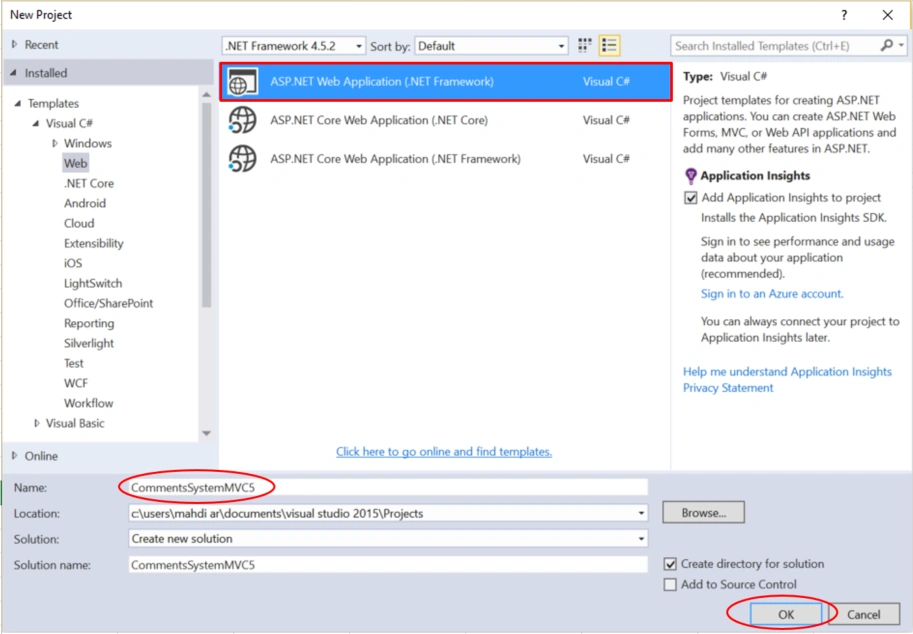
Open Visual Studio and select File >> New Project.
The "New Project" window will pop up. Select ASP.NET Web Application (.NET Framework), name your project, and click OK.
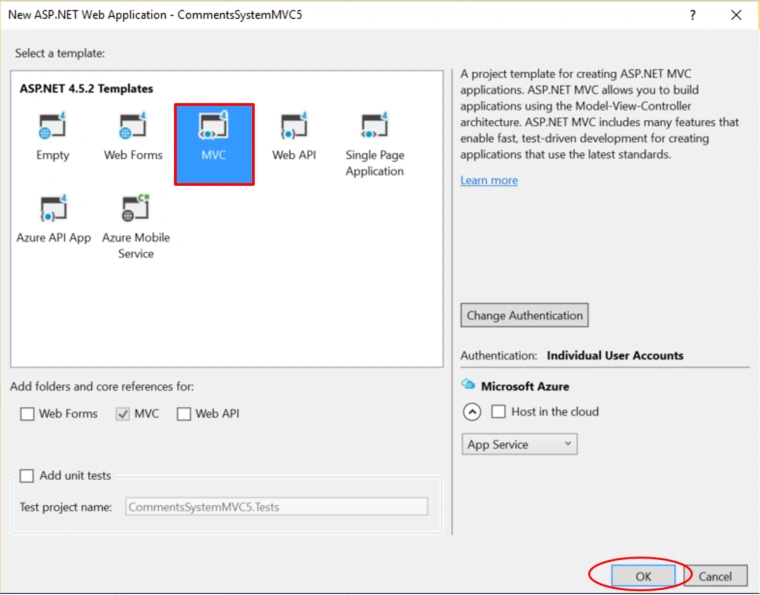
Next, a new dialog will pop up for selecting the template. We are going to choose MVC template and click OK.
Adding ADO.NET Entity Data Model
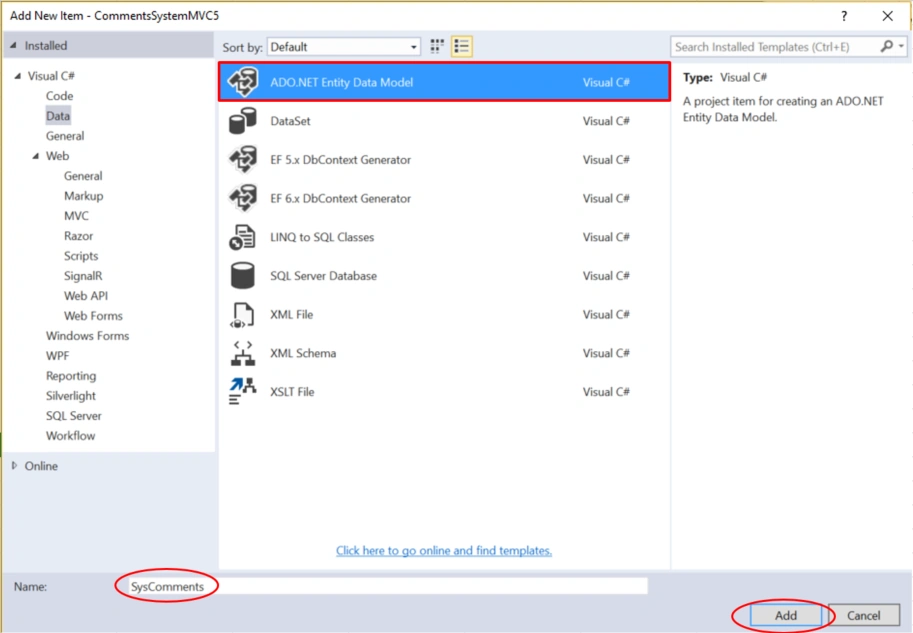
Right-click on the project name, click Add >> Add New Item.
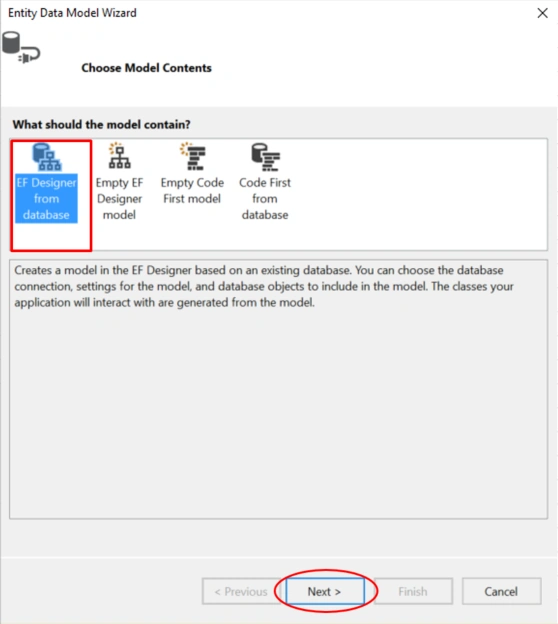
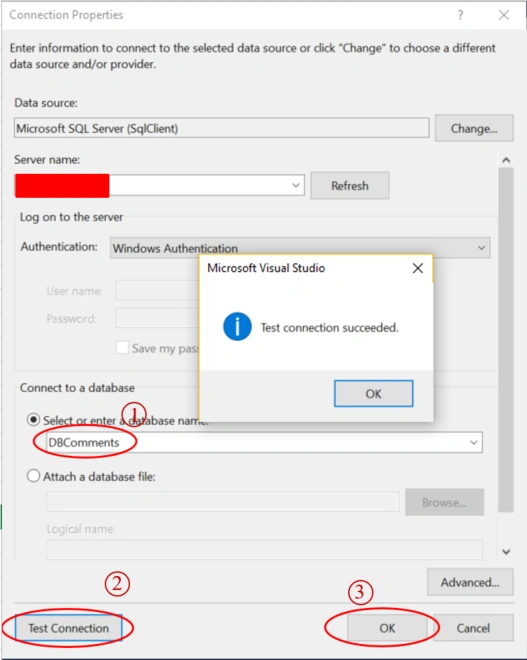
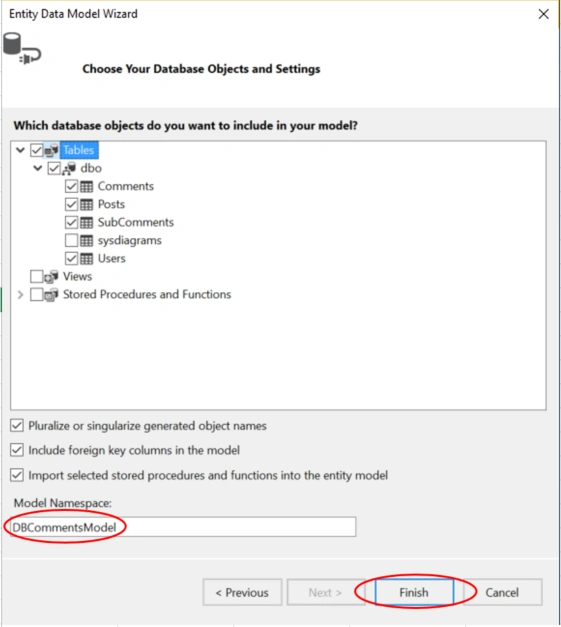
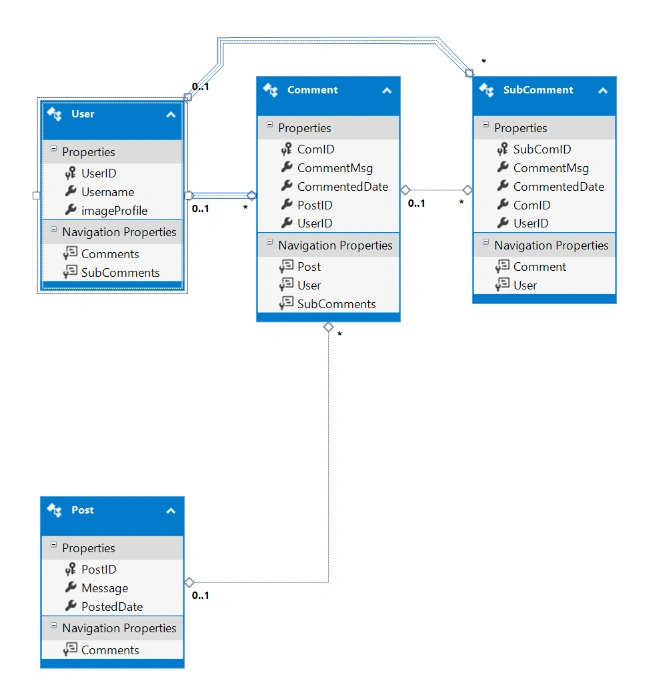
A dialog box will pop up. Inside Visual C#, select Data >> ADO.NET Entity Data Model, and enter the name for your DbContext model as SysComments, then click Add.
Create a Controller
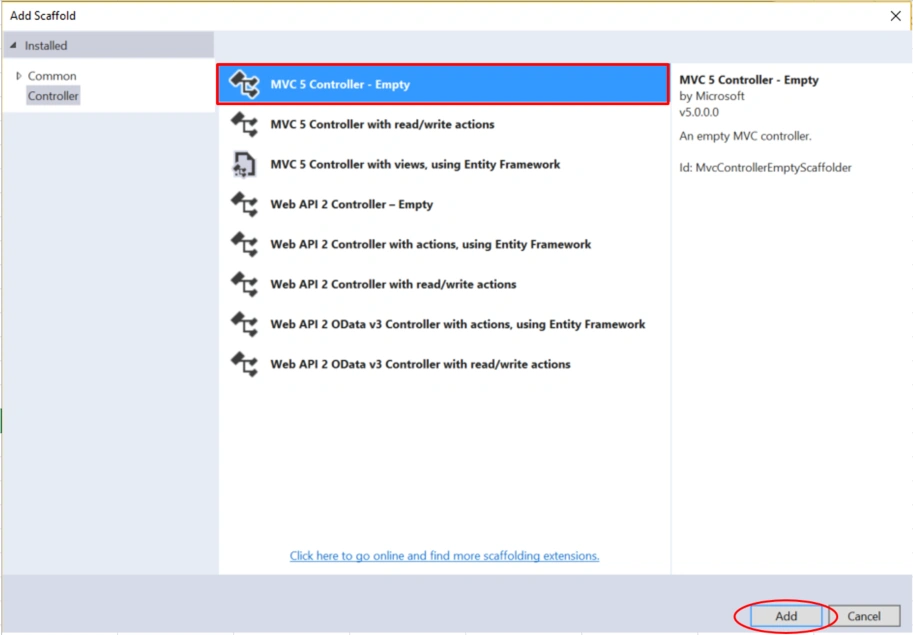
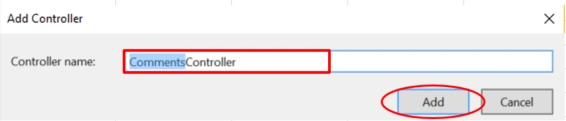
Now, we are going to create a Controller. Right-click on the Controllers folder> > Add >> Controller>> selecting MVC 5 Controller - Empty>> click Add. In the next dialog, name the controller CommentsController and then click Add.
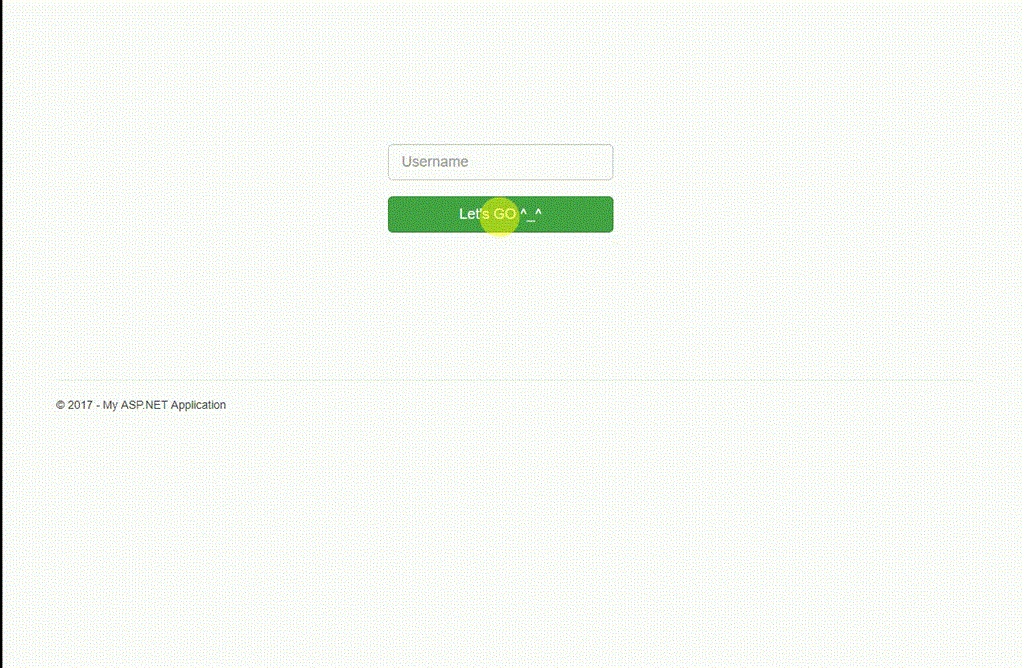
Here, we have used Get Users action in order to authenticate user by providing her/his username. If the user exists in users table, we will redirect him to Get Posts action, otherwise the following message ‘username does not exist’ will be displayed.
- [HttpGet]
- public ActionResult GetUsers()
- {
- return View();
- }
- [HttpPost]
- public ActionResult GetUsers(string username)
- {
- User user = dbContext.Users.Where(u => u.Username.ToLower() == username.ToLower())
- .FirstOrDefault();
- if(user != null)
- {
- Session["UserID"] = user.UserID;
- return RedirectToAction("GetPosts");
- }
- ViewBag.Msg = "Username does not exist !";
- return View();
- }
GetUsers.cshtml
- @{
- ViewBag.Title = "GetUsers";
- }
- @using (Html.BeginForm("GetUsers", "Comments", FormMethod.Post))
- {
- <div class="blockUser" style="width: 44%; margin: 16% 26%;">
- <div style="margin-left: 23%;">
- <input type="text" class="form-control input-lg" name="username" placeholder="Username" /><br />
- <input type="submit" class="btn btn-success btn-lg" value="Let's GO ^_^" style="width: 75%;" />
- </div>
- </div>
- }
- @if (ViewBag.Msg != null)
- {
- <div class="alert alert-danger" role="alert">Oups! @ViewBag.Msg</div>
- }
In order to display all posts, we have created Get Posts action which selects all posts from posts table, then displayed them within GetPosts.cshtml by using foreach loop.
- [HttpGet]
- public ActionResult GetPosts()
- {
- IQueryable<PostsVM> Posts = dbContext.Posts
- .Select(p => new PostsVM
- {
- PostID = p.PostID,
- Message = p.Message,
- PostedDate = p.PostedDate.Value
- }).AsQueryable();
- return View(Posts);
- }
GetPosts.cshtml
- @model IQueryable<CommentsSystemMVC5.ViewModels.PostsVM>
- @{
- ViewBag.Title = "GetPosts";
- }
- @if (Model != null)
- {
- foreach (var post in Model)
- {
- <div class="panel panel-default" style="width: 80%;">
- <div class="panel-body">
- <div class="avatar">
- <img src="~/Images/avatar.png" class="img-circle" style="width: 60px;"/>
- <span> <a href="" style="font-weight:bold">Leo Messi</a> </span><br />
- <p style="margin-left: 60px; margin-top: -19px;">
- <span class="glyphicon glyphicon-time" aria-hidden="true"></span>
- <time class="timeago" datetime="@post.PostedDate">@post.PostedDate</time>
- </p>
- </div>
- <div class="postMessage" style="margin-top: 11px; margin-left: 9px;">
- <span class="label label-warning"> @string.Format("Post #{0}", post.PostID) </span><br />
- <p class="message">
- @post.Message
- </p>
- </div>
- </div>
- <div class="panel-footer">
- <button type="button" class="btn btn-default Comment" data-id="@post.PostID" value="Comment">
- <span class="glyphicon glyphicon-comment" aria-hidden="true"></span> Comment
- </button>
- </div>
- <div id="@string.Format("{0}_{1}","commentsBlock", post.PostID)" style="border: 1px solid #f1eaea; background-color: #eaf2ff;">
- <div class="AddComment" style="margin-left: 30%; margin-bottom: 5px; margin-top: 8px;">
- <input type="text" id="@string.Format("{0}_{1}", "comment", post.PostID)" class="form-control" placeholder="Add a Comment ..." style="display: inline;" />
- <button type="button" class="btn btn-default addComment" data-id="@post.PostID"><span class="glyphicon glyphicon-comment" aria-hidden="true"></span></button>
- </div>
- </div>
- </div>
- }
- }
- @section Scripts
- {
- <script type="text/javascript">
- $(document).ready(function () {
- //Click Comment
- $('.Comment').on('click', function () {
- var id = $(this).attr("data-id");
- var allCommentsArea = $('<div>').addClass('allComments_' + id);
- //function that allow us to get all comments related to post id
- $.ajax({
- type: 'GET',
- url: '@Url.Action("GetComments", "Comments")',
- data: { postId: id },
- success: function (response) {
- if ($('div').hasClass('allComments_' + id + ''))
- {
- $('div[class=allComments_' + id + ']').remove();
- }
- //console.log(response);
- allCommentsArea.html(response);
- allCommentsArea.prependTo('#commentsBlock_' + id);
- },
- error: function (response) {
- alert('Sorry: Comments cannot be loaded !');
- }
- })
- });
- //Add New Comment
- $('.addComment').on('click', function () {
- var postId = $(this).attr('data-id');
- var commentMsg = $('#comment_' + postId).val();
- var dateTimeNow = new Date();
- //alert('Hello');
- var comment = {
- CommentMsg: commentMsg,
- CommentedDate: dateTimeNow.toLocaleString()
- };
- $.ajax({
- type: 'POST',
- url: '@Url.Action("AddComment", "Comments")',
- data: { comment, postId },
- success: function (response) {
- $('div[class=allComments_' + postId + ']').remove();
- var allCommentsArea = $('<div>').addClass('allComments_' + postId);
- allCommentsArea.html(response);
- allCommentsArea.prependTo('#commentsBlock_' + postId);
- },
- error: function (response) {
- alert('Sorry: Something Wrong');
- }
- });
- });
- jQuery("time.timeago").timeago();
- });
- </script>
- }
As you can see, Get Comments action is responsible to get all comments related to the given post id, then we will display them within _MyComments partial view.
- public PartialViewResult GetComments(int postId)
- {
- IQueryable<CommentsVM> comments = dbContext.Comments.Where(c => c.Post.PostID == postId)
- .Select(c => new CommentsVM
- {
- ComID = c.ComID,
- CommentedDate = c.CommentedDate.Value,
- CommentMsg = c.CommentMsg,
- Users = new UserVM
- {
- UserID = c.User.UserID,
- Username = c.User.Username,
- imageProfile = c.User.imageProfile
- }
- }).AsQueryable();
- return PartialView("~/Views/Shared/_MyComments.cshtml", comments);
- }
Shared/_MyComments.cshtml
To add partial view, from the Solution Explorer, expand Views folder, right click on Shared folder >> Add >> View. Don’t forget to check "Create as a partial view" option.
- @model IQueryable<CommentsSystemMVC5.ViewModels.CommentsVM>
- @using CommentsSystemMVC5.ViewModels;
- @if (Model != null)
- {
- foreach (CommentsVM comment in Model)
- {
- <div class="row" style="width: 100.3%; border-bottom: 1px solid #d2cece; margin-right: -14px; margin-left: -1px;">
- <div class="col-md-4" style="width: 21%;">
- <div class="userProfil" style="margin-left: 9px; margin-top: 12px;">
- <img src="~/Images/@comment.Users.imageProfile" class="img-circle" style="width: 46px; height: 53px; border: 1px solid #bcb8b8;" />
- <a href="#" style="margin-left: 5px; font-weight: bold; font-size: 13px;"> @comment.Users.Username </a>
- </div>
- </div>
- <div class="col-md-7" style="width: 60%;">
- <div class="commentDetails">
- <p style="margin-top: 27px; font-size: 13px; color: #9c9898;"> @comment.CommentMsg </p>
- <a href="#" class="Reply" data-id="@comment.ComID">Reply</a>
- <div class="@string.Format("{0}_{1}", "ReplayComments", comment.ComID)" style="display:none;">
- <div class="ReplayCommentInput" style="margin-left: 3%; margin-bottom: 5px; margin-top: 8px;">
- <input type="text" id="@string.Format("{0}_{1}", "inputReplay", comment.ComID)" class="form-control" placeholder="Add a Comment ..." style="display: inline;" />
- <button type="button" class="btn btn-default ReplyAddComment" data-id="@comment.ComID"><span class="glyphicon glyphicon-comment" aria-hidden="true"></span></button>
- </div>
- </div>
- </div>
- </div>
- <div class="col-md-1" style="width: 19%;">
- <div class="commentDate">
- <span class="glyphicon glyphicon-time" aria-hidden="true"></span>
- <time class="timeago" style="margin-top: 27px; font-size: 13px; color: #9c9898; margin-left: 4px;" datetime="@comment.CommentedDate">@comment.CommentedDate</time>
- </div>
- </div>
- </div>
- }
- }
- <script type="text/javascript">
- $(document).ready(function () {
- //Get All ReplyComment
- $('.Reply').on('click', function () {
- var ComID = $(this).attr('data-id');
- $.ajax({
- type: 'GET',
- url: '@Url.Action("GetSubComments", "Comments")',
- data: { ComID },
- success: function (response) {
- if ($('div').hasClass('zoneReply_' + ComID + ''))
- {
- $('div [class=zoneReply_' + ComID + ']').remove();
- }
- var selReply = $("<div>").addClass('zoneReply_' + ComID);
- selReply.append(response);
- selReply.prependTo($('.ReplayComments_' + ComID));
- $('.ReplayComments_' + ComID).show();
- },
- error: function (response) {
- alert('something Wrong');
- }
- });
- });
- //Add Reply Comment
- $('.ReplyAddComment').on('click', function () {
- var ComID = $(this).attr('data-id');
- var CommentMsg = $('#inputReplay_' + ComID).val();
- var dateTimeNow = new Date();
- var subComment = {
- CommentMsg: CommentMsg,
- CommentedDate: dateTimeNow.toLocaleString()
- };
- $.ajax({
- type: 'POST',
- url: '@Url.Action("AddSubComment", "Comments")',
- data: { subComment, ComID },
- success: function (response) {
- if ($('div').hasClass('zoneReply_' + ComID + '')) {
- $('div [class=zoneReply_' + ComID + ']').remove();
- }
- var selReply = $("<div>").addClass('zoneReply_' + ComID);
- selReply.append(response);
- selReply.prependTo($('.ReplayComments_' + ComID));
- $('.ReplayComments_' + ComID).show();
- },
- error: function (response) {
- alert('something Wrong');
- }
- });
- });
- jQuery("time.timeago").timeago();
- })
- </script>
Adding a comment is very simple. We have created Add Comment action which accepts the comment and posts id parameters then persisting comment object into comments table by using add extension method.
- [HttpPost]
- public ActionResult AddComment(CommentsVM comment, int postId)
- {
- //bool result = false;
- Comment commentEntity = null;
- int userId = (int)Session["UserID"];
- var user = dbContext.Users.FirstOrDefault(u => u.UserID == userId);
- var post = dbContext.Posts.FirstOrDefault(p => p.PostID == postId);
- if (comment != null)
- {
- commentEntity = new EDMX.Comment
- {
- CommentMsg = comment.CommentMsg,
- CommentedDate = comment.CommentedDate,
- };
- if (user != null && post != null)
- {
- post.Comments.Add(commentEntity);
- user.Comments.Add(commentEntity);
- dbContext.SaveChanges();
- //result = true;
- }
- }
- return RedirectToAction("GetComments", "Comments", new { postId = postId });
- }
Here, Get subComments is used to select all sub comments related to the given comID (comment id). Then, we will display them within _MySubComments partial view.
- [HttpGet]
- public PartialViewResult GetSubComments(int ComID)
- {
- IQueryable<SubCommentsVM> subComments = dbContext.SubComments.Where(sc => sc.Comment.ComID == ComID)
- .Select(sc => new SubCommentsVM
- {
- SubComID = sc.SubComID,
- CommentMsg = sc.CommentMsg,
- CommentedDate = sc.CommentedDate.Value,
- User = new UserVM
- {
- UserID = sc.User.UserID,
- Username = sc.User.Username,
- imageProfile = sc.User.imageProfile
- }
- }).AsQueryable();
- return PartialView("~/Views/Shared/_MySubComments.cshtml", subComments);
- }
Shared/_MySubComments.cshtml
- @model IQueryable<CommentsSystemMVC5.ViewModels.SubCommentsVM>
- @using CommentsSystemMVC5.ViewModels
- @if (Model != null)
- {
- foreach (SubCommentsVM subComment in Model)
- {
- <div class="row" style="width: 100.3%; border-bottom: 1px solid #d2cece; margin-right: -14px; margin-left: -1px;">
- <div class="col-md-4" style="width: 36%;">
- <div class="userProfil" style="margin-left: 9px; margin-top: 12px;">
- <img src="~/Images/@subComment.User.imageProfile" class="img-circle" style="width: 46px; height: 53px; border: 1px solid #bcb8b8;" />
- <a href="#" style="margin-left: 5px; font-weight: bold; font-size: 13px;"> @subComment.User.Username </a>
- </div>
- </div>
- <div class="col-md-7" style="width: 32%;">
- <div class="commentDetails">
- <p style="margin-top: 27px; font-size: 13px; color: #9c9898;"> @subComment.CommentMsg </p>
- </div>
- </div>
- <div class="col-md-1" style="width: 32%;">
- <div class="commentDetails">
- <span class="glyphicon glyphicon-time" aria-hidden="true"></span>
- <time class="timeago" style="margin-top: 27px; font-size: 13px; color: #9c9898; margin-left: 4px;" datetime="@subComment.CommentedDate">@subComment.CommentedDate</time>
- </div>
- </div>
- </div>
- }
- }
- <script type="text/javascript">
- $(document).ready(function () {
- jQuery("time.timeago").timeago();
- });
- </script>
- [HttpPost]
- public ActionResult AddSubComment(SubCommentsVM subComment, int ComID)
- {
- SubComment subCommentEntity = null;
- int userId = (int)Session["UserID"];
- var user = dbContext.Users.FirstOrDefault(u => u.UserID == userId);
- var comment = dbContext.Comments.FirstOrDefault(p => p.ComID == ComID);
- if (subComment != null)
- {
- subCommentEntity = new EDMX.SubComment
- {
- CommentMsg = subComment.CommentMsg,
- CommentedDate = subComment.CommentedDate,
- };
- if (user != null && comment != null)
- {
- comment.SubComments.Add(subCommentEntity);
- user.SubComments.Add(subCommentEntity);
- dbContext.SaveChanges();
- //result = true;
- }
- }
- return RedirectToAction("GetSubComments", "Comments", new { ComID = ComID });
- }
View Model
Don’t forget to add the the following View Models.
- using System;
- using System.Collections.Generic;
- using System.Linq;
- using System.Web;
- namespace CommentsSystemMVC5.ViewModels
- {
- public class PostsVM
- {
- public int PostID { get; set; }
- public string Message { get; set; }
- public DateTime PostedDate { get; set; }
- }
- public class CommentsVM
- {
- public int ComID { get; set; }
- public string CommentMsg { get; set; }
- public DateTime CommentedDate { get; set; }
- public PostsVM Posts { get; set; }
- public UserVM Users { get; set; }
- }
- public class UserVM
- {
- public int UserID { get; set; }
- public string Username { get; set; }
- public string imageProfile { get; set; }
- }
- public class SubCommentsVM
- {
- public int SubComID { get; set; }
- public string CommentMsg { get; set; }
- public DateTime CommentedDate { get; set; }
- public CommentsVM Comment { get; set; }
- public UserVM User { get; set; }
- }
- }
Output
Now, our comments system application is ready. We can run and see the output in the browser.
That’s all. Please send your feedback and queries in comments box.
Hân NguyễnPosted Oct 18, 2021, 2:45 AM
Please so how about Post View? ?t mean that how a client can post a Post?
Sachin RathorePosted Mar 9, 2021, 9:51 AM
Is it possible to create comment system in asp.net C# ?
Former memberPosted Jul 13, 2019, 5:26 AM
article is helpful
ahmed mehanyPosted Jun 23, 2019, 2:43 AM
What is the edmx in the following commentEntity = new EDMX.Comment { CommentMsg = comment.CommentMsg, CommentedDate = comment.CommentedDate, };
Cornell EmilePosted Aug 11, 2018, 8:49 PM
Great Article