

Introduction
In this article, you will see how to let two browser windows communicate with each other.
Through this article, I will show you how to show the text written in one browser window to another browser window. You will see that we can chat within two browser windows.
In this article, we will mainly use JavaScript and jQuery.
Step 1
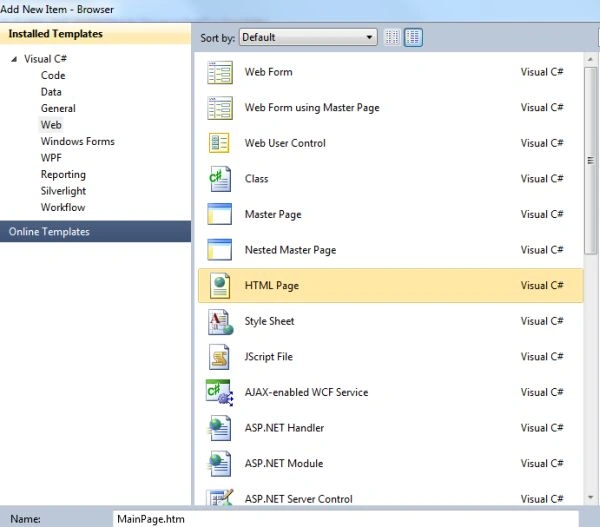
First of all, add two HTML pages to your Visual Studio.
Rename the first of the HTML pages to MainPage.htm and the other one to RecieverPage.htm.
We will first work on the MainPage.htm, this will be the page that will first run and will help us to open the second browser window.
Step 2
After adding the page the first thing to do is to add a jQuery file named "jquery.windowmsg-1.0.js". You can add this file by downloading the Zip file provided previously.
On the MainPage.htm we will add two TextBoxes and three Buttons. The Textboxes will be used to communicate within the browsers and the buttons will be used to open the receiver window and to send the message.
It's code will be like this:
- <!DOCTYPE html PUBLIC "-//W3C//DTD XHTML 1.0 Transitional//EN" "http://www.w3.org/TR/xhtml1/DTD/xhtml1-transitional.dtd">
- <html>
- <head>
- <title></title>
- <script src="http://jqueryjs.googlecode.com/files/jquery-1.2.3.min.js" type="text/javascript"></script>
- <script src="jquery.windowmsg-1.0.js" type="text/javascript"></script>
- <script type="text/javascript">
- $(function() {
- $.initWindowMsg();
- var secondwindow;
- $('#clickbutton').click(function() {
- secondwindow = window.open('Recieverpage.htm', 'child', "width=400, height=400, location=no, menubar=no, scrollbars=no, status=no, toolbar=no");
- if (window.focus) { secondwindow.focus() }
- });
- $('#sendbutton').click(function() {
- value = $('#textbox1').val();
- $.triggerWindowEvent(secondwindow, "parentMsg1", value);
- });
- $('#sendbutton2').click(function() {
- value = $('#textbox2').val();
- $.triggerWindowEvent(secondwindow, "parentMsg2", value);
- });
- $.windowMsg("childMsg1", function(message) {
- $('#textbox1').val(message);
- });
- $.windowMsg("childMsg2", function(message) {
- $('#textbox2').val(message);
- });
- });
- </script>
- </head>
- <body>
- <h1>
- This is Main Window
- </h1>
- <p>
- Click on the Button to open another Window and then start typing your message in it.
- </p>
- <form>
- <input id="clickbutton" type="button" value="Click to Open Window"></input>
- <p>
- <input id="textbox1" type="text" value=""></input>
- <input id="sendbutton" type="button" value="send"></input>
- </p>
- <p>
- <input id="textbox2" type="text" value=""></input>
- <input id="sendbutton2" type="button" value="send"></input>
- </p>
- </form>
- <form name="newform">
- <input type="hidden" name="newformEvent" value="childMsg2"></input>
- <input type="hidden" name="newformData" value="hi"></input>
- <input id="button3" type="button" style="display:none" value="" name="newformButton"></input>
- </form>
- </body>
- </html>
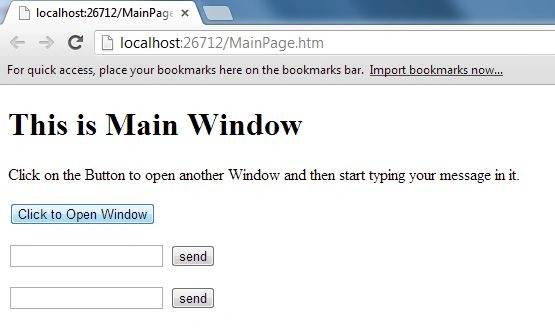
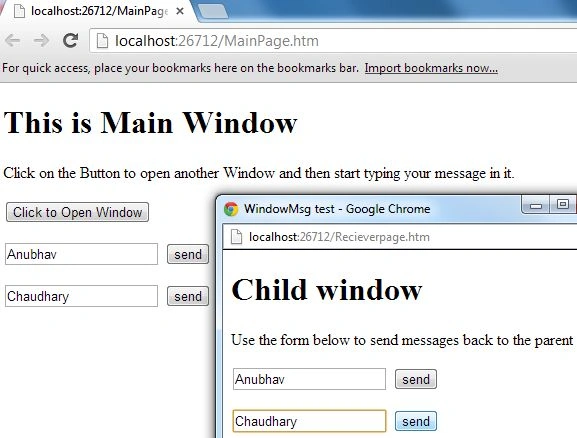
Its output will be like this:
Step 3
Now we will proceed to the second page, which is "ReceiverPage.htm".
On this page, we will add two Textboxes and two buttons that will help us to send the reply to the first browser window's messages.
Its code will be like this:
- <!DOCTYPE html PUBLIC "-//W3C//DTD XHTML 1.0 Transitional//EN" "http://www.w3.org/TR/xhtml1/DTD/xhtml1-transitional.dtd">
- <html>
- <head>
- <title>
- WindowMsg test
- </title>
- <script src="http://jqueryjs.googlecode.com/files/jquery-1.2.3.min.js" type="text/javascript"></script>
- <script src="jquery.windowmsg-1.0.js" type="text/javascript"></script>
- <script type="text/javascript">
- $(function() {
- $.initWindowMsg();
- $('#button1').click(function() {
- value = $('#in1').val();
- $.triggerParentEvent("childMsg1", value);
- });
- $('#button2').click(function() {
- value = $('#in2').val();
- $.triggerParentEvent("childMsg2", value);
- });
- $.windowMsg("parentMsg1", function(message) {
- $('#in1').val(message);
- });
- $.windowMsg("parentMsg2", function(message) {
- $('#in2').val(message);
- });
- });
- </script>
- </head>
- <body>
- <h1>
- Child window
- </h1>
- <p>
- Use the form below to send messages back to the parent
- </p>
- <form>
- <p>
- <input id="in1" type="text" value=""></input>
- <input id="button1" type="button" value="send"></input>
- </p>
- <p>
- <input id="in2" type="text" value=""></input>
- <input id="button2" type="button" value="send"></input>
- </p>
- </form>
- <form name="newform">
- <input type="hidden" name="newformEvent"></input>
- <input type="hidden" name="newformData"></input>
- <input id="button3" type="button" style="display:none" value="" name="newformButton"></input>
- </form>
- </body>
- </html>
Step 4
Now all the code is done, it's time to run the application.
Run the first page, in other words, "MainPage.htm".
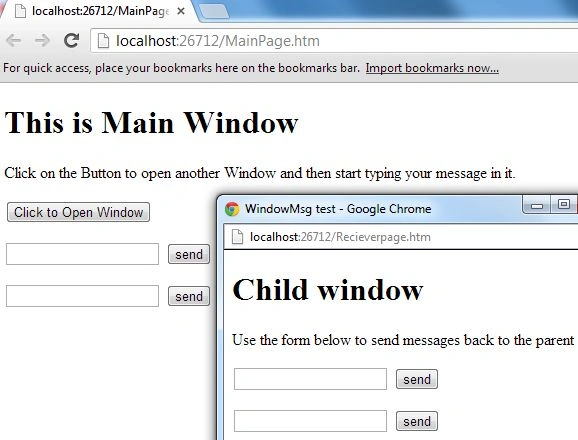
All the Textboxes will be empty initially, click on the button to open the second window.
On clicking the button a new browser window will be opened, initially both "MainPage.htm" as well as "RecieverPage.htm" will be empty.
Now type your message on the first TextBox of MainPage.htm and click on the Send button. On click, you will see the same Text displayed in the first TextBox of the second browser window.
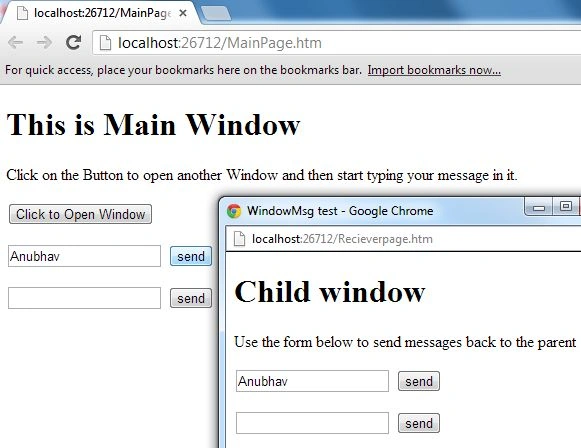
Now type a reply to this message in the second TextBox of the second browser window and click on the Send button. This data will then be displayed in the second TextBox of the first browser window.
Join the conversation! Your thoughts help the community grow.