

Introduction
This article will compare four important architecture presentation patterns i.e. MVP(SC),MVP(PV),PM,MVVM and MVC. Many developers are confused around what is the difference between these patterns and when should we use what. This article will first kick start with a background and explain different types of presentation patterns. We will then move ahead discussing about the state , logic and synchronization issues. Finally we will go in detail of each pattern and conclude how they differ from each other.
Here's my small gift for all my .NET friends , a complete 400 pages FAQ Ebook which covers various .NET technologies like Azure , WCF , WWF , Silverlight , WPF , SharePoint and lot more from here.
Special thanks
This whole article is abstract from http://martinfowler.com/eaaDev/uiArchs.html GUI architectures. Great work by Mr. Martin flower.
Josh Smith and team http://msdn.microsoft.com/en-us/magazine/dd419663.aspx , great work on MVVM.
Mr. Nikhil kothari's blog http://www.nikhilk.net/Silverlight-ViewModel-Pattern.aspx , awesome source for MVVM.
Background - Presentation patterns
One of the biggest problems associated with user interface is lot of cluttered code. This cluttered code is due to two primary reasons , first the UI has complicated logic to manipulate the user interface objects and second it also maintains state of the application. Presentation patterns revolve around how to remove the UI complication and make the UI more clean and manageable. Below are different variety and classifications of presentation patterns as shown in the below figure.

Presentation pattern are divided in to three important categories MVP ( Model view presenter ) , MVC ( Model view controller) and finally (PM) presenter model. MVP is further divided in to supervising controller and passive view. Presenter model is further divided by Microsoft team in two technology specific patterns MVVM for silverlight and MVVM for WPF.
3 big problems of UI :- State , Logic and Synchronization
There are 3 big problems associated with UI as listed below.
State :- State / data is one of the biggest concern in UI. State means the current data picture of your user interface. In web terminologies it can be session variable and in windows application it can be a simple UI level data. The more the UI maintains states ,the more complication is increased.
Logic :- User interface normally have UI logics like manipulating textboxes , combo boxes or any other UI elements.The more these kind of logic exists in the UI the more it becomes complex.
Synchronization :- User interfaces normally co-ordinate with domain / business components. UI also needs to synchronize data between UI elements ( textboxes , comboboxes etc) and business objects. If your UI is taking of synchronization again the UI complexity increases.

The Hero - Presentation design Pattern
Presentation design pattern helps to solve the above UI problems. The base logic of presentation design patterns is that we need to create a extra class which will consume complicated logic , data and synch issues which currently the UI does , thus making the UI dump , clean and simple. Depending on how much this class takes responsibilities defines further whether its a SC , PV , PM design pattern etc. In other words its the maturity of the presenter class which will define what kind of design pattern it is.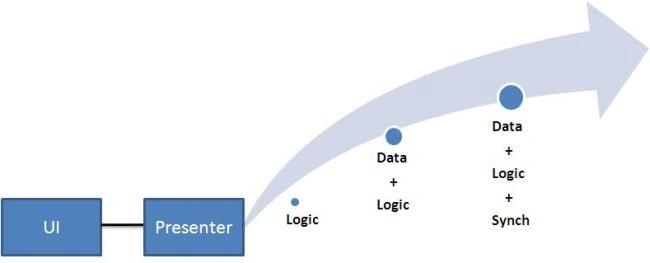
Some acronyms to simplify the article
| Acronym | Full form |
| V | View or user Interface. |
| P | Presenter class which has the UI logic. |
| L | UI logic |
| S | State of the UI |
| M | Business components or domain objects. |
| SC | Supervising controller . |
| PV | Passive view. |
| PM | Presenter model. |
We will use the above acronym to simplify our explanation of presentation design pattern.
Supervising controller pattern ( SC )
Fundamentals about SC :-
- State is stored in the view.
- Presenter owns the complex presentation logic. Simple UI binding logic is taken care by using binding technologies like WPF binding and Silverlight binding. Anything complex is taken care presenter class.
- Presenter is aware of the view.
- View is not aware of the presenter.
- View connects with model using technical bindings provided by WPF and Silverlight.

Passive view (PV)
Fundamentals about PV :-
- State is stored in the view.
- All logic of UI is stored in presenter.
- View is completely isolated from the model. It also takes the extra task of synchronizing data between model and view.
- Presenter is aware of the view.
- View is not aware of the presenter.

Presentation Model (PM)
Fundamentals about SC :-
- State is stored in the presenter.
- Logic is stored in presenter.
- Presenter represents a abstract view of the UI.
- Presenter is not aware of the view.
- View is aware of the presenter.
- View is completely isolated from the model.

MVVM
Fundamentals about SC :-
- Presenter model is the base.
- State is stored in the presenter.
- Logic is stored in presenter.
- Presenter represents an abstract view of the UI.
- Presenter is not aware of the view.
- View is aware of the presenter.
- View is completely isolated from the model.
- Uses WPF and Silverlight bindings.


chandu namaniPosted Apr 10, 2010, 1:36 AM
Can anyone please clarify the following: Can we consider the two tier application as N-tier application. I assume that when the application is having more than 3 tiers, we can consider it as N - Tier application.
suradech paleePosted Apr 4, 2010, 10:58 PM
thanks for share