

Overview
In enterprise application development, SOAP (Simple Object Access Protocol) services have long been an integral part of enterprise application development, especially in industries such as financial services, healthcare, and government, where structured communication is required. Ziggy Rafiq compares two critical approaches to SOAP service implementation in the .NET ecosystem: ASMX and CoreWCF for ASP.NET Core SOAP APIs. The purpose of this article is to help developers choose the best SOAP implementation for their application by providing practical examples of the two SOAP implementations.
The following are some of the things you will learn from this article:
- Maintenance and enhancement of legacy SOAP services are done through the use of ASMX.
- With CoreWCF, you can create ASP.NET Core APIs that are scalable, cross-platform, and compatible with multiple platforms.
- Make sure you select the right framework for your application based on its requirements.
The guide is invaluable for developers integrating modern SOAP solutions with REST and gRPC or transitioning to modern SOAP solutions.
The ASP.NET SOAP Web Services (ASMX)
ASP.NET SOAP Web Services (ASMX), as part of the ASP.NET Framework, provide a method for exposing methods as SOAP services that clients can consume over HTTP; these services were the go-to solution for SOAP-based communication in early ASP.NET applications for SOAP-based communication over the internet.
ASMX Features
- Built-in support for SOAP: ASMX services support SOAP by automatically generating SOAP envelopes and annotating methods with the [WebMethod] attribute.
- Auto-generated WSDL: When you create an ASMX service, a WSDL file is automatically generated, which clients can use to understand how the service works.
- Platform limitations: In cross-platform environments, ASMX services are less flexible because they require IIS (Internet Information Services) to host them, making them more limited.
ASMX Web Service Code Example
The following steps will guide you through creating an ASMX web service in the .NET Framework:
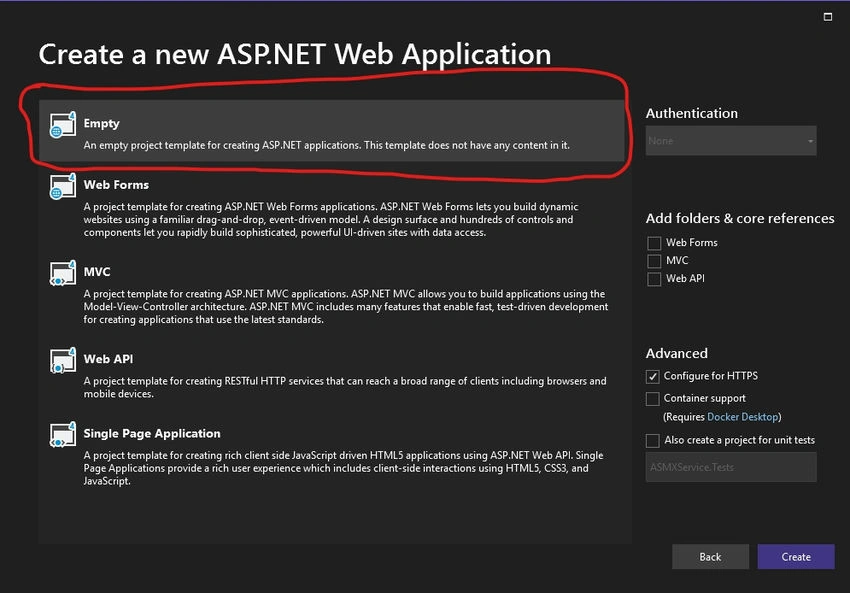
1. Visual Studio should be used to create an ASP.NET Web Forms project.
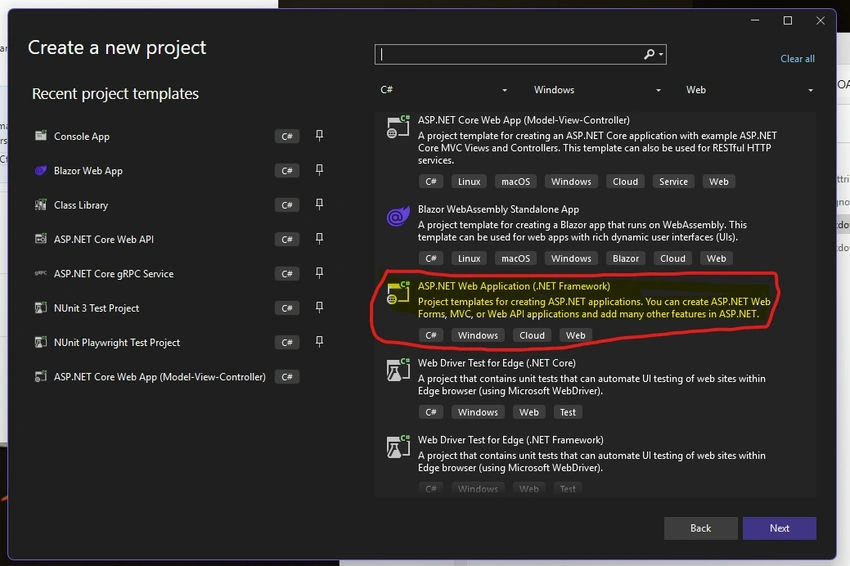
2. Assemble a calculator service by adding a .asmx file to your project (such as CalculatorService.asmx).
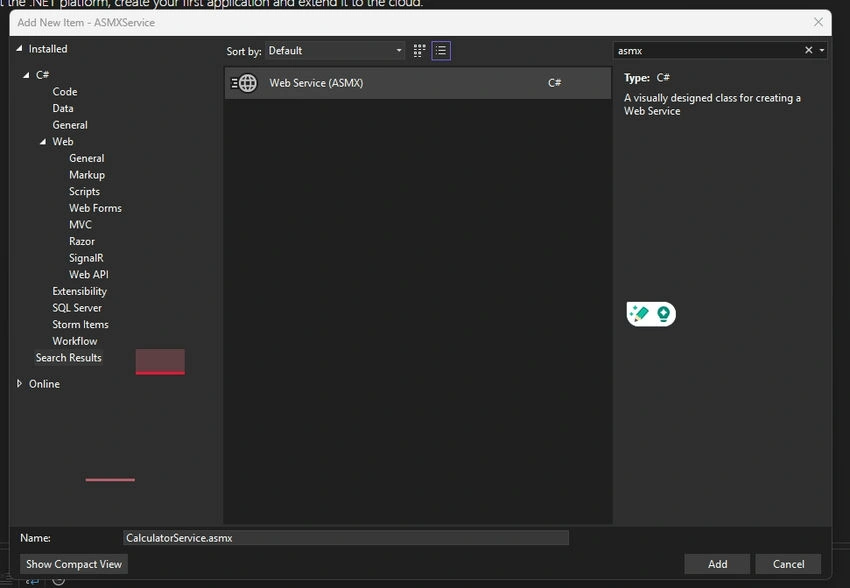
3. The service should be implemented with the [WebMethod] attribute.
An example of a simple calculator service is as follows:
using System.Web.Services;

namespace ASMXService
{
    /// <summary>
    /// Summary description for CalculatorService
    /// </summary>
    [WebService(Namespace = "http://tempuri.org/")]
    [WebServiceBinding(ConformsTo = WsiProfiles.BasicProfile1_1)]
    [System.ComponentModel.ToolboxItem(false)]
    // To allow this Web Service to be called from script, using ASP.NET AJAX, uncomment the following line.
    // [System.Web.Script.Services.ScriptService]
    public class CalculatorService : System.Web.Services.WebService
    {

        [WebMethod]
        public int Add(int a, int b)
        {
            return a + b;
        }

        [WebMethod]
        public int Subtract(int a, int b)
        {
            return a - b;
        }

    }
}
How to Create and Run a Program
- Visual Studio should be used to create an ASP.NET Web Forms project.
- Make sure your project contains an ASSMX file.
- The above code should be added to your service.
- You can view the auto-generated WSDL by visiting the .asmx file in the browser after running the project.
How Do ASP.NET Core SOAP APIs Work?
In ASP.NET Core, Microsoft's cross-platform framework, SOAP services aren't built in, but developers can use CoreWCF to create SOAP-based APIs. The CoreWCF project brings WCF-like functionality to .NET Core, allowing developers to develop SOAP APIs in a modern, scalable, and cross-platform environment.
CoreWCF SOAP APIs for ASP.NET Core
- Requires CoreWCF for SOAP implementation: In contrast to ASMX, ASP.NET Core does not come with SOAP support by default but can be added using CoreWCF.
- Cross-platform support: CoreWCF services can be run on Windows, Linux, and macOS, making them suitable for modern cloud-native applications.
- Integration with modern features: ASP.NET Core features such as middleware, dependency injection, and performance scalability are integrated into CoreWCF.
ASP.NET Core SOAP API Code Example
The following steps will help you create a SOAP API in ASP.NET Core using CoreWCF:
Step 1. The following NuGet packages are required to install CoreWCF:
dotnet add package CoreWCF
dotnet add package CoreWCF.Http
Step 2. Use the [ServiceContract] and [OperationContract] attributes to define the service contract:
using CoreWCF;

namespace CoreWCFService.Contracts.Interfaces;

[ServiceContract]
public interface ICalculatorService
{
    [OperationContract]
    double Add(double a, double b);

    [OperationContract]
    double Subtract(double a, double b);

    [OperationContract]
    double Multiply(double a, double b);

    [OperationContract]
    double Divide(double a, double b);

}
Step 3. Creating a class that inherits from the service contract is the first step toward implementing the service:
using CoreWCFService.Contracts.Interfaces;

namespace CoreWCFService.Contracts;
public class CalculatorService : ICalculatorService
{
    public double Add(double a, double b) => a + b;
    public double Subtract(double a, double b) => a - b;
    public double Multiply(double a, double b) => a * b;
    public double Divide(double a, double b) => b != 0 ? a / b : throw new DivideByZeroException("It cannot be divide by zero.");

}
Step 4. Program.cs should be configured with CoreWCF. Configure CoreWCF by adding the following lines:
using CoreWCF;
using CoreWCF.Configuration;
using CoreWCFService.Contracts;
using CoreWCFService.Contracts.Interfaces;

var builder = WebApplication.CreateBuilder(args);


builder.Services.AddServiceModelServices();
builder.Services.AddServiceModelMetadata();

builder.Services.AddSingleton<CalculatorService>();


builder.Services.AddOpenApi();

var app = builder.Build();


((IApplicationBuilder)app).UseServiceModel(builder =>
{
    builder.AddService<CalculatorService>();
    builder.AddServiceEndpoint<CalculatorService, ICalculatorService>(
        new BasicHttpBinding(), "/CalculatorService");
});


app.MapGet("/calculate/add/{a}/{b}", (double a, double b, CalculatorService service) =>
{
    return Results.Ok(new { Result = service.Add(a, b) });
}).WithName("AddNumbers");

app.MapGet("/calculate/subtract/{a}/{b}", (double a, double b, CalculatorService service) =>
{
    return Results.Ok(new { Result = service.Subtract(a, b) });
}).WithName("SubtractNumbers");

app.MapGet("/calculate/multiply/{a}/{b}", (double a, double b, CalculatorService service) =>
{
    return Results.Ok(new { Result = service.Multiply(a, b) });
}).WithName("MultiplyNumbers");

app.MapGet("/calculate/divide/{a}/{b}", (double a, double b, CalculatorService service) =>
{
    if (b == 0)
        return Results.BadRequest("Cannot divide by zero.");

    return Results.Ok(new { Result = service.Divide(a, b) });
}).WithName("DivideNumbers");


if (app.Environment.IsDevelopment())
{
    app.MapOpenApi();
}

app.UseHttpsRedirection();
app.Run();
# CoreWCFService.http Example
@CoreWCFService_HostAddress = http://localhost:5071

GET {{CoreWCFService_HostAddress}}/calculate/add/15/10
Accept: application/json

###
{
  "Result": 25
}

GET {{CoreWCFService_HostAddress}}/calculate/subtract/20/5
Accept: application/json

###
{
  "Result": 15
}

GET {{CoreWCFService_HostAddress}}/calculate/multiply/20/5
Accept: application/json

###
{
  "Result": 100
}

GET {{CoreWCFService_HostAddress}}/calculate/divide/20/4
Accept: application/json

###
{
  "Result": 5
}

GET {{CoreWCFService_HostAddress}}/calculate/divide/50/0
Accept: application/json

###
{
  "Error": "It cannot be divide by zero."
}
Step 5. Test the SOAP API. After running the application, navigate to /CalculatorService?wsdl to view the WSDL. Then, use tools like Postman or SOAP UI to test the SOAP service.
Differentiating ASMX from ASP.NET Core
| Feature | ASP.net SOAP Web Services (ASMX) | ASP.net Core SOAP APIs (CoreWCF) |
|---|---|---|
| Framework | .Net Framework | ASP.net Core |
| Cross-Platform Support | No | Yes |
| Middleware and DI Support | No | Yes |
| Performance | Moderate | High |
| SOAP Support | Built-In | Require CoreWCF |
| Ideally User Case | When looking after Legacy/Old Applications and System. | Modern applications and systems are built in the current day. |
When to Choose Which?
- In the following situations, you should use ASP.NET SOAP Web Services (ASMX):
- ASMX is heavily used in legacy applications you maintain.
- For your project, migrating to ASP.NET Core isn't feasible or cost-effective.
- ASP.NET Core SOAP APIs (CoreWCF) are recommended if:
- The SOAP-based services you are building are being developed.
- A cross-platform solution must be scalable and support multiple platforms.
- Modern technologies such as REST, gRPC, or message queues can be integrated with SOAP.
Summary
It is still possible to maintain legacy applications with ASMX Web Services, but ASP.NET Core SOAP APIs, powered by CoreWCF, offer more flexibility, performance, and modern development practices. CoreWCF can create cross-platform, scalable SOAP services, making it the perfect choice for modern enterprise applications. Developers can future-proof their SOAP solutions and integrate them seamlessly with newer technologies such as REST and gRPC by adopting CoreWCF.
The code for this article can be found on Ziggy Rafiq's GitHub Repository https://github.com/ziggyrafiq/SOAP-Services-Comparison
This is for developers who need to maintain legacy SOAP services while transitioning to modern, scalable SOAP solutions or integrating SOAP into a broader ecosystem of modern web services.
Join the conversation! Your thoughts help the community grow.