
This article has been excerpted from book "Graphics Programming with GDI+".
Member Description AssumeLinear Assume linear values. Better than the default quality. Defualt Default quality. GammaCorrected Gamma correction is used. HighQuality High quality, low speed. HighSpeed High Speed, low quality. Invalid Invalid quality.
As mentioned earlier, blending is a process of combining two colors: a source color and a background color. The compositing mode specifies how source colors are combined with background colors.
The CompositingMode property of the Graphics class represents the compositing mode of a graphics surface, which applies to all graphics shapes for that surface. The CompositingMode enumeration has two members: SourceCopy and SourceOver. SourceCopy specifies that when a color is rendered, it overwrites the background color, and SourceOver specifies that when a color is rendered, it is blended with the background color using the alpha component.
The following code snippet shows how to set the CompositingMode property of a Graphics object.
Graphics g = this.CreateGraphics();
g.Clear(this.Backcolor);
g.CompositingMode = CompositingMode.SourceCopy;
g.CompositingMode = CompositingMode.SourceOver;
// Dispose of object
g.Dispose();
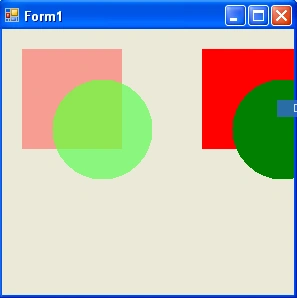
CompositingMode may be helpful in scenarios where you need to draw overlapped images. Suppose you draw one rectangle and one ellipse, and an area of the ellipse overlaps a small area of the rectangle. You may or may not want to show the overlapped area of the rectangle. The compositing mode provides you the option of doing either.
Instead of applying CompositingMode to all of the graphics, you can apply it to selected shapes. One way to do this is to create a temporary Graphics object (a new surface), draw all the shapes you need and apply the compositing mode on this object. You can also create graphics containers and apply the necessary setting to each graphics container.
The quality of compositing is inversely proportional to the rendering speed: The higher the quality, the slower the rendering. The CompositingQuality property of the Graphics object represents the quality of a composition process, which takes a value of type CompositingQuality enumeration. The CompositingQuality enumeration is defined in Table 9.12.
Listing 9.33 draws two sets of shapes. Each set has a rectangle and an ellipse. First we create a Bitmap object, and then we create a temporary Graphics object using the FromImage method by passing the Bitmap object. We set the CompositingMode property of this Graphics object to SourceOver, which means that the color rendered overwrites the background color. Then we draw a rectangle and an ellipse.
TABLE 9.12: CompositingQuality members



Join the conversation! Your thoughts help the community grow.