

Introduction
Microsoft Cognitive Services API offers a wide range of APIs and algorithms around which you can build your applications. The algorithms include facial recognition, speech API, Computer Vision, spelling app, Emotion API, Video API, Linguistics API etc. The APIs are based on five main categories, vision, speech, search, language, and knowledge.
Using these APIs, you can bring powerful AI into your apps. The whole idea of cognitive services is being able to integrate powerful AI and machine learning.
Getting started
- You need an Azure subscription.
- Your subscription should be enabled for cognitive services.
- Of course, Visual Studio.
We will basically create a cognitive service API in Azure, then use Visual Studio to leverage the best of the API.
Let’s Begin
Select Data + Analytics, then Cognitive Services APIs (Preview), then supply details for the Cognitive service.
Provide a generic account name.
Choose your subscription.
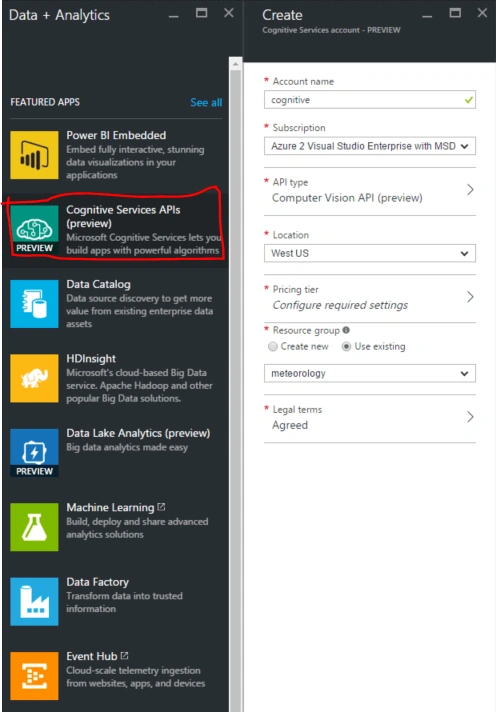
Then, choose the API Type.
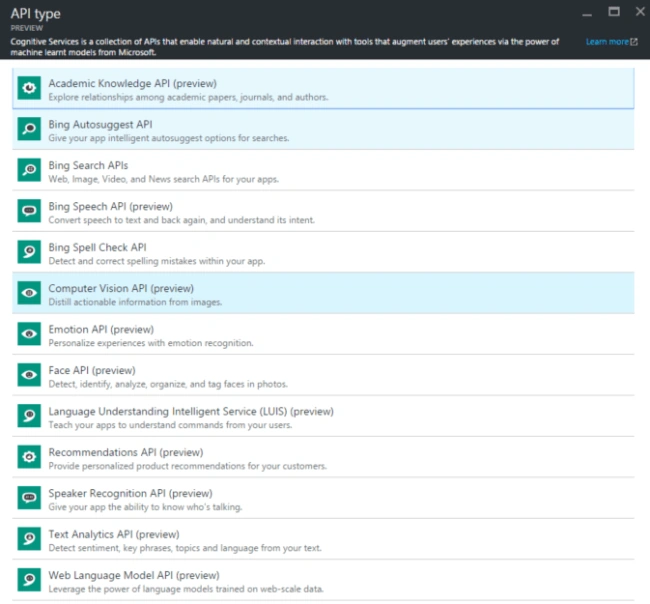
There are many APIs available. I am choosing Computer Vision API in the demo.
Then, choose your location, pricing tier, Resource Group.
Agre to the legal terms and click Create.
Once you click Create, just wait for a few minutes and your Cognitive service will be ready to serve your application. After the service is ready, you have to go to https://www.microsoft.com/cognitive-services and click on My Account.
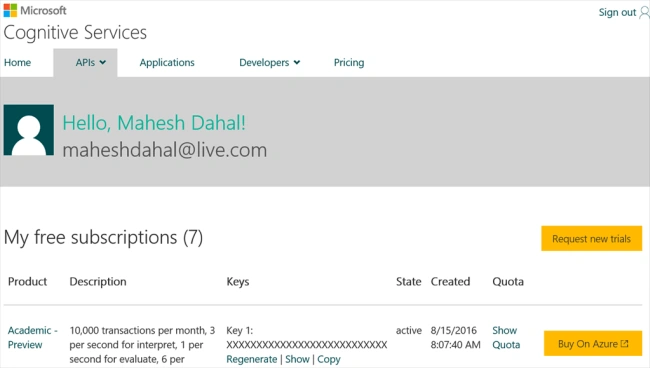
From here, you can access many keys for many other services too. Click on show and copy the key.
Now, let’s move on to Visual Studio and start writing code. The following code is based on the original documentation from computer Vision API.
First, create a filepicker and write the following code for the click event of the button.
- private void button1_Click(object sender, EventArgs e)
- {
- DialogResult result = openFileDialog1.ShowDialog(); // Show the dialog.
- if (result == DialogResult.OK) // Test result.
- {
- string file = openFileDialog1.FileName;
- try {
- Vision(file);
- } catch (IOException) {}
- }
- private async void test(string filename)
- {
- var visionClient = new VisionServiceClient("your subscription key copied earlier"); //Note this is not azure subscription key.
- AnalysisResult analysisResult;
- var features = new VisualFeature[] {
- VisualFeature.Tags, VisualFeature.Description
- };
- var fs = new FileStream(@filename, FileMode.Open);
- analysisResult = await visionClient.AnalyzeImageAsync(fs, features);
- fs.Dispose(); // Dispose the fs to use it again in picture box.
- pictureBox1.ImageLocation = filename;
- string json = JsonConvert.SerializeObject(analysisResult); //serelize the onject to json.
- textBox1.Text = json; //show json in textbox.
- }

This is a very basic demo of Vision API but the possibilities are unlimited. I request that you explore more around Vision API. There is a lot you can do with Vision API and other cognitive services.
Abhilash BabuPosted Feb 5, 2019, 12:42 AM
How to recognize brand detection using computer vision ?
Gaurav RajputPosted Nov 19, 2016, 3:05 AM
Can you please provid me with the vedio or full code of vision api integration pls??
Mahesh DahalPosted Sep 26, 2016, 8:40 AM
"Created not" ? That's a typo, right ?
Mahesh ChandPosted Sep 25, 2016, 10:39 PM
Good one. I think we should create a new category on C# Corner, Cognitive Services for these articles. What do you think?
Hashim ShafiqPosted Sep 25, 2016, 9:16 AM
Cool :)