

Introduction
Serialization is a way to you save the specific state of the program in a file so that you can retrieve that file in the class at some other point. A class implements the Serializable interface to perform serialization.
Creating the serialized file
Use the following procedure to create the serialized file:
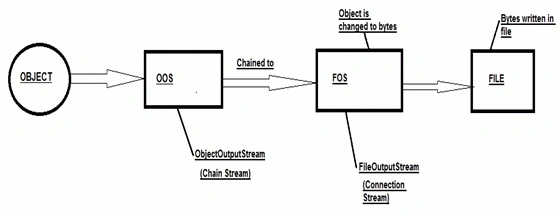
- Create a FileOutputStream object. A FileOutputStream object knows how to connect to a file that is already created or it creates the file and then connects with it. It is a connection stream that writes bytes to the file.
FileOutputStream fos=new FileOutputStream("MyFile.ser");
- Now create an ObjectOutputStream Object. An ObjectOutputStream object allows you to write the Object, but it cannot directly write to the file. So we use a FileOutputStream object to write the object to the file. ObjectOutputStream is a chain stream that converts the object into data that can be written into streams.
ObjectOutputStream oos=new ObjectOutputStream(fos);
- Now we write the object in the file using the writeObject() method of the ObjectOutputStream object.
oos.writeObject(object reference);
- Now close the objectoutputstream object using the close() method. Closing the stream at the top will close the one underneath it, so FileOutputStream automatically closes.
oos.close();
A diagrammatic representation of the preceding process is:
 An example of how to create a serialized file is:
A file with the name File.ser will be created in the folder in which you have created your class. This file.ser can be used in another part of the class and you can get the object and its state by deserializing the file.
An example of how to create a serialized file is:
A file with the name File.ser will be created in the folder in which you have created your class. This file.ser can be used in another part of the class and you can get the object and its state by deserializing the file.
- import java.io.FileNotFoundException;
- import java.io.FileOutputStream;
- import java.io.IOException;
- import java.io.ObjectOutputStream;
- import java.io.Serializable;
- public class SerializableExample implements Serializable {
- int x;
- int y;
- /**
- *@param args
- */
- public static void main(String[] args) {
- // TODO Auto-generated method stub
- SerializableExample se=new SerializableExample();
- se.x=3;
- se.y=4;
- try {
- FileOutputStream fos=new FileOutputStream("File.ser");
- ObjectOutputStream oos=new ObjectOutputStream(fos);
- oos.writeObject(se);
- oos.close();
- System.out.println("File is created");
- }catch (FileNotFoundException e) {
- // TODO Auto-generated catch block
- e.printStackTrace();
- }catch (IOException e) {
- // TODO Auto-generated catch block
- e.printStackTrace();
- }
- }
- }
Join the conversation! Your thoughts help the community grow.