

Most business applications implements a DataGrid in Silverlight and each scenario comes with its own set of complications that sometimes looks funny but challenging. Well I am writing this article after being stuck with a similar situation. In this article we will discuss approaches available to bind various controls, to different cells of a particular column inside a DataGrid, using IValueconvertor and with a bit of common-sense applied.
The Issue/Scenario
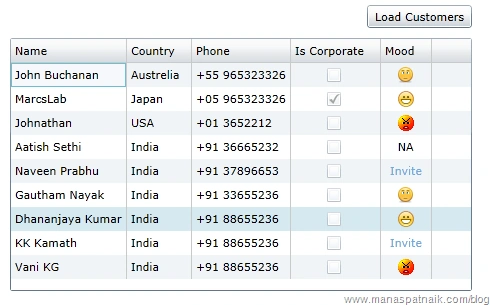
Our application required a few records to be displayed in a grid ... the simplest thing we can do, even while sleeping. But the challenge lies in displaying a different set of controls based on a business rule. Let me be clear with an example.We have a set of Customer lists that need to be displayed in a Grid. The Customer object holds a property called Mood; the mood can either be Happy, Neutral or Angry. Well it doesn't stop here. If the Mood is Not available the Cell must display "NA" and if the property is null then it should display a HyperLinkbutton which in turn will send a request to the particular customer seeking feed back. The prototype for a particular control can be seen below:

So the grid must be smart enough either to use Image control or Simple Text Block control with NA or a Button control with its own code behind logic.The binding data of each row will decide the control for a particular column at run time. My next section will focus on various approaches and some basic concepts of grid customization.
Addressing the Issue And Some Basics of DataGrid
The DataGrid comes with varieties of Column types, which can be either:- DataGridTextColumn : For plain Text Values
- DataGridCheckBoxColumn :For Boolean Values
- DataGridTemplateColumn : For Integrated Controls (Bound Controls)
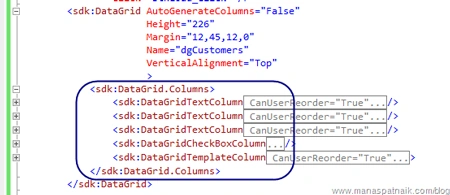
The DataGridTemplateColumn is handy to show custom column content with bound control for editing. By default it support use of a uniform control across column cells.That means once defined, all the cells of that column will be uniform. As I mentioned earlier CellTemplete property of DataGrid allows us to display data while that cell is not in editing mode.

Here in this article we will concentrate on displaying the data so our focus will be on CellTemplete.
While looking for solution for the issue mentioned above we thought of various options such as Dynamic DataTemplete (DataTemplateSelector) which WPF support but not Silverlight.DataTemplateSelector allows to use specific template based on the data object logic.Then thought of modifying XAML at runtime by creating Datatemplete in code behind and attach it to a cell template although we kept it as the last choice. We were looking for a control which can hold any control defined at runtime and the choice of control can be decided using Ivalueconvertor based on the particular business object.
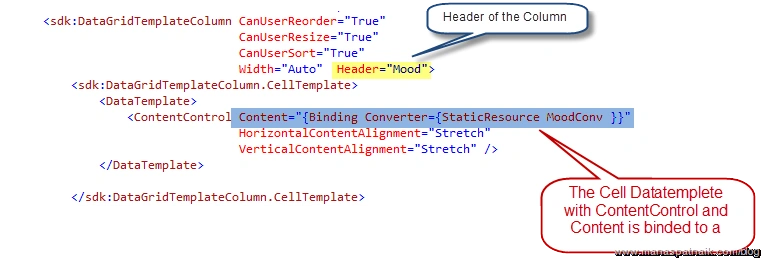
What about ContentControl ??Basically ContentControl is a control whose Control property can be any of the Silverlight UIElement.
So the best appeared solution for the given scenario is to use a ContentControl inside DataTemplete and assign the required custom control at runtime using IvalueConvertor. We will look into the implementation over next section.
Setting up the Grid and Binding
The page contains a Grid which will show the Customer Data .The Customer business entity object is somehow defined as mentioned bellow
|
and the Grid definition for above entity is follows as below
 .

Join the conversation! Your thoughts help the community grow.