

What is a Conditional Statement in C#?
Conditional statements are a fundamental concept in programming that allows developers to control the flow of their code based on certain conditions. In C#, conditional statements are achieved through a variety of keywords and operators that allow you to check for certain conditions and execute specific blocks of code based on the results.
Conditional statements in C#
- if
- if-else
- if-else-if
- Nested if
- Switch
- Nested switch
IF Statement in C#
If statement executes the block of code when the specified condition becomes true. If the given condition is not true or not satisfied, then that block will not execute.
Syntax
if(condition)
{
     // your code to execute
}
Example
// Example of if condition

string name = "yogesh";
Console.WriteLine("Before IF Block");

if (name == "virat")
{
     Console.WriteLine("Name is virat");
}
if (name == "yogesh")
{
     Console.WriteLine("Name is Yogesh");
}
Console.WriteLine("After IF Block");
Output
Explanation
- First, a string variable named "name" is declared and initialized with the value "yogesh".
- Next, a message "Before IF Block" is printed on the console.
- The first "if" statement checks if the value of the "name" variable is equal to "virat". However, since the value of "name" is "yogesh", this "if" statement is not executed, and the program continues to the next "if" statement.
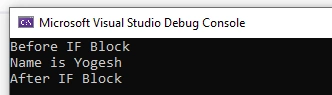
- The second "if" statement checks if the value of the "name" variable is equal to "yogesh". Since this condition is true, the message "Name is Yogesh" is printed on the console.
- Finally, a message "After IF Block" is printed on the console.
If Else Statement in C#
With the If statement, we can execute the block of code when the given condition becomes true. In this case, user will not understand what goes wrong. If we perform some operation or show the message to the user when the condition is satisfied but when it is not, then the user will not receive any message.
If Else statement can handle this kind of confusion. In the else block, we can define a code block that is executed when the condition is not satisfied.
Syntax
if(condition)
{
    // code block when condition satisfied
}
else
{
   // code block when condition not satisfied
}
Example
// Example of if else statement
string name = "virat";
Console.WriteLine("Before If Else Statement");

if (name == "yogesh")
{
     Console.WriteLine("Name is Yogesh");
}

else
{
     Console.WriteLine("Name is Not Yogesh");
}
Console.WriteLine("After If Else Statement");
Output
Explanation
- First, a string variable named "name" is declared and initialized with the value "virat".
- Next, a message "Before If Else Statement" is printed on the console.
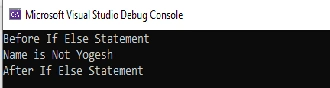
- The "if-else" statement checks if the value of the "name" variable is equal to "yogesh". Since the value of "name" is not "yogesh", the condition in the "if" statement is false, and the code within the curly braces following the "else" keyword is executed instead. Therefore, the message "Name is Not Yogesh" is printed to the console.
- Finally, a message "After If Else Statement" is printed on the console.
- In summary, this code demonstrates how the "if-else" statement can be used to execute one block of code when a condition is true and another block of code when the condition is false. If the condition in the "if" statement is true, the code within the curly braces following the "if" keyword is executed. Otherwise, the code within the curly braces following the "else" keyword is executed.
If Else If Statement in C#
If Else If is also called an If Else Ladder, which shows like a ladder with multiple legs. In this type of statement, we can define more than one condition and execute a block of code based on that condition.
In the If Else statement, we show that if the condition is not satisfied, then it will go into the else block. But what if we want to check other conditions? In this case, we can use If Else If statements.
Here you can define as many conditions as you want with different else if blocks. In this statement compiler first check the first condition if it is satisfied, then it will execute the code of that condition block else it will go to the next else if condition and do the same thing. If none of the defined conditions are satisfied, then it will execute the else block.
Here else, the block is not mandatory. You can define it if you want.
Syntax
If(condition)

{
     // code to execute when condition 1 satisfied
}

else if(other condition)
{
     // code to execute when condition 2 satisfied
}

else
{
    // code to execute when none of the above  satisfied
}
Example
// Example of if else if  statement
string name = "virat";
Console.WriteLine("Before If Else If Statement");

if (name == "yogesh")
{
     Console.WriteLine("Name is Yogesh");
}

else if (name == "virat")
{
     Console.WriteLine("Name is Virat");
}

else if (name == "rahul")
{
     Console.WriteLine("Name is Rahul");
}

else
{
     Console.WriteLine("Name is Undefine");
}
Console.WriteLine("After If Else If Statement");
Output
Explanation
- First, a string variable named "name" is declared and initialized with the value "virat".
- Next, a message "Before If Else If Statement" is printed on the console.
- The "if-else if" statement checks the value of the "name" variable against multiple conditions.
- First, it checks if the value of "name" is equal to "yogesh". Since the value of "name" is not "yogesh", the code within the curly braces following the first "else if" statement is skipped.
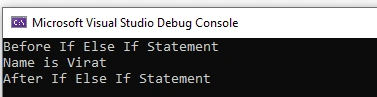
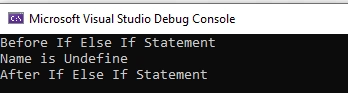
- Next, it checks if the value of "name" is equal to "virat". Since the value of "name" is "virat", the condition in the second "else if" statement is true, and the code within the curly braces following the second "else if" statement is executed. Therefore, the message "Name is Virat" is printed on the console.
- Since the condition in the second "else if" statement is true, the remaining "else if" and "else" statements are not evaluated, and the execution of the "if-else if" statement ends.
- Finally, a message "After If Else If Statement" is printed on the console.
- In summary, this code demonstrates how the "if-else if" statement can be used to check multiple conditions and execute different blocks of code depending on the condition that is true. If the condition in the first "if" statement is true, the code within the curly braces following the "if" keyword is executed. Otherwise, the code within the curly braces following the first "else if" keyword is evaluated. If the condition in the second "else if" statement is true, the code within the curly braces following the second "else if" keyword is executed, and so on. If none of the conditions is true, the code within the curly braces following the "else" keyword is executed.
Nested if Statement in C#
We can also define the conditional statement as another conditional statement. It is called Nested Condition. If we want to check other conditions when one of the condition is satisfied, then we can use this statement.
In the nested code block, we can add all types of conditional statements.
Syntax
if(condition)
{
	if(nestedCondition)
	{

	}
	else
	{

	}

}
Example
// Example of Nested If statement

string name = "virat";
int age = 10;
Console.WriteLine("Before Nested If Statement");

if (name == "yogesh")
{
     if(age == 10)
     {
         Console.WriteLine("Age of Yogesh Is 10");
     }
     else if (age == 20)
     {
         Console.WriteLine("Age of Yogesh Is 20");
     }

}
else if (name == "virat")
{
     if (age == 10)
     {
         Console.WriteLine("Age of Virat Is 10");
     }
     else if (age == 20)
     {
         Console.WriteLine("Age of Virat Is 20");
     }
}
else
{
     Console.WriteLine("Name is Undefine");
}

Console.WriteLine("After Nested If Statement");
Output
Explanation
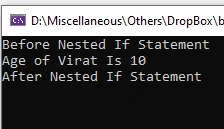
- In this example, the variable's name and age are initialized with values "virat" and 10, respectively.
- The code first checks the value of the name using the outer if statement. If name is "yogesh", then the inner if statement is executed. The inner if statement checks the value of age and displays a message accordingly.
- If name is not "yogesh", then the else-if statement is executed. The inner if statement checks the value of age and displays a message accordingly.
- If neither name is "yogesh" nor "virat", then the else statement is executed, which displays the message "Name is Undefine".
- Finally, the code displays the message "After Nested If Statement".
- In summary, a nested if statement is used when we need to check multiple conditions based on different values of a variable. In this example, the inner if statement is executed based on the value of name, and the inner if statements within each outer if statement is executed based on the value of age.
Switch Statement in C#
The switch statement is a control flow statement that allows a program to evaluate an expression and perform different actions based on the value of the expression. It provides an alternative to a series of if-else statements when multiple conditions need to be checked.
The switch statement takes an expression and compares it with a series of cases. Each case contains a value and a block of code to be executed if the expression matches that value. The value of the expression is compared against each case value in turn until a match is found. If a match is found, the corresponding block of code is executed, and the switch statement ends.
If no match is found, a default case can be specified to handle this situation. The default case is executed if none of the other case values match the expression. The default case is optional and can be omitted if no action is needed for the default scenario.
The switch statement provides a way to simplify code and make it easier to read and understand. It is often used to handle menu options, user input or to perform different actions based on the state of a program.
Syntax
switch(expression)

{
    case value1:
        // code block
        break;
    case value2:
        // code block
        break;
    // more cases
    default:
        // code block
        break;
}
The break statement is used inside a switch block to terminate the current case and move on to the next statement after the switch block.
If the break is not defined after a case, the code will continue to execute the next case until a break statement is encountered or the switch block ends. This is known as "falling through" the cases.
Falling through cases can sometimes be used intentionally to avoid duplicating code, but it can also lead to unexpected results if not handled carefully. In general, it's considered best practice to always include a break statement after each case unless you have a specific reason not to.
Example
int dayOfWeek = 3;
string dayName;
switch (dayOfWeek)

{
     case 1:
         dayName = "Monday";
         break;
     case 2:
         dayName = "Tuesday";
         break;
     case 3:
         dayName = "Wednesday";
         break;
     case 4:
         dayName = "Thursday";
         break;
     case 5:
         dayName = "Friday";
         break;
     case 6:
         dayName = "Saturday";
         break;
     case 7:
         dayName = "Sunday";
         break;
     default:
         dayName = "Invalid day";
         break;
}

Console.WriteLine("Name Of Day Is: "+dayName);
Output
Explanation
- The integer value is stored in the variable dayOfWeek and represents the day of the week, with 1 being Monday, 2 being Tuesday, and so on, up to 7 being Sunday.
- The switch statement evaluates the value of dayOfWeek and selects the appropriate case block based on its value. If dayOfWeek matches one of the case values, the corresponding dayName string is assigned a value that represents the name of the day.
- If dayOfWeek does not match any of the case values, the default case is executed, and dayName is assigned the value "Invalid day".
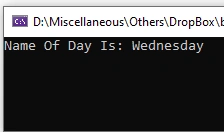
- Finally, the program prints the value of dayName to the console, indicating the name of the day based on the value of dayOfWeek. In this case, since dayOfWeek is assigned a value of 3, the output will be "Name Of Day Is: Wednesday".
Nested Switch Statement in C#
A nested switch statement is a switch statement inside another switch statement. It is similar to a nested if-else statement, but it provides a more organized way of handling complex multiple conditions.
A nested switch statement is implemented by using one switch statement inside another switch statement. The inner switch statement can have its own set of cases, and the outer switch statement can have its own set of cases.
Example
int outer = 1;
int inner = 2;
string message;

switch (outer)
{
case 1:
     switch (inner)
     {
         case 1:
             message = "Outer is 1 and Inner is 1";
             break;
         case 2:
             message = "Outer is 1 and Inner is 2";
             break;
         default:
             message = "Invalid Inner Value";
             break;
     }
     break;
case 2:
     message = "Outer is 2";
     break;
default:
     message = "Invalid Outer Value";
     break;
}

Console.WriteLine(message);
Output
Explanation
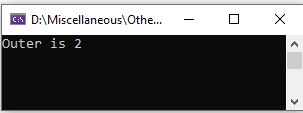
- The outer switch statement is used to evaluate the value of the variable 'outer', while the inner switch statement is used to evaluate the value of the variable 'inner', but only when the value of 'outer' is equal to 1.
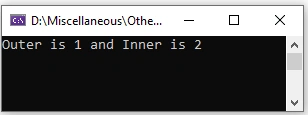
- If the value of 'outer' is 1, the inner switch statement is executed. If the value of 'inner' is 1, the message "Outer is 1, and Inner is 1" is assigned to the variable 'message'. If the value of 'inner' is 2, the message "Outer is 1, and Inner is 2" is assigned to 'message'. If the value of 'inner' is neither 1 nor 2, the message "Invalid Inner Value" is assigned to 'message'.
- If the value of 'outer' is not 1, the outer switch statement proceeds to the next case. If the value of 'outer' is 2, the message "Outer is 2" is assigned to 'message'. If the value of 'outer' is neither 1 nor 2, the message "Invalid Outer Value" is assigned to 'message'.
- Finally, the value of 'message' is outputted to the console using the WriteLine() method.
Summary
Conditional statements in C# allow developers to control the flow of their programs based on certain conditions. These statements provide a way to execute specific blocks of code based on whether certain conditions are true or false, making it an essential tool for programming.
Join the conversation! Your thoughts help the community grow.