

In this article we will be seeing how to configure a crawl schedule for
enterprise search content source in SharePoint 2010 using C#.
In the Search service application, you can schedule a full or incremental crawl
of a content source. There are four types of Schedules:
- DailySchedule - Used to specify the number of days between crawls.
- WeeklySchedule - Used to specify the number of weeks between crawls.
- MonthlyDateSchedule - Used to specify the days of the month and months of the year when the crawl should occur.
- MonthlyDayOfWeekSchedule - Used to specify the days of the month, the weeks of the month, and the months of the year when the crawl should occur.
Through UI:
- Go to Central Administration => Application Management => Manage service applications => Search Service Application.
- In the Navigation go to Crawling => Content Sources.
- You could be able to see the content sources.
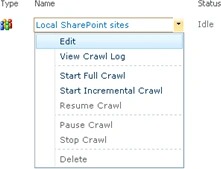
- I am going to edit the content source "Local SharePoint sites" and schedule the crawl.
- Go to ECB menu of Local SharePoint
Sites =>Edit.
- You could see "Crawl schedule section"
where you could schedule the Full Crawl and Incremental Crawl.

C# code:

Join the conversation! Your thoughts help the community grow.