

Hello Everyone!!
I have this new article for you showing how to configure Blocked files in SharePoint. Ideally in a Document Library SharePoint allow only a few kinds of files to be uploaded. There are many extensions that SharePoint blocks.
Many people think that SharePoint doesn't support them and they upload those kinds of files using Zip folders but now you don’t need to do that.
I will show you through this article how you can allow many kinds of blocked files in SharePoint.
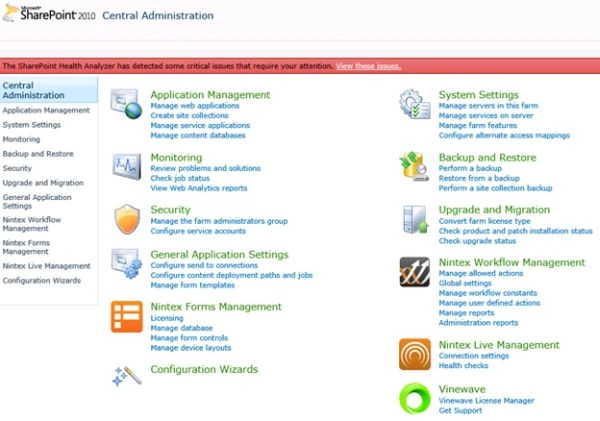
- Open Central Administration of the SharePoint Server.
- Select Security and click on it.
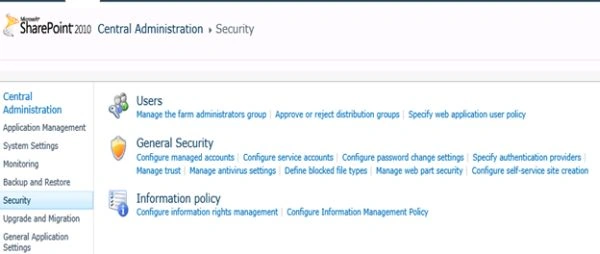
- Under Security we can see “Define blocked file types”, click on it.
- Here you will be able to see all the blocked files on the scroll bar that will be displayed with respect to your web applications.
- To allow them to your Document Library you will need to delete it from the list and click on OK. The extension will be unlocked.
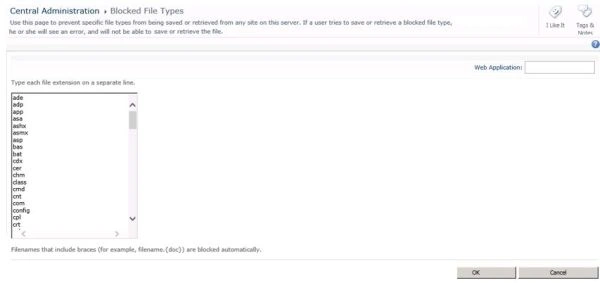
- These are the extensions of the files blocked from SharePoint.
Blocked File Types
- ade
- adp
- app
- asa
- ashx
- asmx
- asp
- bas
- bat
- cdx
- cer
- chm
- class
- cmd
- cnt
- com
- config
- cpl
- crt
- csh
- der
- dll
- exe
- fxp
- fta
- gadget
- grp
- hlp
- hpj
- hta
- htr
- htw
- ida
- idc
- idq
- ins
- isp
- its
- jse
- json
- ksh
- lnk
- mad
- maf
- mag
- mam
- maq
- mar
- mas
- mat
- mau
- mav
- maw
- mcf
- mda
- mdb
- mde
- mdt
- mdw
- mdz
- msc
- msh
- msh1
- msh1xml
- msh2
- msh2xml
- mshxml
- msi
- msp
- mst
- ops
- pcd
- pif
- pl
- prf
- prg
- printer
- ps1
- ps1xml
- ps2
- ps2xml
- psc1
- psc2
- pst
- reg
- rem
- scf
- scr
- sct
- shb
- shs
- shtm
- shtml
- soap
- stm
- svc
- url
- vb
- vbe
- vbs
- vsix
- ws
- wsc
- wsf
- wsh
Keep Learning.
Cheers!
Manpreet SinghPosted Jan 16, 2015, 9:59 AM
Thank You Bhushan Gawale !!
Bhushan GawalePosted Jan 15, 2015, 1:28 PM
Informative, keep it up!!