

Introduction
A comprehensive knowledge base is key to increased customer satisfaction and improved productivity of users. Give users quick access to the knowledge base by setting up knowledge management in Dynamics 365 Customer Service.
Setup overview
You can set up knowledge management on the Customer Service admin center, Customer Service Hub, or manually for a model-driven app.
- Set up knowledge management
- Set up the knowledge management settings page manually for a model-driven app
Set up knowledge management
Make sure that you have the System Administrator or System Customizer security role or equivalent permissions. You must also be the tenant administrator of Microsoft 365.
You can set up knowledge management in the Customer Service admin center or Customer Service Hub app. The settings you configure for knowledge management in the Customer Service Hub app are carried over to the Customer Service admin center app, and vice versa.
Customer Service admin center ->Agent experience ->Knowledge->Record Type (Manage).
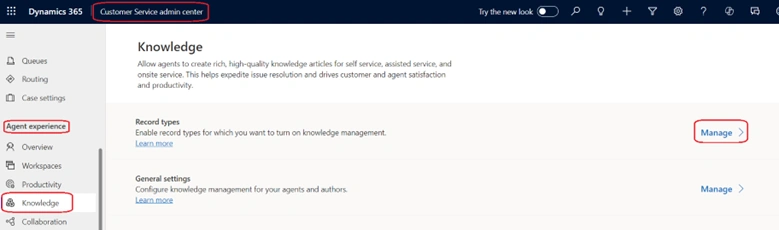
On theRecord Typespage, add and configure the record types for which you want to turn on knowledge management.
- select Add. The Add record type dialog appears.
- On the Add record type dialog, from the Select record type dropdown list, select the record type.
- SelectSave and Close.
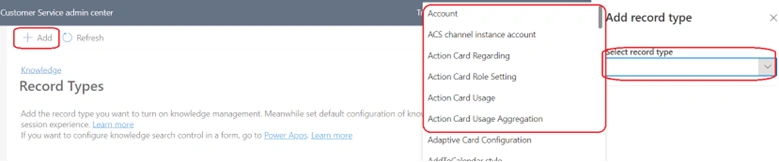
By default, knowledge management is enabled for case and conversation record types. The ability to set up knowledge search control for the app side pane is available only in the Customer Service admin center app.
Customer Service admin center ->Agent experience ->Knowledge->General Settings(Manage).
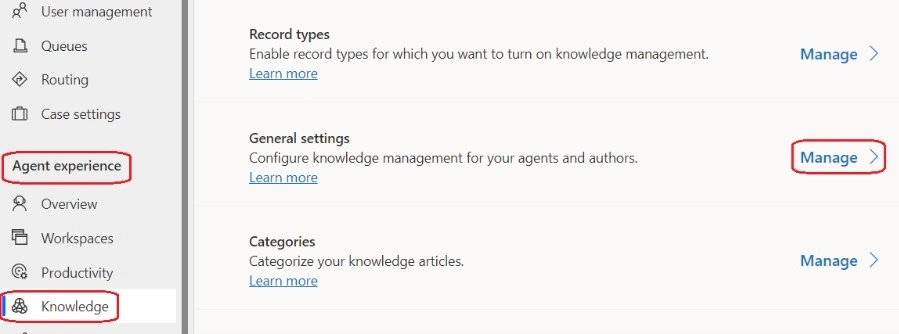
In the search results display section, select the display count from the dropdown.
In the Feedback section, set the Enable feedback toggle to Yes.
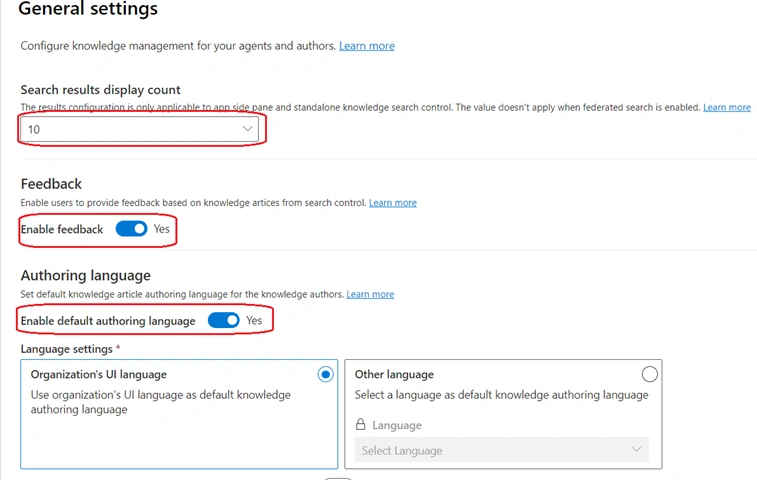
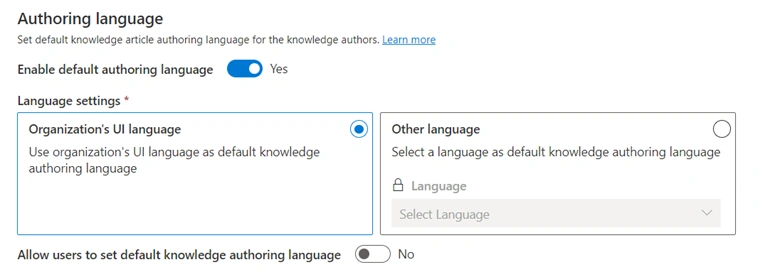
In the authoring language section, set the enabled default authoring language for your users to use.
- If you want to select a default knowledge authoring language for your organization, then select the organization's UI language option.
- If you want to use the organization's UI language as the default knowledge authoring language, select the other language option and then select a language from the language dropdown.
- If you also want to allow users to set their default knowledge authoring language, set the allow users to set default knowledge authoring language toggle to Yes.
- In the Origins allow list section, add your origins links to the Add origin links field.
- In the Knowledge search experience section, enable the following as required:

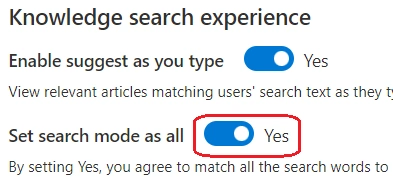
You can help agents improve their productivity by setting the Enable Suggest as you type toggle to Yes. This feature provides suggestions on the most relevant records as agents type keywords in the search box. The search phrase is matched against the title of the article, and the matching results appear in a flyout menu. The matched text is highlighted to show the presence of the keyword.
When an agent selects the record, the system displays the article inline on the knowledge search control embedded on a form, on an application tab in the Customer Service workspace, and as an inline view in the independent knowledge search control
- Set search mode as all toggle to Yes By setting Yes, you agree to match all the search words to consider an article as a match, when Dataverse search is enabled.
- Select Save.
- Optionally, in the categories section, selectManage. The Categories System Viewspage appears. You can create and manage a logical structure of categories for your records.
- Customer Service admin center ->Agent experience ->Knowledge->Filters(Manage)

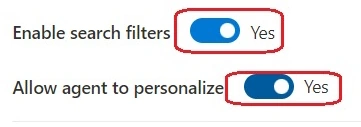
- set the Enable search filters toggle to. If you want to allow agents to save the search filters according to their areas, set the allow agent to personalize toggle to Yes.
- Optionally, in the article Template section, selectManage. TheArticle Templates System Viewspage appears. You can create templates to help knowledge authors use consistent language and messaging.
- Optionally, in the Search Provider section, select Manage. The Search Provider System Viewspage appears. You can use search providers to federate the search of files, documents, or articles from data sources outside of your current Dynamics 365 organization.
Note. During the creation of knowledge articles, duplicate detection rules aren't supported on the Knowledge Article entity.
Join the conversation! Your thoughts help the community grow.