

In this article we learn how to configure reporting services integration with SharePoint 2013. SQL Server 2012 Service Pack 1 (SP1) is a version of Microsoft SQL Server 2012 that supports Microsoft SharePoint 2013 Excel Services usage of Excel workbooks containing data models and Reporting Services Power View reports.
What's new in SQL Server 2012 SP1 Installation for Business Intelligence:
- PowerPivot for SharePoint: Analysis Services provides a backend service for Excel Services to load, query, and refresh PowerPivot data models so that users can interact with Excel workbooks that contain data models in the browser. Analysis Services in SharePoint mode is fully independent of, and external to, SharePoint, although the server running Analysis Services must be on the same network and the Active Directory Domains Services (AD DS) forest as the SharePoint farm. You install and manage Analysis Services using SQL Server installation media and tools. Choose the setup option PowerPivot for SharePoint. After you install Analysis Services in SharePoint mode, the only additional configuration tasks are to grant the SharePoint services account's server administrator permissions in Analysis Services and to configure Excel Services to point to the Analysis Services instance.
- spPowerpivot.msi: A Windows Installer package available with the SQL Server 2012 SP1 Feature Pack. The installer enhances the PowerPivot for SharePoint experience with more features such as PowerPivot Gallery and Schedule Data Refresh. The .msi deploys Analysis Services client libraries, the PowerPivot for SharePoint 2013 Configuration tool, and copies PowerPivot for SharePoint 2013 installation files to SharePoint servers.
- Reporting Services: The overall Reporting Services installation remains the same with SQL Server 2012 SP1 as it was with SQL Server 2012. There is an updated Reporting Services for SharePoint add-in that supports SharePoint 2013.
In this article we are only discussing the reporting services configuration. We will see the remaining sessions, described previously, in future articles.
The following is the server architecture (I am using a three-server farm for the demo):
- Web Front End
- Database Server
- Application Server (I am using it for reporting services.)
The Reporting Server is essentially an Application Server that is joined to the SharePoint farm. It will run the SSRS Service Application. Using the SSRS integrated mode now means that it is fully under SharePoint.
Installation to be done on each server
Web Front End
Use the following procedure to install the Web Front End:
- Install SP2013 Prerequisites
- Install SharePoint Server 2013
- SharePoint Products Configuration Wizard
- Create Root Web Application (Port 80)
- Create Root Site Collection
- Create all Service Applications manually (this was for other purposes; Reporting Services was not one of them yet)
- Install SQL Server 2012 selecting only the Reporting Services Add-In for SharePoint
- Install SQL Server 2012 SP1 for SharePoint 2013 Support
Application Server
Use the following procedure to install the Application Server:
- Install SP2013 Prerequisites
- Install SharePoint Server
- SharePoint Products Configuration Wizard
- Install SQL Server 2012, selecting both Reporting Services and the Reporting Services Add-In for SharePoint
- Install SQL Server 2012 SP1 for SharePoint 2013 Support
We have the option to use SQL Server 2012 with Service Pack 1.
Database Server
Use the following procedure to install the Database Server:
- Install SQL Server 2012 Selecting all the options including SSRS and integration and analysis services
- Install Service pack1
Power Shell Changes
Make the followng changes for/using Power Shell:
- Click the Start button.
- Click the Microsoft SharePoint 2010 Products group.
- Right-click SharePoint 2010 Management Shell then click "Run as administrator".
- Run the following PowerShell command to install the SharePoint service. A successful completion of the command displays a new line in the management shell. No message is returned to the management shell when the command completes successfully:
Install-SPRSService
- Run the following PowerShell command to install the service proxy:
Install-SPRSServiceProxy
- Run the following PowerShell command to start the service or see the following notes for instructions to start the service from SharePoint Central Administration:
get-spserviceinstance -all |where {$_.TypeName -like "SQL Server Reporting*"} | Start-SPServiceInstance
- You can also start the service from SharePoint Central Administration rather than running the third PowerShell command. The following steps are also useful to verify that the service is running.
- In SharePoint Central Administration, click "Manage Services on Server" in the "System Settings" group.
- Find SQL Server Reporting Services Service and click "Start" in the Action column.
- The status of the Reporting Services service will change from Stopped to Started. If the Reporting Services service is not in the list, use PowerShell to install the service.
Central Administration Changes
Make the fllowing Central Administration Changes (If you are done with Power Shell then there is no need to do this configuration):
- In SharePoint Central Administration, click "Manage Services on Server" in the System Settings group.
- Find SQL Server Reporting Services Service and click "Start" in the Action column.
- The status of the Reporting Services service will change from Stopped to Started. If the Reporting Services service is not in the list, use PowerShell to install the service
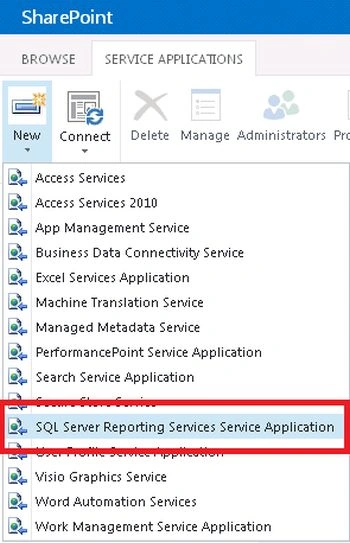
- From the Manage Services on the Server click on the SQL Server reporting Services, as shown below:
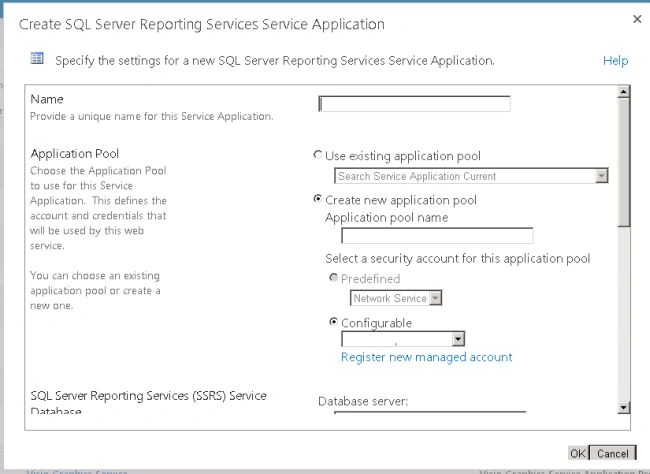
- In the screen, you can provide the Service name, database name and managed account details and click "Ok" to start the service; see:
- It will take some time to configure this; it will lok like:

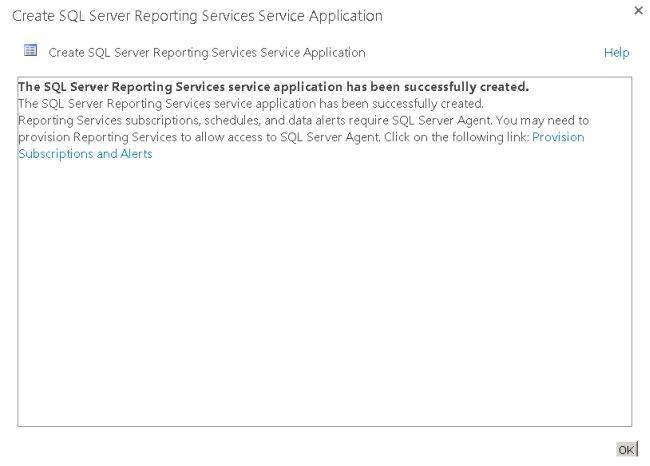
- Once all configurations are done successfully, you will get the following screen:
- You can verify the same in the Manage services session. You will see that the services are started and working fine, as in:

One of the interesting changes that Microsoft did in Reporting Services was to change the SharePoint mode from a Windows Service to a SharePoint Shared Service. There are many benefits of that, two of which are (1) an integrated administration experience and (2) integrated scale out capabilities.
One of the consequences of this new Architecture is that you don't need to manually configure each one of the machines that belongs to the Farm independently, the configuration for the Reporting Services Shared Application is in the SharePoint configuration Database; a one-time configuration will take effect in all the machines in the farm.
Flavio SPosted Jan 11, 2024, 10:29 AM
So.. if I understand your last paragraph... if you have an environment with several SP servers, you only need to install the Reporting services in one server, and the addin in all the others?
Kaviya BalasubramanianPosted Jun 1, 2018, 1:47 AM
Hi Destin, I have enable the reporting services in sharepoint db server it was completed successully. But when i run the Install-SPRSService am getting the error and also i could not see the sql report services in central admin. do u have any idea for this?
John MaPosted Jun 14, 2017, 2:47 AM
Hi. Given all Servers are VM. I want to know if want to improve the performance for loading the rdl in SharePoint Document Library, I should add more RAM to the WFE or the App Server?
Destin JoyPosted Aug 26, 2014, 4:27 AM
Thank you all@lLuciano check loop back is disabled in the server