

Introduction
Let us see how to setup the Azure Active Directory with necessary app permissions for accessing the Microsoft data using graph API.
In this article, you will see the basic information and Azure setup to make authentication calls using Azure active directory app authentications. This will help to get the access token for accessing the Microsoft data, like O365 mails, events, calendar, user profile data, etc. with the help of graph APIs.
Azure is required to register the application for AD authentications. From the application, required permissions will be given to the data available on the Microsoft cloud. In this scenario, the domain used for SharePoint and Azure is same.
Steps Involved
Log in to the Azure portal.
From the left navigation menu, select the Azure Active Directory. The Azure AD will contain the users, groups, apps, domains, and directory related information.
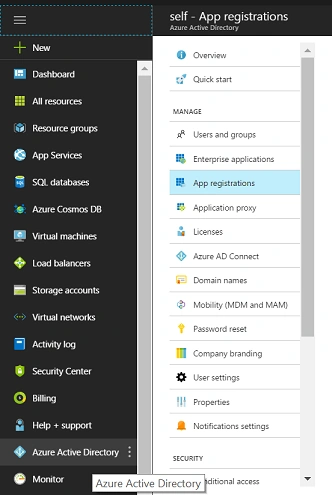
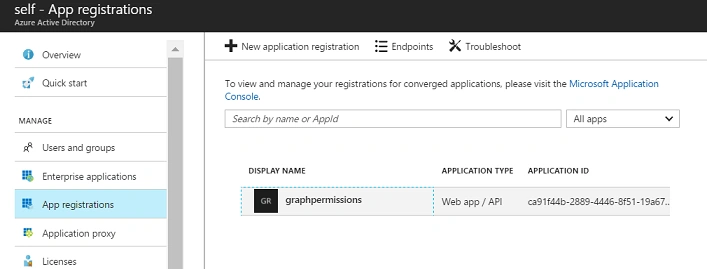
From the sub menu, select the app registrations. Click on new application registration to provide the application name and application URL details.

Then, select the created app for further configurations. In the app, you can configure the reply URLs for the source apps, owners, and to provide or grant permissions to the required Microsoft data sources.

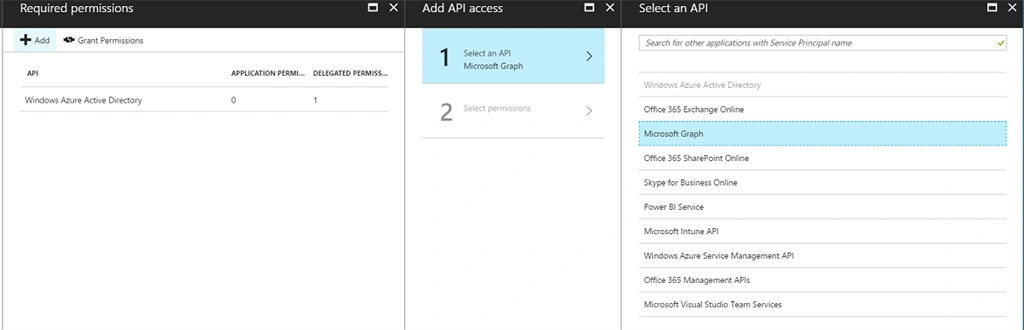
Select the necessary permissions. The following snapshot shows the permissions selected for the application. Click on Select >> Done.

Provide necessary access by selecting the Grant Permissions option from the permissions panel.

The following snapshot shows the reply URLs configured. The Reply URLs are used for sending the authentication details back to the client. The Reply URLs are available under App Settings.
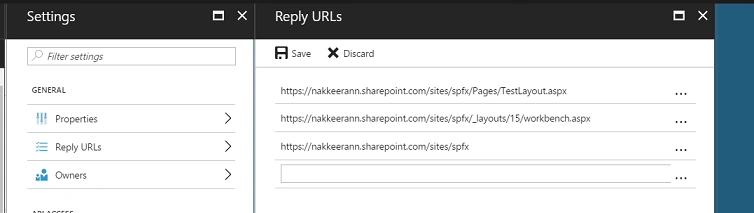
Then, the application should be configured with OAuth protocol. Since the client application accesses the information using OAuth Implicit flow, the “oauth2AllowImplicitFlow” value should be set to true.
In the registered app, click on Manifest. Find the oauth2AllowImplicitFlow parameter, and set the value to true. The below screenshot shows the same.
Summary
Thus, you have seen setting up the Azure Active Directory for granting permissions while the client applications access the data.
In my next article, we will see how to make the authenticated calls to access the Microsoft cloud data from SharePoint framework components.
GowthamPosted Feb 20, 2019, 7:55 AM
Hi Nakkeeran,It is possible to get a office planner details in same way.
manikanta mundruPosted May 24, 2018, 4:15 PM
Hi Natarajan. Nice article. Just a question regarding delegated permissions. What permissons do I need(As a normal not global admin) to set up for writing data to azure ad properties(Birthday and Hiredate). Do i need to set up any delegated permissons or just application permissons for writing azure AD?