

Hi again in this anonymous site series..
In my previous post I explained steps about how to create anonymous web site using SharePoint existing site. So in this post I am going to make use of out of the box ASP.NET Membership Provider and it to anonymous site which we created. (This is easy one)
So very first step is to have ASPNET db in SQL Server, and for this we are going to use the traditional ASP.NET way with popular command aspnet_regsql
1. Open visual studio command prompt and type in command aspnet_regsql, you will see ASP.NET Sql Server setup wizard, click next and select configure SQL Server for application services.
Enter Database Server name and keep database name as <default> in dropdown (this will create db with name aspnetdb in SQL Server), click finish on next screen
2. Once aspnetdb database is created in SQL Server, then next step is to make use of this db.
Browse to Central Administration site and click on Application Management tab. Find and click on Authentication Providers, select Internet zone. Change Authentication type to Forms , and enter Membership Provider Name as AspNetSqlMembershipProvider and Role Manager Name as AspNetSqlRoleProvider. Click on save.
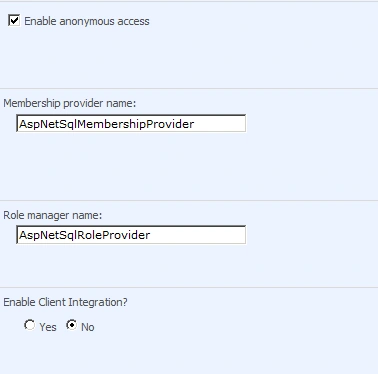
3. Now we have configured anonymous application to use Forms authentication, next step is to specify Membership provider and role manager entries in web.config file of anonymous web site
Add following entries to web.config file
<membership>
<providers>
<add name="AspNetSqlMembershipProvider
" type="System.Web.Security.SqlMembershipProvider,System.Web,Version=2.0.0.0,
Culture=neutral, PublicKeyToken=b03f5f7f11d50a3a" connectionStringName="LocalSqlServer" enablePasswordReset="true" requiresQuestionAndAnswer="true" passwordFormat="Hashed" applicationName="/" />
</providers>
</membership>
<roleManager>
<providers>
<remove name="AspNetSqlRoleProvider"
/>
<add name="AspNetSqlRoleProvider" type="System.Web.Security.SqlRoleProvider,System.Web,Version=2.0.0.0,
Culture=neutral, PublicKeyToken=b03f5f7f11d50a3a" connectionStringName="LocalSqlServer" role="SignedInClient" applicationName="/" />
</providers>
</roleManager>
<connectionStrings>
Join the conversation! Your thoughts help the community grow.