

Configuring Parameters and Parameter Data Types (ADO.NET)
Command objects use parameters to pass values to SQL statements or stored procedures, which facilitates type checking and validation.
Command text, parameter input is treated as a constant (literal value) not as executable code.
Command text as constant guard against "SQL injection" attacks, in which an attacker inserts a command that compromises security on the server into an SQL statement.
See the below code to understand about parameterized query its other important related topics.
Begin your application by launching VS.NET and creating a new project using File - > Project and choose C# Windows Application template as shown in figure below:

Add a new item application configuration file as shown below from Project -> Add New Item

The code for the application configuration file:
<?xml version="1.0" encoding="utf-8" ?>
<configuration>
<connectionStrings>
<add name="constr" connectionString="initial catalog=puran; data source=MCN002; integrated security=sspi"/>
</connectionStrings>
</configuration>
Note: In the above code I have made a connection using windows authentication.
In the form design and button, textboxes and labels as follow:

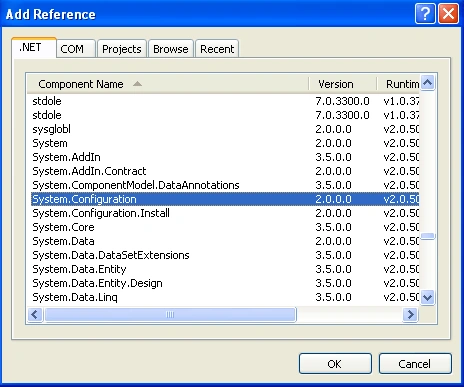
Add the necessary reference file from the solution explorer, Reference as below:
Code for adding records in a database through textbox using parameterized query in disconnected model.
using System;
using System.Collections.Generic;
using System.ComponentModel;
using System.Data;
using System.Drawing;
using System.Linq;
using System.Text;
using System.Data.SqlClient;
using System.Data.Common;
using System.Configuration;
using System.Windows.Forms;
namespace adding_Records_disconnected
{
public partial class Form1 : Form
{
public Form1()
{
InitializeComponent();
}
SqlConnection con;
SqlCommand cmd;
private void button1_Click(object sender, EventArgs e)
{
con = new SqlConnection(ConfigurationManager.ConnectionStrings["constr"].ConnectionString);
cmd = new SqlCommand();
cmd.Connection = con;
cmd.Parameters.Add(new SqlParameter("@RollNo", SqlDbType.Int));
cmd.Parameters["@RollNo"].Value = textBox1.Text;
cmd.Parameters.Add(new SqlParameter("@Name", SqlDbType.VarChar));
cmd.Parameters["@Name"].Value = textBox2.Text;
cmd.Parameters.Add(new SqlParameter("@Fees", SqlDbType.Float));
cmd.Parameters["@Fees"].Value = textBox3.Text;
cmd.CommandText="insert into student values(@RollNo, @Name, @Fees)";
con.Open();
cmd.ExecuteNonQuery();
con.Close();
MessageBox.Show("Record inserted");
}
}
}
The above code explanation will be clearer with the theoretical aspect below. Read the following paragraphs for better understanding of the code listed in the article.
DbParameter Object
A DbParameter object can be created by using its constructor, or by adding it to the DbParameterCollection by calling the Add method of the DbParameterCollection collection.
The Add method will take as input either constructor arguments or an existing parameter object, depending on the data provider.
ParameterDirection Property
When adding parameters, you must supply a ParameterDirection property for parameters.
The following table shows the ParameterDirection values that you can use with the ParameterDirection enumeration.


SenthilkumarPosted Aug 12, 2009, 11:44 AM
Really it was informative. But i have one doubt. You have mentioned like it will use the query cached plan. Here the query formation may be different. But when you release the query from your application then it will be same as normal query. Example insert into student values(@RollNo,@Name,@Fees) this normally programmers used like insert into student values(textBox1.Text, textBox2.Text, textBox3.Text) Finally both will be same at the point of release from the application. How it can use the cached plans like stored procedures?????? I agree it will improve the security. Thank you... Erode Senthilkumar