

With SharePoint Online, we are not able to access the SharePoint Server anymore. Hence, if we have to do updates, we have to either write an app that can be deployed to SharePoint Online or we can make use of the Swiss army knife – SharePoint Management Shell to get things done. Yet another powerful and old School approach is the use of the Console Application, which can harness the power of .NET managed CSOM (Client Side Object Model) modules.
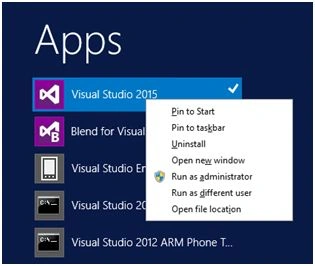
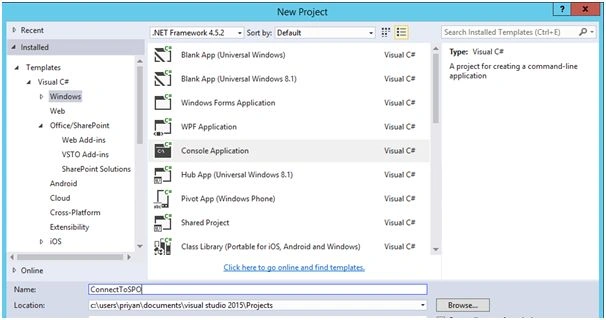
Open Visual Studio and create a console Application.
In order to work with SharePoint Client Object Model, we have to add two references to the Console Application,
- Microsoft.SharePoint.Client
- Microsoft.SharePoint.Client.Runtime

Internal Implementation walk through
Add the references to the class file,
- usingSystem.Security;
- usingMicrosoft.SharePoint.Client;
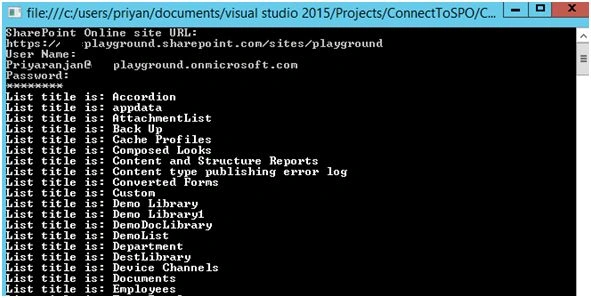
Load the lists present within the SharePoint Online site and execute the batch by calling Context.ExecuteQuery command. This would fetch all the lists within the site, which can be looped, using a simple for loop, as shown below:
- using(var context = new ClientContext(webSPOUrl))
- {
- context.Credentials = new SharePointOnlineCredentials(userName, password);
- Web web = context.Web;
- context.Load(web.Lists,
- lists => lists.Include(list => list.Title,
- list => list.Id));
- context.ExecuteQuery();
- foreach(List list in web.Lists)
- {
- Console.WriteLine("List title is: " + list.Title);
- }
- }
In order to use the password in the below statement it should be retrieved as a secure string from the Console Application. Though we can fetch the password from the console as a string, SharePoint online credentials expects a secure string. A string would generate an error.
- context.Credentials = new SharePointOnlineCredentials(userName, password);
- string password = "";
- //Read from console
- ConsoleKeyInfo info = Console.ReadKey(true);
- while (info.Key != ConsoleKey.Enter)
- {
- //Add the password to the string variable
- if (info.Key != ConsoleKey.Backspace)
- {
- Console.Write("*");
- password += info.KeyChar;
- }
- else if (info.Key == ConsoleKey.Backspace)
- {
- //If backspace is pressed remove the character from password string
- if (!string.IsNullOrEmpty(password))
- {
- password = password.Substring(0, password.Length - 1);
- intpos = Console.CursorLeft;
- Console.SetCursorPosition(pos - 1, Console.CursorTop);
- Console.Write(" ");
- Console.SetCursorPosition(pos - 1, Console.CursorTop);
- }
- }
- info = Console.ReadKey(true);
- }
- Console.WriteLine();
- varsecurePassword = new SecureString();
- //Convert string to secure string
- foreach(char c in password)
- securePassword.AppendChar(c);
- securePassword.MakeReadOnly();
- returnsecurePassword;
shaily shahPosted Sep 24, 2019, 11:20 AM
Hi Priyaranjan, Thanks for this Post!!I've been struggling to connect a .Net app with SharePoint online. I have tried the code you posted, but I'm getting the following error: "System.Net.WebException: 'The remote server returned an error: (401) Unauthorized.' However, I know for sure that the SharePoint URL, username, and password are correct Please let me know if you have any suggestions. Kind regards, Shaily Shah
Chandra SPosted Jul 5, 2017, 3:14 AM
"Cannot contact web site 'https://xxx.sharepoint.com/' or the web site does not support SharePoint Online credentials. The response status code is 'Unauthorized'. The response headers are 'X-SharePointHealthScore=0, X-MSDAVEXT_Error=917656; Access+denied.+Before+opening+files+in+this+location%2c+you+must+first+browse+to+the+web+site+and+select+the+option+to+login+automatically., SPRequestGuid=333c029e-c012-4000-24ab-82a3221248d0, request-id=333c029e-c012-4000-24ab-82a3221248d0, Strict-Transport-Security=max-age=31536000, X-FRAME-OPTIONS=SAMEORIGIN, SPRequestDuration=79, SPIisLatency=1, MicrosoftSharePointTeamServices=16.0.0.6621, X-Content-Type-Options=nosniff, X-MS-InvokeApp=1; RequireReadOnly, X-MSEdge-Ref=Ref A: 7AD784E47C7E417AA62B4C48241F5633 Ref B: MAA01EDGE0216 Ref C: Wed Jul 5 00:10:52 2017 PST, Content-Length=0, Content-Type=text/plain; charset=utf-8, Date=Wed, 05 Jul 2017 07:10:52 GMT, P3P=CP=\"ALL IND DSP COR ADM CONo CUR CUSo IVAo IVDo PSA PSD TAI TELo OUR SAMo CNT COM INT NAV ONL PHY PRE PUR UNI\", Server=Microsoft-IIS/10.0, X-Powered-By=ASP.NET'." on ExecuteQuery(), can you please help
Santhakumar MunuswamyPosted Jun 25, 2016, 12:59 AM
Thank you for nice article
ruthvik deekondaPosted Jun 24, 2016, 1:30 AM
Good one.. :)
Kuppurasu NagarajPosted Jun 21, 2016, 12:41 PM
Nice Sharing..
RajaPosted Jun 21, 2016, 5:01 AM
Nice....
Debasis SahaPosted Jun 21, 2016, 12:49 AM
Good One..